Unlock a world of possibilities! Login now and discover the exclusive benefits awaiting you.

- Qlik Community
- :
- Forums
- :
- Analytics & AI
- :
- Products & Topics
- :
- App Development
- :
- Qlik Sense. Chart. Scroll bar.
- Subscribe to RSS Feed
- Mark Topic as New
- Mark Topic as Read
- Float this Topic for Current User
- Bookmark
- Subscribe
- Mute
- Printer Friendly Page

 brabbi1989
- Mark as New
- Bookmark
- Subscribe
- Mute
- Subscribe to RSS Feed
- Permalink
- Report Inappropriate Content
Qlik Sense. Chart. Scroll bar.
Hi. I have faced with one issue and I can;t understand it.
I worked on chart and I saw interesting detail:
on the scrollbar data exists but in the chart now. Screen in attachments.
How can it be? Can I disabled scrollbar?
Version:September 2018
Thanks


- Mark as New
- Bookmark
- Subscribe
- Mute
- Subscribe to RSS Feed
- Permalink
- Report Inappropriate Content
As far i know, Not yet arrived. If you can decrease the height of the object it will go away 🙂
brabbi1989
- Mark as New
- Bookmark
- Subscribe
- Mute
- Subscribe to RSS Feed
- Permalink
- Report Inappropriate Content
@Anil_Babu_SamineniI've tried it, I decreased the height but scrollbar stay.
 da_pagnott
- Mark as New
- Bookmark
- Subscribe
- Mute
- Subscribe to RSS Feed
- Permalink
- Report Inappropriate Content
I tried and with the following settings:
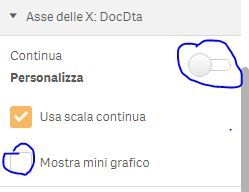
It seems what you need!
I got this result without the bottom bar:

 brabbi1989
- Mark as New
- Bookmark
- Subscribe
- Mute
- Subscribe to RSS Feed
- Permalink
- Report Inappropriate Content
@da_pagnott thanks. It's a really good idea but doesn't work for me. This setting changes visualization and displays group data. I need evryday analyze 😞
