Unlock a world of possibilities! Login now and discover the exclusive benefits awaiting you.

- Qlik Community
- :
- Forums
- :
- Analytics & AI
- :
- Products & Topics
- :
- App Development
- :
- Re: Qliksense Filterpane(Listbox): How to select z...
- Subscribe to RSS Feed
- Mark Topic as New
- Mark Topic as Read
- Float this Topic for Current User
- Bookmark
- Subscribe
- Mute
- Printer Friendly Page

 ol_dev
- Mark as New
- Bookmark
- Subscribe
- Mute
- Subscribe to RSS Feed
- Permalink
- Report Inappropriate Content
Qliksense Filterpane(Listbox): How to select zero or one value?
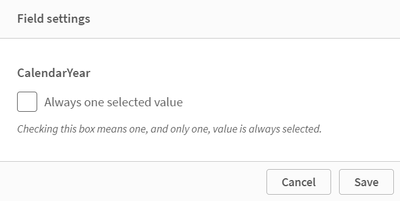
It seems that by default all fields in Qliksense allows multi-selection, though it is possible to edit field settings to allow each field to be single selection. The issue however, is that it is not possible to default to an unselected(zero-selected) state, instead one value has to always be selected. Is there a workaround to allow either 0 or 1 value to be selected? Or is this a planned feature in future Qliksense? Please help.
- « Previous Replies
-
- 1
- 2
- Next Replies »

 SemBL83
- Mark as New
- Bookmark
- Subscribe
- Mute
- Subscribe to RSS Feed
- Permalink
- Report Inappropriate Content
Hi,
You can tag the field as hidden via your script (TAG field1 WITH $hidden;)
But this is not dynamic. I am unaware of any option that dynamically would hide your selection from the toolbar. The TAG function is fixed throughout the user's experience,
You can also hide multiple fields at once using SET HideSuffix =; or SET HidePrefix =;
https://help.qlik.com/en-US/sense/May2024/Subsystems/Hub/Content/Sense_Hub/Scripting/field-tags.htm

- « Previous Replies
-
- 1
- 2
- Next Replies »