Unlock a world of possibilities! Login now and discover the exclusive benefits awaiting you.

- Qlik Community
- :
- Forums
- :
- Analytics & AI
- :
- Products & Topics
- :
- App Development
- :
- Qliksense & Linux Log files - "Invalid path"
- Subscribe to RSS Feed
- Mark Topic as New
- Mark Topic as Read
- Float this Topic for Current User
- Bookmark
- Subscribe
- Mute
- Printer Friendly Page

 AnalyticsDev
- Mark as New
- Bookmark
- Subscribe
- Mute
- Subscribe to RSS Feed
- Permalink
- Report Inappropriate Content
Qliksense & Linux Log files - "Invalid path"
Hi.
I have an SFTP residing on a linux server that I have been granted access to. I need to pull log files off of it with Qlik. I'm able to connect with Qlik's SFTP connector, I can see the folder structure and drill down to /var/log . When I see the log file I want to pull in and click 'Select', Qliksense immediately returns 'Invalid path'.
Via Putty, I've verified that this is the correct location within linux for these log files, but Qlik doesn't agree.
What does this mean and any suggestions to get around this?
Thanks,
Accepted Solutions

 Frank_S
- Mark as New
- Bookmark
- Subscribe
- Mute
- Subscribe to RSS Feed
- Permalink
- Report Inappropriate Content
It's similar for the built in sftp connector.
Same public host key. user, password for test.rebex.net.
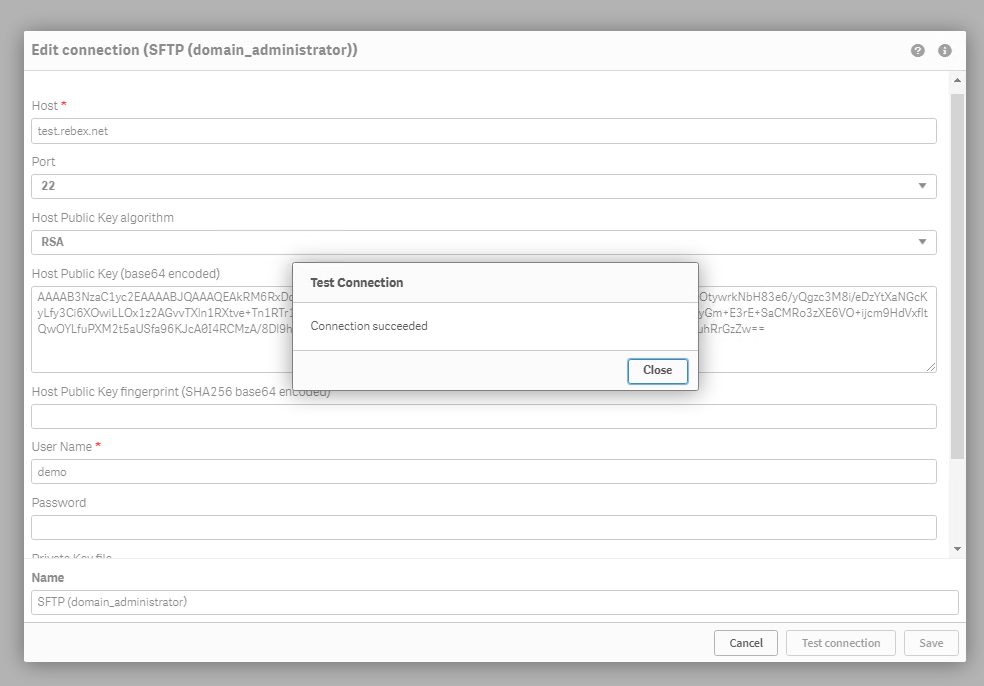
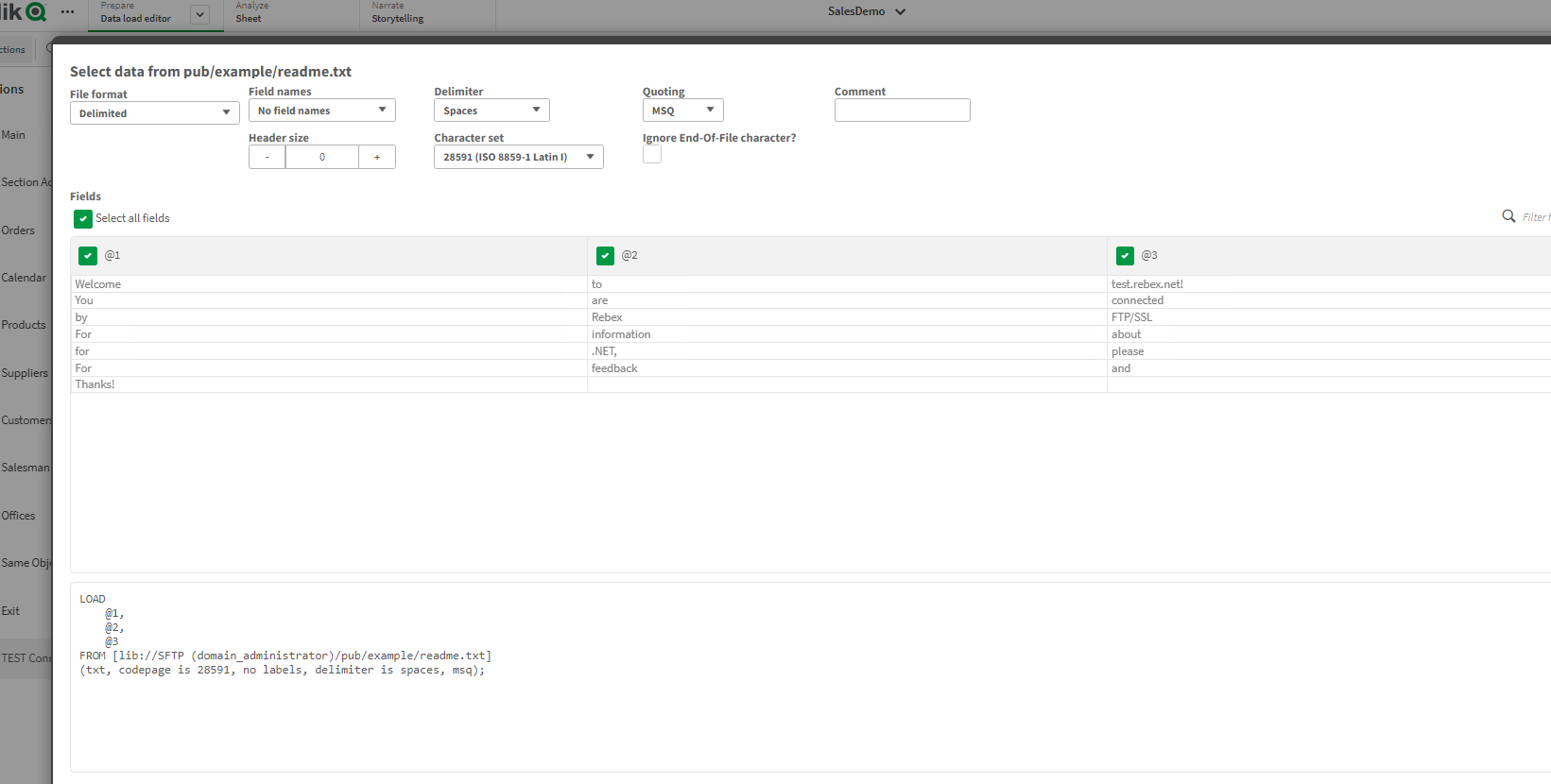
Insert the connection to your load script and select 'pub>example' and load the readme.txt file
Kind regards...
 David_Friend
- Mark as New
- Bookmark
- Subscribe
- Mute
- Subscribe to RSS Feed
- Permalink
- Report Inappropriate Content
any special characters in the file name perhaps?
also check your deploy.config file: https://community.qlik.com/t5/Official-Support-Articles/Qlik-WebConnector-for-FTP-SFTP-error-Access-...
Frank_S
- Mark as New
- Bookmark
- Subscribe
- Mute
- Subscribe to RSS Feed
- Permalink
- Report Inappropriate Content
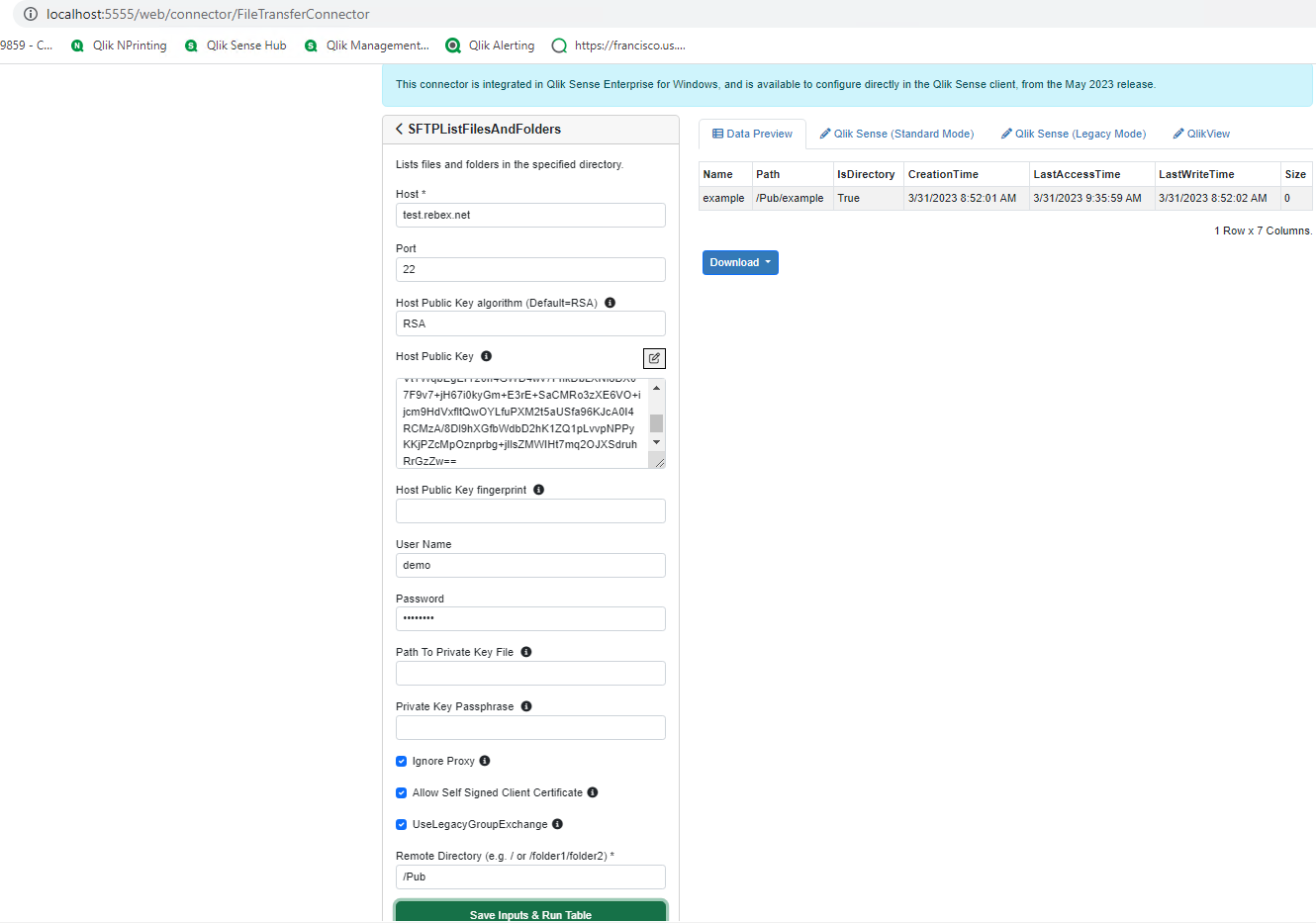
Try connecting from Qlik Sense to a public server like test.rebex.net port 22 from your sftp client. (This server also appears to be linux)
https://www.sftp.net/public-online-sftp-servers
- Use the default RSA algorithm in the Qlik SFTP connector.
- Capture the public host key for the rebex server (this should be provided when you connect from your sftp client software like filezilla.
- copy into Qlik Sense sftp connector host public key field
- user: demo
- password: password
- /Pub is the directory to connect to
It works with test done in our demo environment as shown in the image below.
If the linux server path you are trying to connect to is not working for you then you may need to speak to your sftp server linux admin as to why its not working for you. (Just keep in mind that linux is case sensitive so the path needs to be perfectly accurate. Hopefully the method above may solve it for you.).
Kind regards...
AnalyticsDev
- Mark as New
- Bookmark
- Subscribe
- Mute
- Subscribe to RSS Feed
- Permalink
- Report Inappropriate Content
Hi, Im using the built-in Qliksense SFTP connector, not Qlik Web Connectors. The article you posted seems to talk about qlik web connectors and updating a file etc, but thats not what im using at the moment.
Frank_S
- Mark as New
- Bookmark
- Subscribe
- Mute
- Subscribe to RSS Feed
- Permalink
- Report Inappropriate Content
It's similar for the built in sftp connector.
Same public host key. user, password for test.rebex.net.
Insert the connection to your load script and select 'pub>example' and load the readme.txt file
Kind regards...
