Unlock a world of possibilities! Login now and discover the exclusive benefits awaiting you.

- Qlik Community
- :
- Forums
- :
- Analytics & AI
- :
- Products & Topics
- :
- App Development
- :
- Re: Really want this to work - substringcount() an...
- Subscribe to RSS Feed
- Mark Topic as New
- Mark Topic as Read
- Float this Topic for Current User
- Bookmark
- Subscribe
- Mute
- Printer Friendly Page

 jjwild00
- Mark as New
- Bookmark
- Subscribe
- Mute
- Subscribe to RSS Feed
- Permalink
- Report Inappropriate Content
Really want this to work - substringcount() and aggr()
aggr(concat(SelectedValue1), GroupValue1) returns a single value as GroupValue1 is the same for all records. The value is 'ABC'.
Value1 is a field that can be A, B, C or D.
The following calculated dimension fails to return a value:
=SubStringCount(aggr(concat(SelectedValue1), GroupValue1), Value1)
However, the following both return the correct value, 1 in the first case and 0 or 1 in the second case:
=SubStringCount(aggr(concat(SelectedValue1), GroupValue1), 'A')
=SubStringCount('ABC', Value1)
I can put part of the expression that fails to return a value into a variable and it works in QlikView. However, I need to have this work in Sense and its variable handling is not as powerful.
Does anyone see something I can change to get the full expression to work?
Accepted Solutions

 sunny_talwar
- Mark as New
- Bookmark
- Subscribe
- Mute
- Subscribe to RSS Feed
- Permalink
- Report Inappropriate Content
Is this what you are after?
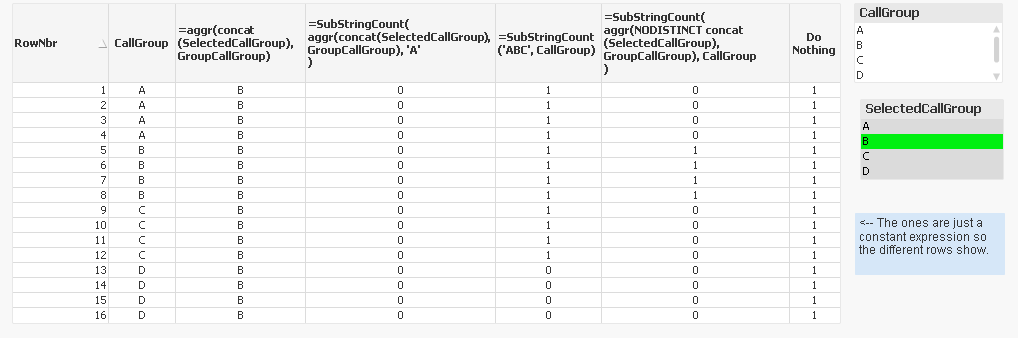
Calculated dimension:
=SubStringCount(
Aggr(NODISTINCT Concat(SelectedCallGroup), GroupCallGroup), CallGroup
)
sunny_talwar
- Mark as New
- Bookmark
- Subscribe
- Mute
- Subscribe to RSS Feed
- Permalink
- Report Inappropriate Content
Not sure how you are using this, can you share a sample?
jjwild00
- Mark as New
- Bookmark
- Subscribe
- Mute
- Subscribe to RSS Feed
- Permalink
- Report Inappropriate Content
I uploaded a sample.
sunny_talwar
- Mark as New
- Bookmark
- Subscribe
- Mute
- Subscribe to RSS Feed
- Permalink
- Report Inappropriate Content
Is this what you are after?
Calculated dimension:
=SubStringCount(
Aggr(NODISTINCT Concat(SelectedCallGroup), GroupCallGroup), CallGroup
)
sunny_talwar
- Mark as New
- Bookmark
- Subscribe
- Mute
- Subscribe to RSS Feed
- Permalink
- Report Inappropriate Content
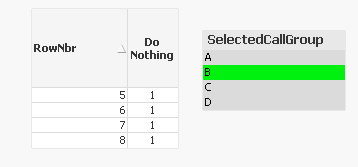
Also not sure why you need to use this as a dimension, but usually to show selection from an unlinked field, we can use set analysis like this
Sum({<CallGroup = p(SelectedCallGroup)>}1)
jjwild00
- Mark as New
- Bookmark
- Subscribe
- Mute
- Subscribe to RSS Feed
- Permalink
- Report Inappropriate Content
Thanks for this too. It is a dimension so I can set it to not show on the chart if it is null. If the SubStringCount returns 0, then I do not want the row in the chart.
This is not possible in a measure (Sense term for an expression).
