Unlock a world of possibilities! Login now and discover the exclusive benefits awaiting you.

- Qlik Community
- :
- Forums
- :
- Analytics & AI
- :
- Products & Topics
- :
- App Development
- :
- Re: Remaining monthly workdays
- Subscribe to RSS Feed
- Mark Topic as New
- Mark Topic as Read
- Float this Topic for Current User
- Bookmark
- Subscribe
- Mute
- Printer Friendly Page

 micheledenardi
- Mark as New
- Bookmark
- Subscribe
- Mute
- Subscribe to RSS Feed
- Permalink
- Report Inappropriate Content
Remaining monthly workdays
Hi experts,
today i have to calculate the remaining workdays (Monday to Friday) per each months removing the holidays specified on "Holidays" tab of the attached XLSX.
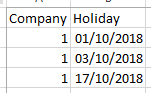
I put also the company code because in my case we have more than one.
Probably i have to use NetWorkDays() but i didn't understand how to specify multiple days dinamically.
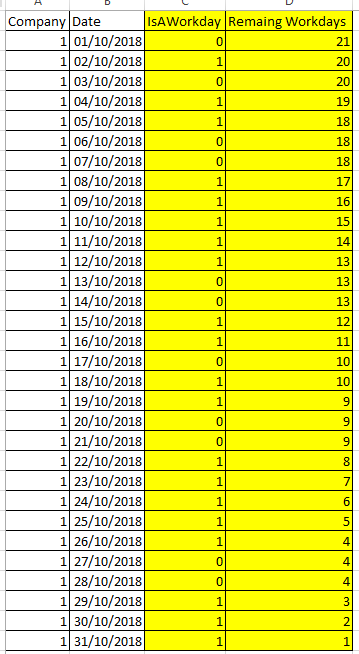
So, removing Saturdays and Sundays and the three "Custom Holidays" of the XLSX "Holidays" tab, i wuold like to calculate the two yellow columns and obtain this:
If a post helps to resolve your issue, please accept it as a Solution.

 lalphonso
- Mark as New
- Bookmark
- Subscribe
- Mute
- Subscribe to RSS Feed
- Permalink
- Report Inappropriate Content
Hi Michele,
Could you try the test script below:
// Load initial company data
CompanyCal:
LOAD
Company,
"Date",
// Note. Match will be based on initial DayNames list from the main tab.
if(match(weekday("Date"),'Sat.','Sun.')>0,0,1) as isAWorkDay
FROM [lib://Downloads/SampleData.xlsx]
(ooxml, embedded labels, table is CompanyCalendar);
//Add the holidays
left Join (CompanyCal)
LOAD
Company,
Holiday as "Date",
1 as isHoliday
FROM [lib://Downloads/SampleData.xlsx]
(ooxml, embedded labels, table is Holiday);
Final:
NoConcatenate
Load *,
if(Company=Previous(Company),
if(resetmonth =1, //first day of month
if(isAWorkDay = 1 and isHoliday=0, 1,0),
if(isAWorkDay = 1 and isHoliday=0, peek(daycounter)+1, peek(daycounter)))
,1) as daycounter;
Load
Company,
"Date",
isAWorkDay,
alt(isHoliday,0) as isHoliday,
if(month("Date")<>Previous(month("Date")) ,1,0) as resetmonth
resident CompanyCal
order by Company, "Date" desc;
drop table CompanyCal;
Drop fields resetmonth;
Regards,
LA

 valnod_90
- Mark as New
- Bookmark
- Subscribe
- Mute
- Subscribe to RSS Feed
- Permalink
- Report Inappropriate Content
hi i've created a table with three columns:
the first one is the dimension "Date";
the second one contains this measure:
if(weekday(Date)='sat', '0',
if(weekday(Date)='sun', '0',
if(Date = '17/10/2018', '0',
if(Date = '1/10/2018', '0',
if(Date = '3/10/2018', '0', 1)))))
the third one contains this measure:
networkdays(Date,MonthEnd(Today()),'1/10/2018','3/10/2018','17/10/2018')
(The bold dates are your holydays.)
This is my result:

 passionate
- Mark as New
- Bookmark
- Subscribe
- Mute
- Subscribe to RSS Feed
- Permalink
- Report Inappropriate Content
Create a master calendar using link below:
Master Calendar with Working days & Holidays Flag
You can use holiday flag customized for each company if you want.
micheledenardi
- Mark as New
- Bookmark
- Subscribe
- Mute
- Subscribe to RSS Feed
- Permalink
- Report Inappropriate Content
Hi Leslie,
your solution works but i would like to use more optimized script.
If a post helps to resolve your issue, please accept it as a Solution.
micheledenardi
- Mark as New
- Bookmark
- Subscribe
- Mute
- Subscribe to RSS Feed
- Permalink
- Report Inappropriate Content
Ciao Valentina,
your solution works on front end but i need to set up this solution during load script and in a dinamically way (without hard cording dates into formulas) !
If a post helps to resolve your issue, please accept it as a Solution.
lalphonso
- Mark as New
- Bookmark
- Subscribe
- Mute
- Subscribe to RSS Feed
- Permalink
- Report Inappropriate Content
Hi Michele,
The way I see it you would need to evaluate each row based on the Company it belongs to and whether its a holiday for that company. What were you looking at optimising? If you do have a large dataset to load - perhaps you could save the tables as a QVD file as an intermediary step?
Regards,
LA
