Unlock a world of possibilities! Login now and discover the exclusive benefits awaiting you.

- Qlik Community
- :
- Forums
- :
- Analytics & AI
- :
- Products & Topics
- :
- App Development
- :
- SUM ALL/TOTAL, disregard show null settings
- Subscribe to RSS Feed
- Mark Topic as New
- Mark Topic as Read
- Float this Topic for Current User
- Bookmark
- Subscribe
- Mute
- Printer Friendly Page

- Mark as New
- Bookmark
- Subscribe
- Mute
- Subscribe to RSS Feed
- Permalink
- Report Inappropriate Content
SUM ALL/TOTAL, disregard show null settings
I have a calculation that depends on getting the correct value of SUM(TOTAL <Dimension01> Field01). I have a pivot table that displays `Dimension02` that can have NULL values. I want to hide the NULL values, but still get the correct sum of `Field01`. How do I achieve this?
SUM(TOTAL <Dimension1>
SUM ALL TOTAL <Dimension1>
SUM({1}
SUM(ALL
SUM(TOTAL <Dimension1> {1}
etc...
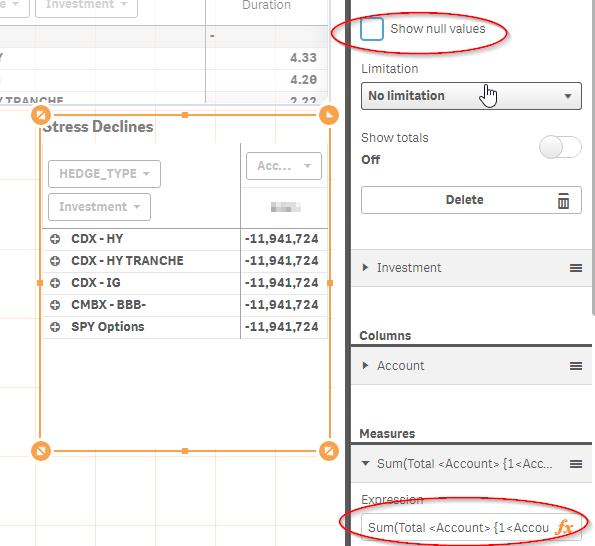
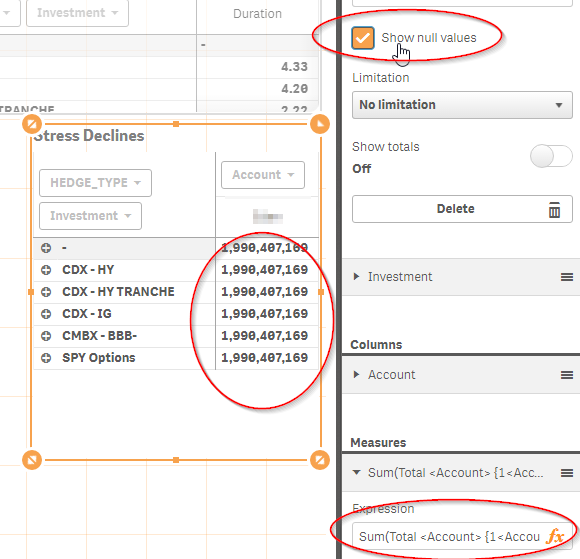
My sum is very much dependent on the Show Null Values setting. I want to disregard it.

 sunny_talwar
- Mark as New
- Bookmark
- Subscribe
- Mute
- Subscribe to RSS Feed
- Permalink
- Report Inappropriate Content
This seems to be working for me

- Mark as New
- Bookmark
- Subscribe
- Mute
- Subscribe to RSS Feed
- Permalink
- Report Inappropriate Content
Not for me. Please see screenshots. My formula: Sum(Total <Account> {1<Account = {"=Count({<Sector = {'Hedge - Credit','Hedge - Options'}>} Investment) > 0"}>} MktValue_with_AI)
sunny_talwar
- Mark as New
- Bookmark
- Subscribe
- Mute
- Subscribe to RSS Feed
- Permalink
- Report Inappropriate Content
Would you be able to create a sample where you can replicate the issue for us to check?
- Mark as New
- Bookmark
- Subscribe
- Mute
- Subscribe to RSS Feed
- Permalink
- Report Inappropriate Content
I'm using Qlik Sense. I'm attaching the qvf export of the app.
Here's the relevant data:
Set NullInterpret = '';
[Data1]:
LOAD Investment, Account, HEDGE_TYPE, Sector, MarketValue INLINE [
Investment, Account, HEDGE_TYPE, Sector, MarketValue
1, Account01, CDX, Hedge,100
2, Account01, CDX, Hedge,100
3, Account02, , Hedge,500
4, Account01, , Home,100
5, Account02, CMBX, Hedge,500
6, Account01, , Hedge,500
7, Account02, , Hedge,500
8, Account01, , Hedge,9999
9, Account0333, Cars, ,500
];
Formula:
Sum(Total <Account> {<Account = {"=Count({<Sector = {'Hedge'}>} Investment) > 0"}>} MarketValue)