Unlock a world of possibilities! Login now and discover the exclusive benefits awaiting you.

- Qlik Community
- :
- Forums
- :
- Analytics & AI
- :
- Products & Topics
- :
- App Development
- :
- Select data from a loaded excel file
- Subscribe to RSS Feed
- Mark Topic as New
- Mark Topic as Read
- Float this Topic for Current User
- Bookmark
- Subscribe
- Mute
- Printer Friendly Page

 stekol61
- Mark as New
- Bookmark
- Subscribe
- Mute
- Subscribe to RSS Feed
- Permalink
- Report Inappropriate Content
Select data from a loaded excel file
I have loaded this data from an excel file in my Sense app.
How can i select the value to a textbox for the current week and a specific country?
| week/country | S | F |
| 2019-6 | 103,9751 | 32,1342 |
| 2019-7 | 103,9751 | 32,1342 |
| 2019-8 | 103,9751 | 32,1342 |
| 2019-9 | 101,1003 | 31,2457 |
| 2019-10 | 93,91303 | 29,02444 |
| 2019-11 | 93,91303 | 29,02444 |
| 2019-12 | 93,91303 | 29,02444 |
| 2019-13 | 93,91303 | 29,02444 |
| 2019-14 | 96,59626 | 29,85371 |
| 2019-15 | 97,04347 | 29,99192 |
 y_grynechko
- Mark as New
- Bookmark
- Subscribe
- Mute
- Subscribe to RSS Feed
- Permalink
- Report Inappropriate Content
Hey,
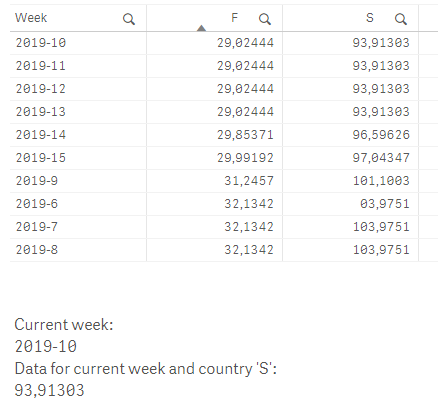
you need to get current week in correct format so the YYYY-WW, just add this to the loading script:
LET v_currentWeek = Replace(weekname(today()),'/','-');
After that in the text box add measure:
MinString({<Week = {'$(v_currentWeek)'}>}S)
This is what I get:
stekol61
- Mark as New
- Bookmark
- Subscribe
- Mute
- Subscribe to RSS Feed
- Permalink
- Report Inappropriate Content
Should I change the format in the loading of the excel ?
LOAD
F1 as new_week,
Sweden,
Finland,
Norway,
Estonia,
Lithuania
FROM [lib://1.3.21.
y_grynechko
- Mark as New
- Bookmark
- Subscribe
- Mute
- Subscribe to RSS Feed
- Permalink
- Report Inappropriate Content
I think you can leave it as it is.
Just add this one line in the load script:
LET v_currentWeek = Replace(weekname(today()),'/','-');
and later on use it to show the data.
MinString({<Week = {'$(v_currentWeek)'}>}S)
Text in green will select the week based on the week of today's date. Red 'S' is where you type the name on the country you want to show.
