Unlock a world of possibilities! Login now and discover the exclusive benefits awaiting you.

- Qlik Community
- :
- Forums
- :
- Analytics & AI
- :
- Products & Topics
- :
- App Development
- :
- Set Default Selections in Alternate States When Op...
- Subscribe to RSS Feed
- Mark Topic as New
- Mark Topic as Read
- Float this Topic for Current User
- Bookmark
- Subscribe
- Mute
- Printer Friendly Page

 marcoyukon
- Mark as New
- Bookmark
- Subscribe
- Mute
- Subscribe to RSS Feed
- Permalink
- Report Inappropriate Content
Set Default Selections in Alternate States When Opening Sheet
I have the Year-Month selection in two separate filter panes and set to P0 and P1 alternate states respectively.
I am unable to find a way to set a default selection in the sheet properties actions upon sheet opening.
The desired action would be to set P0:Year-Month to the previous month and P1:Year-Month to the current month in
these alternate states panes when the sheet is open.
I know how to set defaults, but not when you add alternate states in the mix.
See the example attached with a bookmark created. What would be the converted expression to set the default selection actions in the sheet?

Need this as the default selection upon opening the sheet:


 justISO
- Mark as New
- Bookmark
- Subscribe
- Mute
- Subscribe to RSS Feed
- Permalink
- Report Inappropriate Content
Hi, how I would do in this case: as there are 2 filters with separate alternate states, in one filter I would write
{<Date(Date#([Year-Month],'YYYY-MM'))= {"=Date(Date#([Year-Month],'YYYY-MM'))=monthstart(today())"}>}
to get current month and for previous month in another state/filter I would write
{<Date(Date#([Year-Month],'YYYY-MM'))= {"=Date(Date#([Year-Month],'YYYY-MM'))=addmonths(monthstart(today()),-1)"}>}
Now with these 2 dates in filters, separated by states I go and create new bookmark:
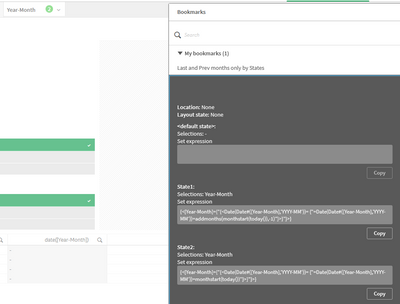
Now, as I have dynamic dates bookmark, I in sheet properties go to Actions and add action 'Apply bookmark' and from bookmarks list select one needed.
