Unlock a world of possibilities! Login now and discover the exclusive benefits awaiting you.

- Qlik Community
- :
- Forums
- :
- Analytics & AI
- :
- Products & Topics
- :
- App Development
- :
- Re: Sorting based on two columns in qliksense stra...
- Subscribe to RSS Feed
- Mark Topic as New
- Mark Topic as Read
- Float this Topic for Current User
- Bookmark
- Subscribe
- Mute
- Printer Friendly Page

 abhijith28
- Mark as New
- Bookmark
- Subscribe
- Mute
- Subscribe to RSS Feed
- Permalink
- Report Inappropriate Content
Sorting based on two columns in qliksense straight table
Hi,
I have a scenario where sorting in straight table should be done on two columns.
1. Name sort by alphabetical order
2. Value sort by Sort_ord within the name
Ex: Input
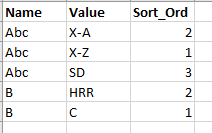
Expected Output
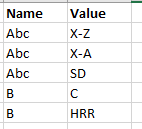
I tried sorting option 1. sort by Name alphabetical 2. sum(Sort_ord) but its not working for few names attached in the Data.xls
I have attached the sample app and sample source data. Please look into it.
Accepted Solutions

 brunobertels
- Mark as New
- Bookmark
- Subscribe
- Mute
- Subscribe to RSS Feed
- Permalink
- Report Inappropriate Content
Hi
Then do it like that
replace dim value by this calculated dimension :
=dual(Value,Sort_ord)
Let column Sort_ord but add 0 in the show column if option
like that :
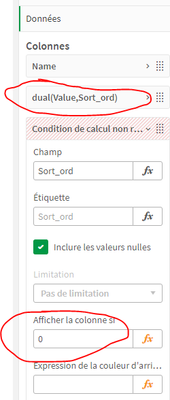
and as result :

brunobertels
- Mark as New
- Bookmark
- Subscribe
- Mute
- Subscribe to RSS Feed
- Permalink
- Report Inappropriate Content
Hi
Is this what you need ?

if yes is the Order in sorting menu option :

abhijith28
- Mark as New
- Bookmark
- Subscribe
- Mute
- Subscribe to RSS Feed
- Permalink
- Report Inappropriate Content
Output is correct but the Sort_ord column should not be added in the table.
Only Name & Value should be there in the table
brunobertels
- Mark as New
- Bookmark
- Subscribe
- Mute
- Subscribe to RSS Feed
- Permalink
- Report Inappropriate Content
Hi
Then do it like that
replace dim value by this calculated dimension :
=dual(Value,Sort_ord)
Let column Sort_ord but add 0 in the show column if option
like that :
and as result :
abhijith28
- Mark as New
- Bookmark
- Subscribe
- Mute
- Subscribe to RSS Feed
- Permalink
- Report Inappropriate Content
Great! It is working as expected.
Thanks for your time & providing the solution.
But if you select Value "A" from first cell only that particular cell value will be selected. It won't select A from all Names. How do we tackle this issue.
abhijith28
- Mark as New
- Bookmark
- Subscribe
- Mute
- Subscribe to RSS Feed
- Permalink
- Report Inappropriate Content
@MarcoWedel @Anil_Babu_Samineni @tresB
Do you have any solution to this scenario. Please suggest
brunobertels
- Mark as New
- Bookmark
- Subscribe
- Mute
- Subscribe to RSS Feed
- Permalink
- Report Inappropriate Content
Hi
This seems to work for me :
Dim = Name
Dim = Value
Sort Order :
Name = Auto
Value = order by expression ascending
add this expression aggr(min(Sort_Ord),Value)
selecting first Value in Value Field ( A) seems to select all respective value corresponding to 'A' :

abhijith28
- Mark as New
- Bookmark
- Subscribe
- Mute
- Subscribe to RSS Feed
- Permalink
- Report Inappropriate Content
Thanks for the response.
Tried it but if you see the third value is showing it as B instead it should show X-B
