Unlock a world of possibilities! Login now and discover the exclusive benefits awaiting you.

- Qlik Community
- :
- Forums
- :
- Analytics & AI
- :
- Products & Topics
- :
- App Development
- :
- Straight table issue
- Subscribe to RSS Feed
- Mark Topic as New
- Mark Topic as Read
- Float this Topic for Current User
- Bookmark
- Subscribe
- Mute
- Printer Friendly Page

- Mark as New
- Bookmark
- Subscribe
- Mute
- Subscribe to RSS Feed
- Permalink
- Report Inappropriate Content
Straight table issue
I am using Qliksense
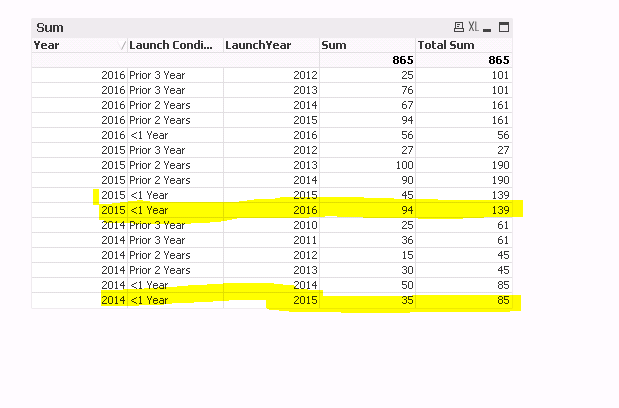
Attached please find the sample data, sample qvw and screen shot. I have a Year and Launch Year fields. So In each Year I can have multiple Launch Years, for example Year=2016 will have launch Years 2016,2015,2014 etc
for Year 2015 will have launch Years 2016,2015,2014 etc.
Now I want to use the following grouping:
=If(LaunchYear >= Year,'<1 Year',
If(LaunchYear >= (Year-2) and LaunchYear < Year,'Prior 2 Years',
If(LaunchYear <= (Year-3), 'Prior 3 Year')))
But at the same time I want to exclude any future Launch Years. For example , If I am in Year 2015, I want to see only Launch Years <= 2015 and then in the last column I would to sum the total for each Year.
Looking for the solution
- « Previous Replies
-
- 1
- 2
- Next Replies »
- Mark as New
- Bookmark
- Subscribe
- Mute
- Subscribe to RSS Feed
- Permalink
- Report Inappropriate Content
This does give me the sum at the Year level , but the sum is not right. If you sum the Values in the Volume column for the Year they dont add up to the total value


 sunny_talwar
- Mark as New
- Bookmark
- Subscribe
- Mute
- Subscribe to RSS Feed
- Permalink
- Report Inappropriate Content
Cannot test this, but how about this:
Aggr(NODISTINCT Sum(If(LaunchYear < Year, SPLTQTY)), Year)
- Mark as New
- Bookmark
- Subscribe
- Mute
- Subscribe to RSS Feed
- Permalink
- Report Inappropriate Content
Nopes doesnt work
- « Previous Replies
-
- 1
- 2
- Next Replies »