Unlock a world of possibilities! Login now and discover the exclusive benefits awaiting you.

- Qlik Community
- :
- Forums
- :
- Analytics & AI
- :
- Products & Topics
- :
- App Development
- :
- Sum column using an aggr if function
- Subscribe to RSS Feed
- Mark Topic as New
- Mark Topic as Read
- Float this Topic for Current User
- Bookmark
- Subscribe
- Mute
- Printer Friendly Page

- Mark as New
- Bookmark
- Subscribe
- Mute
- Subscribe to RSS Feed
- Permalink
- Report Inappropriate Content
Sum column using an aggr if function
I have a working aggr if expression kindly created by SunnyT on here last week, I need this formula to now have an additional steps and cannot seem to get it to work: Sum(Aggr(If(Count({$<Quote_Submitted_Count ={1}, [Created xad] ={"1"}>} TransactionID) > 9, 1, 0), [Broker Name]))
The above expression identifies the number of quotes created by user and if the total number exceeds 10 then their submissions are counted within a simple KPI.
What I now need is the following:
Show the amount of sales in financial terms for those users. So the two new markers would be Quote_Secured_Count and then it would need to sum the money which is held under GWP.
The logic must only sum the GWP where Quote_Secured_Count = 1 for the users where the Quote_Submitted_Count exceeded 10.
- « Previous Replies
-
- 1
- 2
- Next Replies »

 sunny_talwar
- Mark as New
- Bookmark
- Subscribe
- Mute
- Subscribe to RSS Feed
- Permalink
- Report Inappropriate Content
QlikView is case sensitive, do you know if the field is called Created xad or Created XAD or some variation of it?
- Mark as New
- Bookmark
- Subscribe
- Mute
- Subscribe to RSS Feed
- Permalink
- Report Inappropriate Content
I'm using Qlik Sense, so not sure if that makes a difference. The field is Created xad
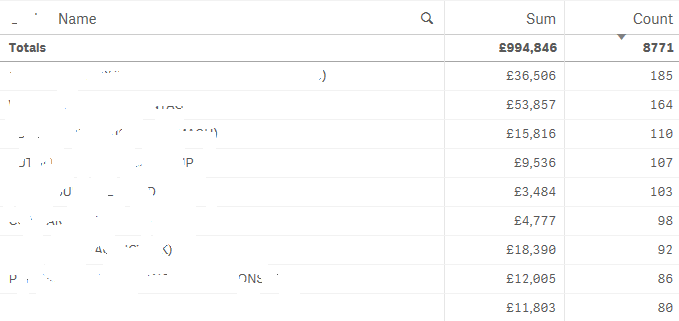
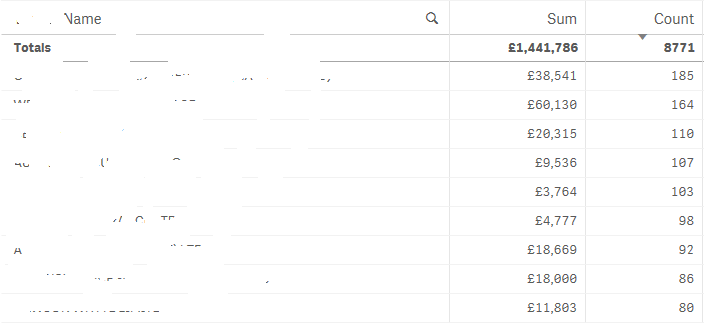
What is interesting is that the count expression works perfectly, I created another filter called "User Type", if I add this in the filter panel and select external the count does not change at all, but the sum then drops to the correct level.
So the issue would appear to be that it is ignoring the Created xad filter for some reason.
- Mark as New
- Bookmark
- Subscribe
- Mute
- Subscribe to RSS Feed
- Permalink
- Report Inappropriate Content
So the top image shows the correct GWP, note how the count stays the same with your expression:
sunny_talwar
- Mark as New
- Bookmark
- Subscribe
- Mute
- Subscribe to RSS Feed
- Permalink
- Report Inappropriate Content
What is the difference between Created xad and User Type field? If you made use of User Type to make selection to get the desired result, do you think you might need User Type in your set analysis instead of Created xad?
sunny_talwar
- Mark as New
- Bookmark
- Subscribe
- Mute
- Subscribe to RSS Feed
- Permalink
- Report Inappropriate Content
How about this?
Sum({<[Broker Name] = {"=Count({$<Quote_Submitted_Count ={1}, [Created xad] ={1}>} TransactionID) > 9"}, Quote_Secured_Count={"1"}, [Created xad] ={1}>} GWP)
- Mark as New
- Bookmark
- Subscribe
- Mute
- Subscribe to RSS Feed
- Permalink
- Report Inappropriate Content
You finally found a combination that Qlik likes! Thanks Sunny, I'd never have gotten to the bottom of it by myself.
- « Previous Replies
-
- 1
- 2
- Next Replies »