Unlock a world of possibilities! Login now and discover the exclusive benefits awaiting you.

- Qlik Community
- :
- Forums
- :
- Analytics & AI
- :
- Products & Topics
- :
- App Development
- :
- Re: Table Chart - set to only display dates within...
- Subscribe to RSS Feed
- Mark Topic as New
- Mark Topic as Read
- Float this Topic for Current User
- Bookmark
- Subscribe
- Mute
- Printer Friendly Page

 jerryr125
- Mark as New
- Bookmark
- Subscribe
- Mute
- Subscribe to RSS Feed
- Permalink
- Report Inappropriate Content
Table Chart - set to only display dates within the current year/month
Hi - I would like to have a setting on a chart that defaults to only displaying the current month/year of data.
Example - SalesDate is in the table - only show records in which the SalesDate is in the current month/year.
Thoughts ? Jerry
 vunguyenq89
- Mark as New
- Bookmark
- Subscribe
- Mute
- Subscribe to RSS Feed
- Permalink
- Report Inappropriate Content
You can apply Set Analysis to the measure expression of the chart. Check out this discussion https://community.qlik.com/t5/Qlik-Sense-App-Development/Set-analysis-current-month-and-year/td-p/11...
Hope it helps!
BR,
Vu Nguyen
jerryr125
- Mark as New
- Bookmark
- Subscribe
- Mute
- Subscribe to RSS Feed
- Permalink
- Report Inappropriate Content
Hi - I looked at the link below - I am trying to add the formula to a table to only display the current months data.
That does not seem to do the trick - thoughts ?
vunguyenq89
- Mark as New
- Bookmark
- Subscribe
- Mute
- Subscribe to RSS Feed
- Permalink
- Report Inappropriate Content
Which expression have you tried? Can you also post some sample data?
jerryr125
- Mark as New
- Bookmark
- Subscribe
- Mute
- Subscribe to RSS Feed
- Permalink
- Report Inappropriate Content
Hi -
Thank you again everyone for your help !
Ok - for example :
I have the table visualization (chart) on my sheet.
Display example :
SalesID ProductName SalesDate
123 Shirt 01/25/2019
456 Cap 11/06/2018
789 Hoodie 04/04/2019
534 Jacket 11/10/2019
I would like the table visualization (chart) to only display the following
SalesID ProductName SalesDate
534 Jacket 11/10/2019
Therefore - only sales in the current year/month.
Thoughts ?? Jerry
vunguyenq89
- Mark as New
- Bookmark
- Subscribe
- Mute
- Subscribe to RSS Feed
- Permalink
- Report Inappropriate Content
You can create the expected table as follows:
- Dimension = SalesID, ProductName
- Measure = Only({<SalesDate = {">=$(=MonthStart(Today()))"}>} SalesDate)
BR,
Vu Nguyen
jerryr125
- Mark as New
- Bookmark
- Subscribe
- Mute
- Subscribe to RSS Feed
- Permalink
- Report Inappropriate Content
Hi -
In the column (as a measure)
=Only({<([SalesDate]) = {">=$(=MonthStart(Today()))"}>} [SalesDate])
Does not work - thoughts ?
vunguyenq89
- Mark as New
- Bookmark
- Subscribe
- Mute
- Subscribe to RSS Feed
- Permalink
- Report Inappropriate Content
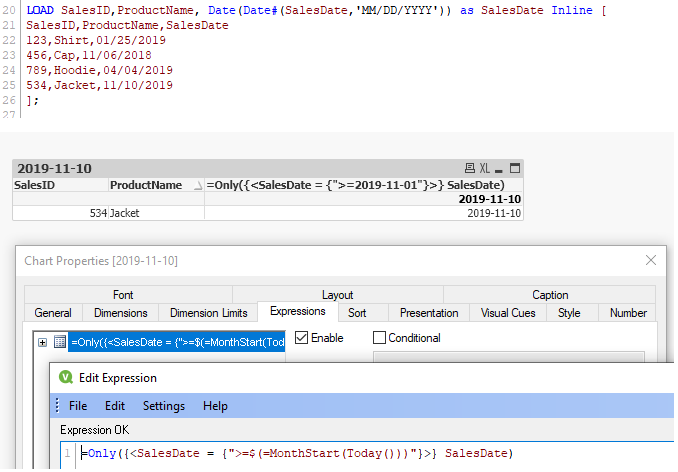
Check if field [SalesDate] in your data is really a date field, otherwise convert it to date.
Below is the reload script I used to create the test data
LOAD SalesID,ProductName, Date(Date#(SalesDate,'MM/DD/YYYY')) as SalesDate Inline [
SalesID,ProductName,SalesDate
123,Shirt,01/25/2019
456,Cap,11/06/2018
789,Hoodie,04/04/2019
534,Jacket,11/10/2019
];
With this data the above expression works
 jerryr125
- Mark as New
- Bookmark
- Subscribe
- Mute
- Subscribe to RSS Feed
- Permalink
- Report Inappropriate Content
HI - still not working - I created a column in my table (again - visualization chart) as a dimension - no luck - Jerryr
=Only({<SalesDate = {">=$(=MonthStartToday()))"}>} Sales.Date )
