Unlock a world of possibilities! Login now and discover the exclusive benefits awaiting you.

- Qlik Community
- :
- Forums
- :
- Analytics & AI
- :
- Products & Topics
- :
- App Development
- :
- Understand the use of RowNo() inside Autonumber fu...
- Subscribe to RSS Feed
- Mark Topic as New
- Mark Topic as Read
- Float this Topic for Current User
- Bookmark
- Subscribe
- Mute
- Printer Friendly Page

 erric3210
- Mark as New
- Bookmark
- Subscribe
- Mute
- Subscribe to RSS Feed
- Permalink
- Report Inappropriate Content
Understand the use of RowNo() inside Autonumber function
Hi Community,
I need to understand the purpose or use of RowNo() inside Autonumber() function.
MAIN:
LOAD * INLINE [
Name, Place, Value
AA, AA-X, 1000
AA, AA-X, 2000
BB, BB-X, 3000
BB, BB-Y, 4000
CC, CC-X, 6000
CC, CC-X, 7000
CC, CC-Y, 8000
];
FINAL:
LOAD Name,
Place,
Value,
AutoNumber(Name&'_'&Place&'_'&Value) AS Auto1,
AutoNumber(ROWNO(),Name&'_'&Place&'_'&Value) AS Auto2
RESIDENT MAIN;
DROP TABLE MAIN;
Result:
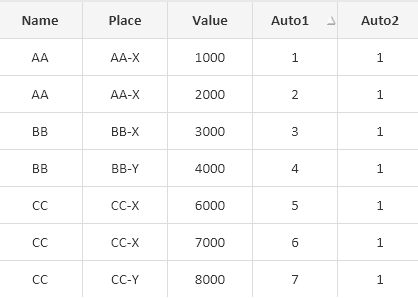
Can some one please explain the concept behind this.
Regards,
Eric

 marcus_sommer
- Mark as New
- Bookmark
- Subscribe
- Mute
- Subscribe to RSS Feed
- Permalink
- Report Inappropriate Content
Autonumber() adds 1 for each new distinct value of the field respectively field-combination. By combining it with rowno() it could respect further dimensions, for example not just returning a number for a product or customer else returning such a number per day or category.
But it's seldom useful because the performance of this approach is already by smaller data-sets quite worse. Therefore if such information is needed it's better to use interrecord-functions like previous() or peek() within a sorted resident load to create such results.
- Marcus
erric3210
- Mark as New
- Bookmark
- Subscribe
- Mute
- Subscribe to RSS Feed
- Permalink
- Report Inappropriate Content
Hi @marcus_sommer Thanks for replying.
I didn't understand this line written by you. How this works:
By combining it with rowno() it could respect further dimensions, for example not just returning a number for a product or customer else returning such a number per day or category.
I'll use the Inter-record functions approach as suggested by you. I've seen your other posts related to Autonumber().
But one thing why the below script is giving output '1' against all rows.
AutoNumber(ROWNO(),Name&'_'&Place&'_'&Value) AS Auto2
Also, I don't have any field to Order by. Should I order by using RecNo() or RowNo().
I think order by works on numeric field which is used for sorting in ascending or descending order.
regards,
Eric
marcus_sommer
- Mark as New
- Bookmark
- Subscribe
- Mute
- Subscribe to RSS Feed
- Permalink
- Report Inappropriate Content
By using rowno() within the autonumber() the rowno() becomes the counter against the specified field-combination. In general autonumber() need no sorting but in some cases it could be useful, for example within a calendar by applying it against Year & Month to get a continuous counter over years.
Creating a dimension-specific counter is rather seldom useful - just regarding to your example it seems not be needed. Even by your applied AutoNumber(Name&'_'&Place&'_'&Value) I have some doubts that you need it.
- Marcus
