Unlock a world of possibilities! Login now and discover the exclusive benefits awaiting you.

- Qlik Community
- :
- Forums
- :
- Analytics & AI
- :
- Products & Topics
- :
- App Development
- :
- create new fields automatically using loop for
- Subscribe to RSS Feed
- Mark Topic as New
- Mark Topic as Read
- Float this Topic for Current User
- Bookmark
- Subscribe
- Mute
- Printer Friendly Page

 Logistix
- Mark as New
- Bookmark
- Subscribe
- Mute
- Subscribe to RSS Feed
- Permalink
- Report Inappropriate Content
create new fields automatically using loop for
Hello everyone,
I have a table I want to optimize creating it using a loop for instead of manually. The original table is named Jobchange_Original. The another is the table I'm trying to improve creating automatically the fields that make reference to the line name, e.g. JOBCHANGE_LINE_LINENAME
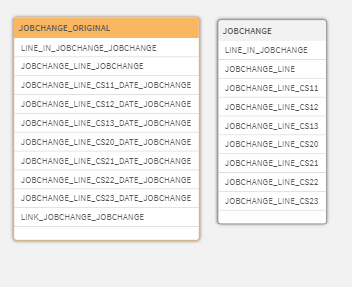
This is the script to create the original table:
JOBCHANGE_ORIGINAL:

  Load

    LINE_IN_JOBCHANGE AS LINE_IN_JOBCHANGE_JOBCHANGE,
    JOBCHANGE_LINE AS JOBCHANGE_LINE_JOBCHANGE,
    IF(JOBCHANGE_LINE='CS11',Fecha_cambio) AS JOBCHANGE_LINE_CS11_DATE_JOBCHANGE,
    IF(JOBCHANGE_LINE='CS12',Fecha_cambio) AS JOBCHANGE_LINE_CS12_DATE_JOBCHANGE,
    IF(JOBCHANGE_LINE='CS13',Fecha_cambio) AS JOBCHANGE_LINE_CS13_DATE_JOBCHANGE,
    IF(JOBCHANGE_LINE='CS20',Fecha_cambio) AS JOBCHANGE_LINE_CS20_DATE_JOBCHANGE,
    IF(JOBCHANGE_LINE='CS21',Fecha_cambio) AS JOBCHANGE_LINE_CS21_DATE_JOBCHANGE,
    IF(JOBCHANGE_LINE='CS22',Fecha_cambio) AS JOBCHANGE_LINE_CS22_DATE_JOBCHANGE,
    IF(JOBCHANGE_LINE='CS23',Fecha_cambio) AS JOBCHANGE_LINE_CS23_DATE_JOBCHANGE,
    JOBCHANGE_LINE&'_'& Turno_cambio	AS LINK_JOBCHANGE_JOBCHANGE
    Resident detail
    Where LINE_IN_JOBCHANGE='1' Order by JOBCHANGE_LINE;
This is the original table results:

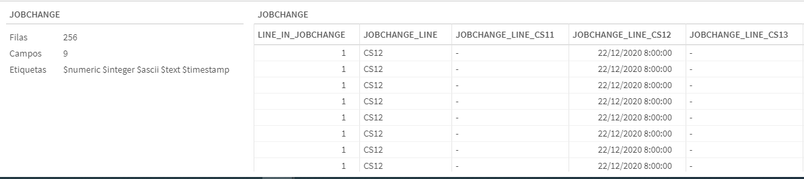
This is the script I made to create the same table with less code, the problem is when I comment the left join, It creates different tables for each field and when i do a left/right/inner/outer join (I tried everything) it creates one single table with repeated records. The thing is I don't know how to join all this fields in one single table without repeating records.
JOBCHANGE:
  Load
    LINE_IN_JOBCHANGE,
    JOBCHANGE_LINE
  Resident detail
  Where LINE_IN_JOBCHANGE='1' Order by JOBCHANGE_LINE;

for i = 0 to $(nLineas)
	e = $(i)+1;

	//left join
    Load
    	IF(JOBCHANGE_LINE='$(vDirector_$(e))',Fecha_cambio) as JOBCHANGE_LINE_$(vDirector_$(e))
    Resident detail
    Where LINE_IN_JOBCHANGE='1' Order by JOBCHANGE_LINE;
Next i;
This is what I get with the second script (with left join uncommented).


- Mark as New
- Bookmark
- Subscribe
- Mute
- Subscribe to RSS Feed
- Permalink
- Report Inappropriate Content
By any chance are you trying this? https://help.qlik.com/en-US/qlikview/April2020/Subsystems/Client/Content/QV_QlikView/Scripting/Scrip...
