Unlock a world of possibilities! Login now and discover the exclusive benefits awaiting you.

- Qlik Community
- :
- Forums
- :
- Analytics & AI
- :
- Products & Topics
- :
- App Development
- :
- exclude nulls on table chart
- Subscribe to RSS Feed
- Mark Topic as New
- Mark Topic as Read
- Float this Topic for Current User
- Bookmark
- Subscribe
- Mute
- Printer Friendly Page

 joeybird
- Mark as New
- Bookmark
- Subscribe
- Mute
- Subscribe to RSS Feed
- Permalink
- Report Inappropriate Content
exclude nulls on table chart
hi
I have tried these following ways to show in a table chart on a qlik sense sheet only the CustomerIDs that have null for Department_Catering
Count({<Department_Catering= {"=Len(Trim(Department_Catering)) > 0"}>}CustomerID)
this above gives the answer to all that has a Department_Catering, but I want the ones that do not
if I do this
Count({<Department_Catering -= {"=Len(Trim(Department_Catering)) > 0"}>}CustomerID)
I get no records
please help

 sunny_talwar
- Mark as New
- Bookmark
- Subscribe
- Mute
- Subscribe to RSS Feed
- Permalink
- Report Inappropriate Content
May be try this:
Count({<CustomerID = {"=Len(Trim(Department_Catering)) = 0"}>}CustomerID)
joeybird
- Mark as New
- Bookmark
- Subscribe
- Mute
- Subscribe to RSS Feed
- Permalink
- Report Inappropriate Content
HI
this brings back all CustomerID, giving a 1 to all the null records for Department_Catering and 0 to the others
how do I limit the records shown in the table to just the ones with the 1 count please?
please help
sunny_talwar
- Mark as New
- Bookmark
- Subscribe
- Mute
- Subscribe to RSS Feed
- Permalink
- Report Inappropriate Content
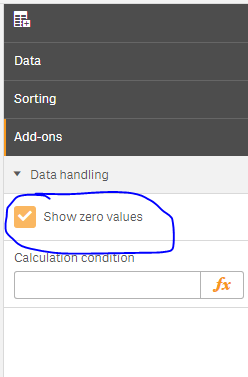
Uncheck 'Show Zero Values under Add-Ons -> Data handling