Unlock a world of possibilities! Login now and discover the exclusive benefits awaiting you.

- Qlik Community
- :
- Forums
- :
- Analytics & AI
- :
- Products & Topics
- :
- App Development
- :
- issue while calculating the difference
- Subscribe to RSS Feed
- Mark Topic as New
- Mark Topic as Read
- Float this Topic for Current User
- Bookmark
- Subscribe
- Mute
- Printer Friendly Page

 vinod2086
- Mark as New
- Bookmark
- Subscribe
- Mute
- Subscribe to RSS Feed
- Permalink
- Report Inappropriate Content
issue while calculating the difference
Hi All,
i am facing issue while calculating the difference.
please find the below data with expected output.
| ID | Distance | Created_Date | Customer | Diff_Distance | |
|---|---|---|---|---|---|
| 1 | 15 | 26-07-2017 06:39 | Cust1 | 0 | |
| 1 | 20 | 27-07-2017 09:09 | Cust2 | 5 | |
| 1 | 23 | 27-07-2017 09:39 | Cust1 | 3 | |
| 1 | 34 | 27-07-2017 10:39 | Cust1 | 9 | |
| 1 | 46 | 27-07-2017 13:54 | Cust1 | 12 | |
| 2 | 13 | 01-08-2017 10:24 | Cust2 | 0 | |
| 2 | 45 | 07-08-2017 07:54 | Cust2 | 32 | |
| 2 | 67 | 16-08-2017 09:54 | Cust1 | 22 | |
| 2 | 43 | 16-08-2017 10:54 | Cust2 | -24 | |
| 3 | 12 | 16-08-2017 11:09 | Cust1 | 0 | |
| 3 | 10 | 16-08-2017 13:24 | Cust3 | -2 | |
| 3 | 23 | 16-08-2017 13:54 | Cust3 | 13 | |
| 3 | 31 | 16-08-2017 23:39 | Cust3 | 8 |
my expected output is diff_Distance.
please help on the same.
Thanks in Advance. 
Accepted Solutions
vinod2086
- Mark as New
- Bookmark
- Subscribe
- Mute
- Subscribe to RSS Feed
- Permalink
- Report Inappropriate Content
i am using below logic but not getting expected output.
If(RowNo() = 1, 0, Distance- peek(Distance,-1))as Diff_Distance,
vinod2086
- Mark as New
- Bookmark
- Subscribe
- Mute
- Subscribe to RSS Feed
- Permalink
- Report Inappropriate Content
i am using below logic but not getting expected output.
If(RowNo() = 1, 0, Distance- peek(Distance,-1))as Diff_Distance,

 sunny_talwar
- Mark as New
- Bookmark
- Subscribe
- Mute
- Subscribe to RSS Feed
- Permalink
- Report Inappropriate Content
Try this
Table:
LOAD * INLINE [
ID, Distance, Created_Date, Customer
1, 15, 26-07-2017 06:39, Cust1
1, 20, 27-07-2017 09:09, Cust2
1, 23, 27-07-2017 09:39, Cust1
1, 34, 27-07-2017 10:39, Cust1
1, 46, 27-07-2017 13:54, Cust1
2, 13, 01-08-2017 10:24, Cust2
2, 45, 07-08-2017 07:54, Cust2
2, 67, 16-08-2017 09:54, Cust1
2, 43, 16-08-2017 10:54, Cust2
3, 12, 16-08-2017 11:09, Cust1
3, 10, 16-08-2017 13:24, Cust3
3, 23, 16-08-2017 13:54, Cust3
3, 31, 16-08-2017 23:39, Cust3
];
FinalTable:
LOAD *,
If(ID = Previous(ID), Distance - Peek('Distance'), 0) as Diff_Distance
Resident Table
Order By ID, Created_Date;
DROP Table Table;
vinod2086
- Mark as New
- Bookmark
- Subscribe
- Mute
- Subscribe to RSS Feed
- Permalink
- Report Inappropriate Content
Hi Sunny,
Thanks for reply.
still i am facing same issue, when i select id 2 first record should display "0" but here by default taking the above (record-current record) this is not correct. same is applicable for id 3 so on..
please let me know if you need more information.
 kaanerisen
- Mark as New
- Bookmark
- Subscribe
- Mute
- Subscribe to RSS Feed
- Permalink
- Report Inappropriate Content
Hi V,
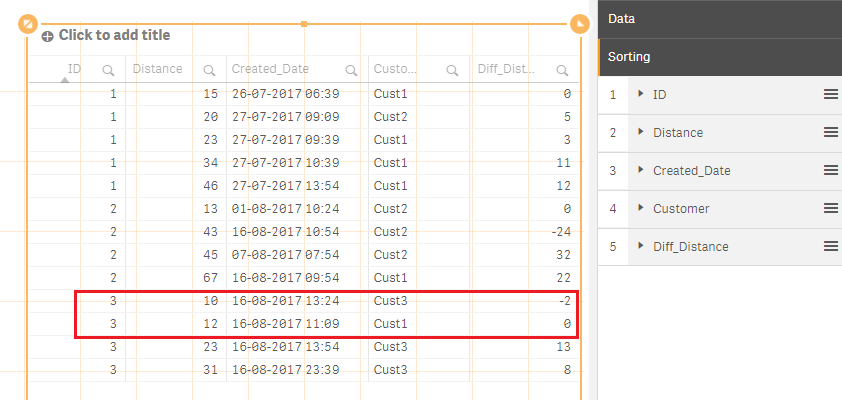
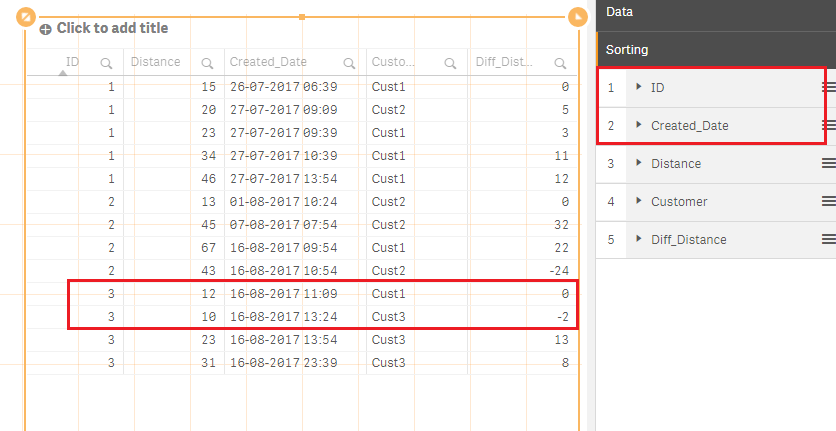
Actually Sunny's solution is valid. I assume that you see different in the front-end when you add the values into a table. The reason is a sorting issue.
Default sorting (ID-Distnace-...):
Modified sorting (ID-CreatedDate-...):
sunny_talwar
- Mark as New
- Bookmark
- Subscribe
- Mute
- Subscribe to RSS Feed
- Permalink
- Report Inappropriate Content
I am seeing the same output as you needed and as kaanerisen showed
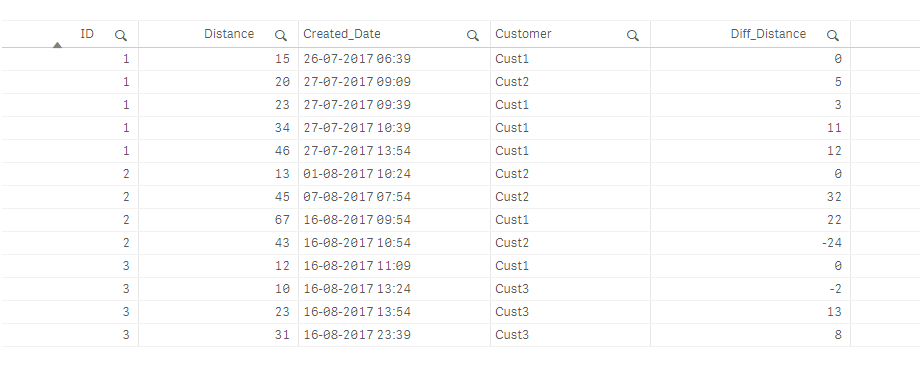
What is wrong here? Am I missing something? Attached the qvf for you to check....
vinod2086
- Mark as New
- Bookmark
- Subscribe
- Mute
- Subscribe to RSS Feed
- Permalink
- Report Inappropriate Content
Thanks Sunny.
its working now
