Unlock a world of possibilities! Login now and discover the exclusive benefits awaiting you.

- Qlik Community
- :
- Forums
- :
- Data Integration
- :
- Products & Topics
- :
- Catalog and Lineage Discussions
- :
- JSON Definition Language
- Subscribe to RSS Feed
- Mark Topic as New
- Mark Topic as Read
- Float this Topic for Current User
- Bookmark
- Subscribe
- Mute
- Printer Friendly Page

 treysmithdev
- Mark as New
- Bookmark
- Subscribe
- Mute
- Subscribe to RSS Feed
- Permalink
- Report Inappropriate Content
JSON Definition Language
Does anyone know where the full JSON Definition Language (JDL) spec is? I'm trying to load some JSON files I have converted and it seems I need to generate a definition file as well, but I have not been able to find any documentation outside of the training slide.
Accepted Solutions
treysmithdev
- Mark as New
- Bookmark
- Subscribe
- Mute
- Subscribe to RSS Feed
- Permalink
- Report Inappropriate Content
I was able to find the documentation in the embedded QDC documentation: Source > JSON > JSON Overview.
Here is the specific documentation I was looking for:
datasetName: | String name of the datasets. Should not contain whitespace. May contain underscore characters.
|
jsonRecordStructure: | JSON_OBJECT
|
jsonDatasetOrganization: | Should contain one of: SINGLETON_JSON_VALUE SEQUENCE_OF_JSON_VALUES
|
table: | Defines the name of a table to be extracted as well as the JSON-path for JSON values to be used for the table. This directive may occur more than once in a single .hen file to define multiple tables for a single JSON dataset. |
Example:
{

"datasetName": "tickets",

"jsonRecordStructure": "JSON_OBJECT",

"jsonDatasetOrganization": "SINGLETON_JSON_VALUE",

"tableDefinitions":

 [

  {

  "tableName": "store",

  "tableDriverSpecification": "$.store[*]",

  "fieldDefinitions":

   [

    {"fieldName": "ticketId", "fieldSpecificationString":    "$.store[*].id" },

    {"fieldName": "created_at", "fieldSpecificationString":  "$.store[*].created_at" },

    {"fieldName": "raw_subject", "fieldSpecificationString": "$.store[*].raw_subject" },

    {"fieldName": "tags", "fieldSpecificationString":        "$.store[*].tags" },

    {"fieldName": "tags2", "fieldSpecificationString":       "$.store[*].tags[*]" },

    {"fieldName":"firstCustomFieldValue","fieldSpecificationString":"$.store[*].customFields[0].value" },

    {"fieldName": "ticketJson", "fieldSpecificationString":  "$.store[*]" }

   ]

  },


  {

  "tableName": "store_tag",

  "tableDriverSpecification": "$.store[*].tags[*]",

  "fieldDefinitions":

   [

    {"fieldName": "ticketId", "fieldSpecificationString": "$.store[*].id" },

    {"fieldName": "tag", "fieldSpecificationString":      "$.store[*].tags[*]" }

   ]

  }

 ]

}
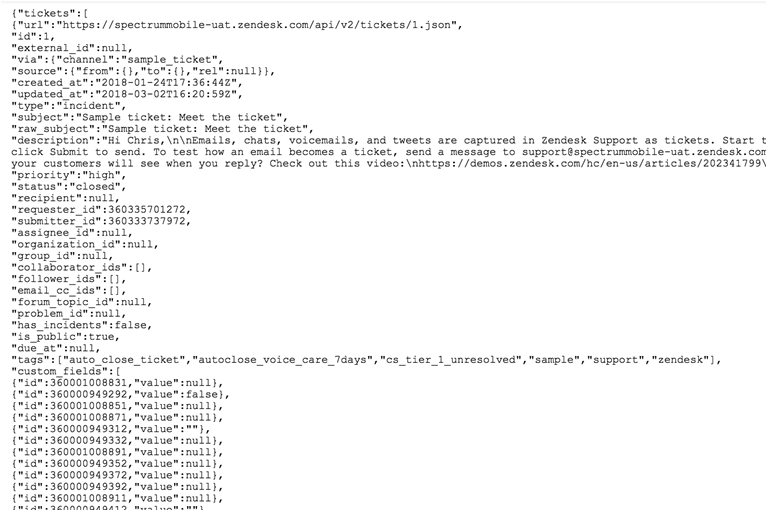
Source:
 treysmithdev
- Mark as New
- Bookmark
- Subscribe
- Mute
- Subscribe to RSS Feed
- Permalink
- Report Inappropriate Content
I was able to find the documentation in the embedded QDC documentation: Source > JSON > JSON Overview.
Here is the specific documentation I was looking for:
datasetName: | String name of the datasets. Should not contain whitespace. May contain underscore characters.
|
jsonRecordStructure: | JSON_OBJECT
|
jsonDatasetOrganization: | Should contain one of: SINGLETON_JSON_VALUE SEQUENCE_OF_JSON_VALUES
|
table: | Defines the name of a table to be extracted as well as the JSON-path for JSON values to be used for the table. This directive may occur more than once in a single .hen file to define multiple tables for a single JSON dataset. |
Example:
{

"datasetName": "tickets",

"jsonRecordStructure": "JSON_OBJECT",

"jsonDatasetOrganization": "SINGLETON_JSON_VALUE",

"tableDefinitions":

 [

  {

  "tableName": "store",

  "tableDriverSpecification": "$.store[*]",

  "fieldDefinitions":

   [

    {"fieldName": "ticketId", "fieldSpecificationString":    "$.store[*].id" },

    {"fieldName": "created_at", "fieldSpecificationString":  "$.store[*].created_at" },

    {"fieldName": "raw_subject", "fieldSpecificationString": "$.store[*].raw_subject" },

    {"fieldName": "tags", "fieldSpecificationString":        "$.store[*].tags" },

    {"fieldName": "tags2", "fieldSpecificationString":       "$.store[*].tags[*]" },

    {"fieldName":"firstCustomFieldValue","fieldSpecificationString":"$.store[*].customFields[0].value" },

    {"fieldName": "ticketJson", "fieldSpecificationString":  "$.store[*]" }

   ]

  },


  {

  "tableName": "store_tag",

  "tableDriverSpecification": "$.store[*].tags[*]",

  "fieldDefinitions":

   [

    {"fieldName": "ticketId", "fieldSpecificationString": "$.store[*].id" },

    {"fieldName": "tag", "fieldSpecificationString":      "$.store[*].tags[*]" }

   ]

  }

 ]

}
Source:
