Unlock a world of possibilities! Login now and discover the exclusive benefits awaiting you.

- Qlik Community
- :
- Forums
- :
- Data Integration
- :
- Products & Topics
- :
- Catalog and Lineage Discussions
- :
- Re: core.error.code.FAILED_TO_CONNECT_TO_LICENSES_...
- Subscribe to RSS Feed
- Mark Topic as New
- Mark Topic as Read
- Float this Topic for Current User
- Bookmark
- Subscribe
- Mute
- Printer Friendly Page

 manuelgomez
- Mark as New
- Bookmark
- Subscribe
- Mute
- Subscribe to RSS Feed
- Permalink
- Report Inappropriate Content
core.error.code.FAILED_TO_CONNECT_TO_LICENSES_SERVICE - Failed to connect to the licenses service. Check if the licenses service is running.
Hello dear community, I just finished installing Qlik Catalog and after entering the username and password I get the following error
core.error.code.FAILED_TO_CONNECT_TO_LICENSES_SERVICE - Failed to connect to the licenses service. Check if the licenses service is running.
Verify that the ports are open and I can still enter
 brunnovb_in
- Mark as New
- Bookmark
- Subscribe
- Mute
- Subscribe to RSS Feed
- Permalink
- Report Inappropriate Content
Hi,
Have you checked that Qlik Licenses & Engine Containers are running?
- Using user "qdc":
- docker inspect -f '{{.State.Running}}' qlikcore_qix-engine_1
- docker inspect -f '{{.State.Running}}' licenses
Otherwise, you can run: cd /usr/local/qdc/qlikcore && ./launch_qlikContainers.sh
Does the server access the internet? The licenses container must be able to contact https://license.qlikcloud.com periodically to verify the validity of the license being used for Catalog.
Best,
Brunno V.B.
manuelgomez
- Mark as New
- Bookmark
- Subscribe
- Mute
- Subscribe to RSS Feed
- Permalink
- Report Inappropriate Content
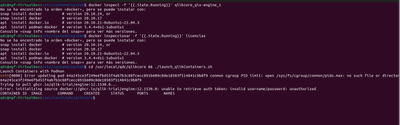
Hello, execute what you tell me and I have the following answer
brunnovb_in
- Mark as New
- Bookmark
- Subscribe
- Mute
- Subscribe to RSS Feed
- Permalink
- Report Inappropriate Content
Hi manuelgomez,
Ok, using Podman you should use:
- podman inspect -f '{{.State.Running}}' catalog-pod-engine
- podman inspect -f '{{.State.Running}}' catalog-pod-licenses
Does the server access the internet? The licenses container must be able to contact https://license.qlikcloud.com periodically to verify the validity of the license being used for Catalog.
Best,
Brunno V.B.
brunnovb_in
- Mark as New
- Bookmark
- Subscribe
- Mute
- Subscribe to RSS Feed
- Permalink
- Report Inappropriate Content
Hi manuelgomez,
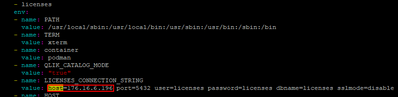
Can you see if the string connection in the "pod qlik Containers.yml" and "docker-compose-qlik Containers.yml" files is correct?
File directory: /usr/local/qdc/qlikcore
I mean referencing the correct host (IP).
Best,
Brunno V.B.
manuelgomez
- Mark as New
- Bookmark
- Subscribe
- Mute
- Subscribe to RSS Feed
- Permalink
- Report Inappropriate Content
Thank you very much I was able to install it but now it gives me an error once I restart the server. Is there any way to let the services start automatically?
brunnovb_in
- Mark as New
- Bookmark
- Subscribe
- Mute
- Subscribe to RSS Feed
- Permalink
- Report Inappropriate Content
Hi manuelgomez,
Yes, there is. You can follow the instructions from the file "https://help.qlik.com/en-US/catalog/February2023/Content/Resources/PDFs/QlikCatalog_February_2023_Si.... I don't know if you've installed using script "CatalogPrereqs.sh", but you may find steps like this "8. Setup Apache Tomcat as a service to automatically start when Linux restarts" and "7. Set PostgreSQL to start automatically, then start it. "
Best,
Brunno V.B.
