Unlock a world of possibilities! Login now and discover the exclusive benefits awaiting you.

- Qlik Community
- :
- Blogs
- :
- Technical
- :
- Design
- :
- Evaluate() Function

 Jennell_Yorkman
- Subscribe to RSS Feed
- Mark as New
- Mark as Read
- Bookmark
- Subscribe
- Printer Friendly Page
- Report Inappropriate Content
The Evaluate() function is a string function that takes one text string parameter. If the string is a valid QlikView or Qlik Sense expression then the evaluated result of the expression will be returned. If the string is not a valid expression, then Null is returned. The Evaluate() function can only be used in the script and not in a chart expression. Evaluate() will do the math for you in the script and return the result. For example, if you are loading a field whose content is expressions like this:
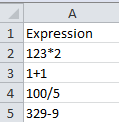
Then you can view that data in two ways. You can either view the actual expression or you can use Evaluate() and view the results.
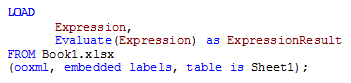
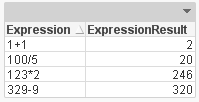
The Evaluate() function is also useful when you are loading a number from a text file or a text field in a database with more than 14 digits. When that number is loaded into QlikView, it is interpreted as a string since it is too long (more than 14 digits).
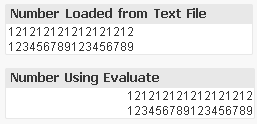
Note that while using Evaluate() returns a number, it is only stored with 14 digit precision. While you may be able to see more than 14 digits, this is just the formatting. The internal mantissa is only 14 digits.
Evaluate() can similarly be used with variables which can be helpful if you have a value that you would like to use multiple times in the script.
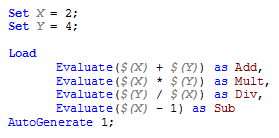

So why use a Evaluate()? At first it seemed unnecessary to me because the calculation would still be done without the Evaluate() function but then I realized that that is only the case when the values are numeric and not strings. So Evaluate() is helpful when your expression is in a string format or when the expression is a number with more than 14 digits. It allows a string expression to be evaluated and the result returned. It is like a short-cut to solving the expression. Try it out!
Thanks,
Jennell
You must be a registered user to add a comment. If you've already registered, sign in. Otherwise, register and sign in.