Unlock a world of possibilities! Login now and discover the exclusive benefits awaiting you.

- Qlik Community
- :
- All Forums
- :
- GeoAnalytics
- :
- Qlik Geoanalytics Custom Connection Failed
- Subscribe to RSS Feed
- Mark Topic as New
- Mark Topic as Read
- Float this Topic for Current User
- Bookmark
- Subscribe
- Mute
- Printer Friendly Page

 svinaya
- Mark as New
- Bookmark
- Subscribe
- Mute
- Subscribe to RSS Feed
- Permalink
- Report Inappropriate Content
Qlik Geoanalytics Custom Connection Failed
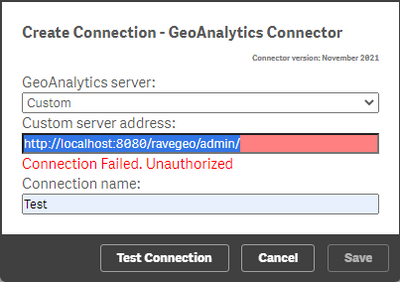
Hi guys, I just installed a Qlik Geoanalytics server (on a Qlik Sense Server) , the installation was ok (I check succesfully the test diagnostic page). But when a try create a Custom connection in Qlik Sense App (Geonalytics) a get the followin message (in red) "Connection Failed. Unauthorized". Can you help me? Thanks
Accepted Solutions

 Joseph_Musekura
- Mark as New
- Bookmark
- Subscribe
- Mute
- Subscribe to RSS Feed
- Permalink
- Report Inappropriate Content
Hi @svisan ,
When creating a connection, remove the /ravegeo/admin and use only http://localhost:8080
Also, I noticed that you are using http:// in the URL (be sure the GeoAnalytics server was installed using http:// and not https://).
You can test access to geoanalytics server using http://localhost:8080/ravegeo/status that should return "ok"
Joseph_Musekura
- Mark as New
- Bookmark
- Subscribe
- Mute
- Subscribe to RSS Feed
- Permalink
- Report Inappropriate Content
Hi @svisan ,
When creating a connection, remove the /ravegeo/admin and use only http://localhost:8080
Also, I noticed that you are using http:// in the URL (be sure the GeoAnalytics server was installed using http:// and not https://).
You can test access to geoanalytics server using http://localhost:8080/ravegeo/status that should return "ok"
