Unlock a world of possibilities! Login now and discover the exclusive benefits awaiting you.

- Qlik Community
- :
- All Forums
- :
- GeoAnalytics
- :
- Qlikview Map with Zip codes using dissolve
- Subscribe to RSS Feed
- Mark Topic as New
- Mark Topic as Read
- Float this Topic for Current User
- Bookmark
- Subscribe
- Mute
- Printer Friendly Page

 tbharath
- Mark as New
- Bookmark
- Subscribe
- Mute
- Subscribe to RSS Feed
- Permalink
- Report Inappropriate Content
Qlikview Map with Zip codes using dissolve
Hi Team,
I am trying to create a US market area map in Geo Analytics. I am trying to use the dissolve option with US zipcodes but my geo mapping dataset is showing zero records. when i try to do this using the state codes i could create 5 market areas without issues. please let me know what could be the mistake i am doing here. I am attaching the data file and the script generated by the connector.
Operation parameters
Dissolve field*: SalesArea
Resolution: Auto
Dissolve definition dataset
Name: DissolveDef
Type: Loaded table
Table Name: areas
Table Fields (key,geometry,...)*: State,State,SalesArea
Geometry Type: Location Named Area
Only load distinct: No
Location ID Suffix: US:AADM1
CRS:Auto
Geometries to dissolve
Name: Dataset
Type: None
Accepted Solutions

 Patric_Nordstro
- Mark as New
- Bookmark
- Subscribe
- Mute
- Subscribe to RSS Feed
- Permalink
- Report Inappropriate Content
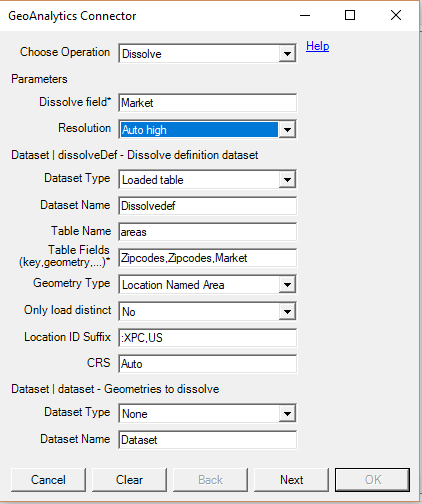
The dissolve op would look something like this.
Given your dataset you want merge Zipcodes based on the field Market.
Adding :XPC,US will help the lookup to understand that it is zipcodes in the US.
Thanks,
Patric
Patric_Nordstro- Mark as New
- Bookmark
- Subscribe
- Mute
- Subscribe to RSS Feed
- Permalink
- Report Inappropriate Content
The dissolve op would look something like this.
Given your dataset you want merge Zipcodes based on the field Market.
Adding :XPC,US will help the lookup to understand that it is zipcodes in the US.
Thanks,
Patric

 Steven_Haught
- Mark as New
- Bookmark
- Subscribe
- Mute
- Subscribe to RSS Feed
- Permalink
- Report Inappropriate Content
@Patric_Nordstrom If I am trying to add the XPC to the script that I have currently, how do I do this?
[DissolveTable]:
SQL
SELECT [Ring],
[Ring_Geometry]
FROM Dissolve(dissolveField='Ring', resolution='source', dissolveDef='DissolveDef')
DATASOURCE DissolveDef
INLINE tableName='Marketdata',
tableFields='Zip,Zip,Ring',
geometryType='LOCATIONNAMEDAREA',
loadDistinct='NO', suffix='US', crs='Auto' {$(DissolveDefInlineTable)}
;
I tried adding 'XPC', 'US' and got a load error. Tried 'XPC, US' and it loaded no lines.
Patric_Nordstro- Mark as New
- Bookmark
- Subscribe
- Mute
- Subscribe to RSS Feed
- Permalink
- Report Inappropriate Content
Change this row to the following:
loadDistinct='NO', suffix=':XPC,US', crs='Auto' {$(DissolveDefInlineTable)}
A tip is to use the wizard and then compare the output with the existing script.
Thanks,
Patric
