Do not input private or sensitive data. View Qlik Privacy & Cookie Policy.
Skip to main content

Announcements
Want to see what's currently in public preview? We've pulled it all together in one place. Check it out here

How to update your Notification Settings

No ratings
cancel
Showing results for 
Search instead for 
Did you mean: 
Mattias_Malré
Former Employee
Former Employee

How to update your Notification Settings

Last Update:

Feb 20, 2019 4:56:02 PM

Updated By:

Sue_Macaluso

Created date:

Nov 13, 2018 3:46:10 PM

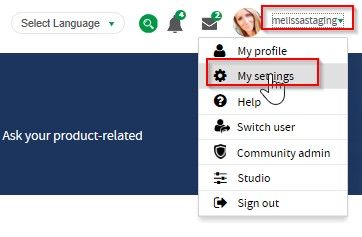
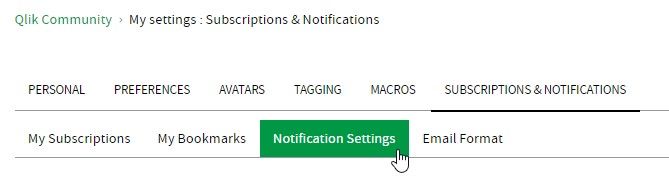
 To update your notification settings go to ”My settings” > “Subscriptions & Notifications” > Notification Settings.

my_settings.jpgnotific.jpg


More Help Available on the Help page 
Labels (2)
Comments
jvitantonio
Specialist III
Specialist III

@Mattias_Malré I don't see to receive/see any notifications through the little bell icon. I'm subscribe to two groups but I don't get the updates. Here's a screenshot of my settings:


Capture.PNG


0 Likes
Contributors
Version history
Last update:
‎2019-02-20 04:56 PM
Updated by: