Unlock a world of possibilities! Login now and discover the exclusive benefits awaiting you.

- Qlik Community
- :
- Support
- :
- Support
- :
- Knowledge
- :
- Support Articles
- :
- Restore deleted app in Qlik Sense, Import app in Q...
- Subscribe to RSS Feed
- Mark as New
- Mark as Read
- Bookmark
- Subscribe
- Printer Friendly Page
- Report Inappropriate Content
Restore deleted app in Qlik Sense, Import app in Qlik Sense

 Andre_Sostizzo
- Mark as New
- Bookmark
- Subscribe
- Mute
- Subscribe to RSS Feed
- Permalink
- Report Inappropriate Content
Restore deleted app in Qlik Sense, Import app in Qlik Sense
Mar 6, 2024 11:09:17 AM
Apr 18, 2018 6:40:29 AM
A Qlik Sense app has been deleted from the Qlik Sense Management Console and needs to be restored.
! Deleting Qlik Sense application from Qlik Management Console (QMC) is generally an irreversible process. Restoring the applications is only possible if a previous backup exists. The delete process removes all files from the configured file share. See Creating a file share (Help.com).
If a backup of the files exists, proceed with the documented steps.
Note that these steps can also be applied when restoring and importing from one Qlik Sense environment to the other.
Information on server migration has also be posted to Qlik Community: Qlik Sense Migration Part1: Migrating your Entire Qlik Sense Environment. If assistance is needed, Qlik Consulting would need to be engaged. Qlik Support cannot provide walk-through assistance with server migrations outside of a post-installation and migration completion break/fix scenario.
Resolution:
To successfully restore Qlik Sense Application to the Qlik Sense environment, you must ensure backup strategy using your backup software tool for your shared folder, where Qlik Sense Application files are stored.
! If no backups of files are available, no restoration will be possible.
Restore process:
1. Find the App filename
You can find the filename (APP_ID) in the AuditActivity_Engine log.
This log is by default stored in: \\<rootShare>\Log\Engine\Audit\ by default.
An example showing App id followed by App name follows:
492 20.4.2.0 20180521T180500.118+0200 QlikServer1 0ccd5e9f-e020-4b76-a84d-144bdf903765 20180521T180500.112+0200 12.145.3.0 Command=Reload app;Result=0;ResultText=Success 0 0 2290 INTERNAL sa_scheduler d296b870-da06-4311-bacc-038992b1c954 c047d8a7-148c-4ea6-97f2-10290e706cd7 License Monitor Engine Not available Doc::DoReloadEx Reload app 0 Success 0ccd5e9f-e020-4b76-a84d-144bdf903765
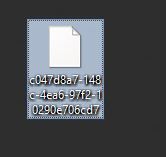
2. Add extension ".qvf" to the app file
This will make the file readable and importable.
- Navigate to the file on disk.
- Right-click and click rename
- Add .qvf as a file extension
- Confirm any warnings that the file may not be accessible any more after renaming
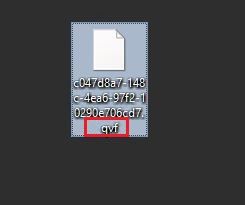
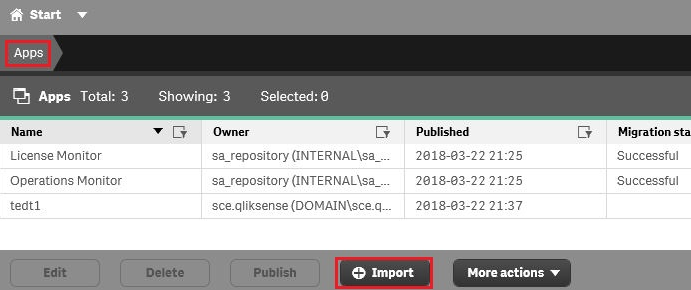
3. Import the App
- Open the Qlik Sense Management Console
- Go to Apps
- Locate and click Import
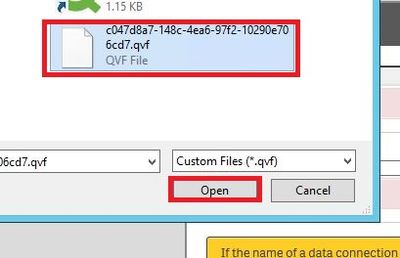
- Locate the file on disk
- Click Open
- Rename the App to the original name

4. App has been imported and received a new APP_ID
You can now locate the app in the shared folder with a new App ID.
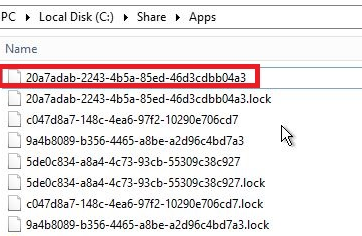
5. Find the proper stream where the app resides

6. Go to section "APPS" select the app, hit "Publish"

Click Publish

The Publishing dialogue:
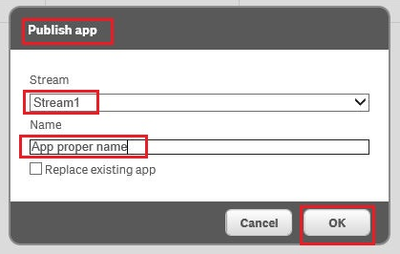
7. Hit "Ok", the app is being published - IMPORTED back
8. The confirmation message should now print as Successful in the App list.



 Bhagwat09
- Mark as Read
- Mark as New
- Bookmark
- Permalink
- Report Inappropriate Content
Thanks for the post
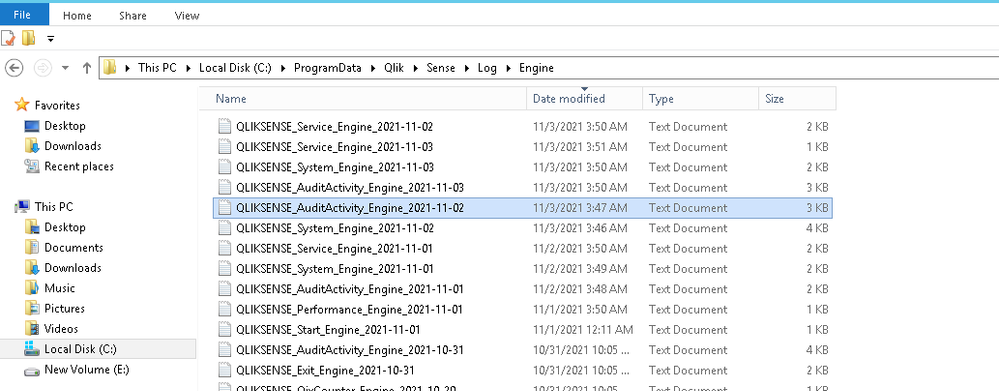
I just want to know that how to find the app file name i.e. 1 st step which you mention over here. I am not able to find \\<rootShare>\Log\Engine\Audit\ this path in my system rather i found below path [ screenshot] . I used to take take weekly backup of using qlik util tool. so how should It will help me to find missing app ?
when I opened the audit activity_engine_2021_11-02 file in notepad it gives me object id not the app id ?
ProductVersion	Timestamp	Description	ProxySessionId	ProxyPackageId	RequestSequenceId	UserDirectory	UserId	SessionId	ObjectId	ObjectName	Service	Origin	Context	Command	Result	Message
12.878.16.0	20211101T034828.890-0700	Command=Export Excel;Result=0;ResultText=Success	0	0	6678938	ALLENLUND	nprinting	bcc6d252-433c-45ea-a168-5110617ea6c7	5e1866d1-192b-455d-b027-6a545b2f3094|TYKdT	Brokerage Inquiry copy_test|Not available	Engine	Not available	GenericObject::ExportData	Export Excel	0	Exported Object TYKdT of type table. Elapsed time: 305ms
12.878.16.0	20211101T034929.245-0700	Command=Export data;Result=0;ResultText=Success	0	0	6686573	ALLENLUND	nprinting	bac1cedf-7e19-453d-a202-6e0a3857ef5a	5e1866d1-192b-455d-b027-6a545b2f3094|VpaDJm	Brokerage Inquiry copy_test|Not available	Engine	Not available	GenericObject::ExportData	Export data	0	Success
12.878.16.0	20211101T041310.401-0700	Command=Export data;Result=0;ResultText=Success	0	0	6693987	ALLENLUND	nprinting	a3c2f271-69ab-489c-84a9-445710e4af15	5e1866d1-192b-455d-b027-6a545b2f3094|upsGw	Brokerage Inquiry copy_test|Not available	Engine	Not available	GenericObject::ExportData	Export data	0	Success
Please help me over this
Thanks
Andre_Sostizzo
- Mark as Read
- Mark as New
- Bookmark
- Permalink
- Report Inappropriate Content
@Bhagwat09, I would double check what Qlik Sense is using as the <rootshare> to make sure you looked for the logs in the right place. This can be confirmed via Qlik Management Console (QMC), under "Service Cluster" configuration. The root path there is what is described as the rootshare in this article. Service Cluster information is touched by the following article. See video on minute 6:19sec. https://community.qlik.com/t5/Knowledge/How-to-change-the-share-path-in-Qlik-Sense-Service-Cluster/t...

 AbdullahMastan
- Mark as Read
- Mark as New
- Bookmark
- Permalink
- Report Inappropriate Content
@Andre_Sostizzo, Hi. we were able to restore the deleted application.
This application was a part of a reload task chain. Due to the deletion, the entire chain got earsed from the QMC, and I am unable to recreate it.
What I have tried:
1. In QMC -> Task -> Last Execution -> Filtering by day - 1 of the delete to get all application. (To no avail, since I'm only able to obtain the applications that trigger after the deleted app)
2. Reload Tasks, Operation Monitor. (To no avail)
Any workaround?
 ifytra
- Mark as Read
- Mark as New
- Bookmark
- Permalink
- Report Inappropriate Content
Hello there,
In order to recover the reload task chain you will need to restore a 'correct' version of your QSR database. A high level step-by-step guide would be
1. Restore the QSR database on PG SQL instance (you can find more info for this in other community threads).
2. Restore any necessary *.qvf files.
3. Run the following query on the restored QSR DB from step 1, to identify reload task chain information (task names, task applications & IDs, triggers etc).
select
rt1."Name" as "Reload Task Name"
,a1."Name" as "Associated Resource"
,a1."ID" as "Application ID"
,COALESCE(ce."Name",'N/A') as "Trigger Name"
,COALESCE(rt2."Name",'N/A') as "Triggered from Associated Task"
,COALESCE(a2."Name",'N/A') as "Trigger from Associated App"
,CASE
WHEN cer."RuleState"=1 THEN 'Task Successful'
WHEN cer."RuleState"=2 THEN 'Task Failed'
ELSE 'N/A'
END AS "Task Status"
,upper(COALESCE(cast(ce."Enabled" as VARCHAR(20)),'N/A')) as "Enabled"
from
Public."ReloadTasks" rt1
left join
Public."CompositeEvents" ce on ce."ReloadTask_ID" = rt1."ID"
left join
Public."Apps" a1 on a1."ID"=rt1."App_ID"
left join
public."CompositeEventRules" cer on cer."CompositeEvent_ID" = ce."ID"
left join
  Public."ReloadTasks" rt2 on rt2."ID" = cer."ReloadTask_ID"
left join
  Public."Apps" a2 on a2."ID" = rt2."App_ID"
where
rt1."Name" like 'YOUR_RELOAD_TASK_CHAIN_%'
order by
rt1."Name"
I hope this will help you.
Best regards,
iLiAS

 Gabbar
- Mark as Read
- Mark as New
- Bookmark
- Permalink
- Report Inappropriate Content
Is there any way to restore the version to the same APP id as the old one ?
 Sonja_Bauernfei
- Mark as Read
- Mark as New
- Bookmark
- Permalink
- Report Inappropriate Content
Hello @Gabbar
The APP id is unique to the deleted record, and a Qlik Sense app cannot be restored to the same one.
All the best,
Sonja

