Unlock a world of possibilities! Login now and discover the exclusive benefits awaiting you.

Announcements
Talend Cloud AWS EU Scheduled Outage: Starting Tues 26 May 21:00 CEST with expected completion Wed 27 May 01:00 CEST
- Qlik Community
- :
- Forums
- :
- Analytics & AI
- :
- Products & Topics
- :
- Management & Governance
- :
- How to disable Shared files access on the Add data...
Options
- Subscribe to RSS Feed
- Mark Topic as New
- Mark Topic as Read
- Float this Topic for Current User
- Bookmark
- Subscribe
- Mute
- Printer Friendly Page
Turn on suggestions
Auto-suggest helps you quickly narrow down your search results by suggesting possible matches as you type.
Showing results for

Anonymous
Not applicable
2017-08-03
05:38 AM
- Mark as New
- Bookmark
- Subscribe
- Mute
- Subscribe to RSS Feed
- Permalink
- Report Inappropriate Content
How to disable Shared files access on the Add data page
Hi there,
I have the Qlik Sense Enterprise server Jun 2017 release installed.
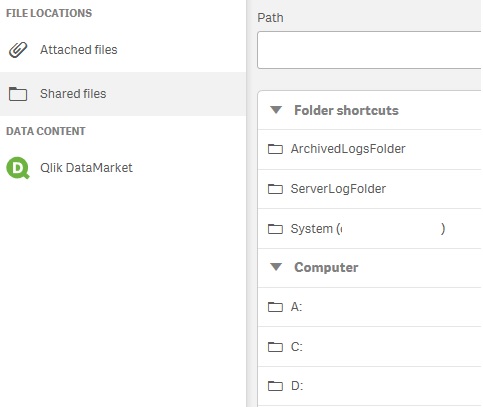
On the Add data page, if a user with the role as RootAdmin/ContentAdmin/SecurityAdmin, the Shared files link shows (attached image), the computer (server) disk drives, which cause a security concern.
Anyone could advise how to disable access the Computer disk drives?
Thanks
Chadwick
835 Views
1 Reply
Anonymous
Not applicable
2017-08-13
11:15 PM
Author
- Mark as New
- Bookmark
- Subscribe
- Mute
- Subscribe to RSS Feed
- Permalink
- Report Inappropriate Content
Solved by disabling the security rule FolderDataConnection