Unlock a world of possibilities! Login now and discover the exclusive benefits awaiting you.

- Qlik Community
- :
- Forums
- :
- Analytics & AI
- :
- Products & Topics
- :
- Move to Qlik Cloud Analytics
- :
- OneDrive Connection Failure
- Subscribe to RSS Feed
- Mark Topic as New
- Mark Topic as Read
- Float this Topic for Current User
- Bookmark
- Subscribe
- Mute
- Printer Friendly Page

 KD2015
- Mark as New
- Bookmark
- Subscribe
- Mute
- Subscribe to RSS Feed
- Permalink
- Report Inappropriate Content
OneDrive Connection Failure
Hi all,
My Qlik Cloud OneDrive data source connection was working properly, and then all of a sudden, my reload tasks started failing & when I try to extract data from any of my existing files in it, I am getting this error message
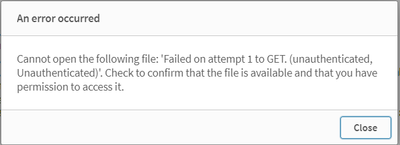
I can still access the OneDrive folder from the load script & see my files. But when I try to pull any one of them in, I am receiving that error message.
Any knowledge on how & why this is happening?
Thank you
- Subscribe by Topic:
-
Cloud
-
General Question
-
Move to Qlik Cloud Analytics
-
Qlik Sense

 Daniele_Purrone
- Mark as New
- Bookmark
- Subscribe
- Mute
- Subscribe to RSS Feed
- Permalink
- Report Inappropriate Content
Hi @KD2015 is the Onedrive account a paid one or a free one?
If a post helps to resolve your issue, please accept it as a Solution.
KD2015
- Mark as New
- Bookmark
- Subscribe
- Mute
- Subscribe to RSS Feed
- Permalink
- Report Inappropriate Content
Thank you Daniele...It is a free version.
Daniele_Purrone
- Mark as New
- Bookmark
- Subscribe
- Mute
- Subscribe to RSS Feed
- Permalink
- Report Inappropriate Content
Thanks @KD2015 , we have at least one support case with a similar outcome when using a free OneDrive account. The "unauthorised" answers comes from Microsoft, so they might have some API limits for free accounts. There doesn't seem to be any issue with paid accounts.
If a post helps to resolve your issue, please accept it as a Solution.
KD2015
- Mark as New
- Bookmark
- Subscribe
- Mute
- Subscribe to RSS Feed
- Permalink
- Report Inappropriate Content
Thank you Daniele, I went ahead and turned the free account into a purchased one but I am still getting the same error message when I try to extract Excel Files. As I was trying to troubleshoot, I thought I should try to extract a different file format & I was surprised to see my qvds being able to be pulled in without any issues. So I am not sure if the issue has to do with Excel files. Any thoughts on this?
Daniele_Purrone
- Mark as New
- Bookmark
- Subscribe
- Mute
- Subscribe to RSS Feed
- Permalink
- Report Inappropriate Content
Hi @KD2015, can you please open a support case with us mentioning this discussion? We need to investigate this!
If a post helps to resolve your issue, please accept it as a Solution.
Daniele_Purrone
- Mark as New
- Bookmark
- Subscribe
- Mute
- Subscribe to RSS Feed
- Permalink
- Report Inappropriate Content
@KD2015 , when opening the support case, please request to have it linked to QB-26521, which is the investigation currently taking place.
If a post helps to resolve your issue, please accept it as a Solution.
Daniele_Purrone
- Mark as New
- Bookmark
- Subscribe
- Mute
- Subscribe to RSS Feed
- Permalink
- Report Inappropriate Content
Hello @KD2015 ,
were you able to solve this issue?
If a post helps to resolve your issue, please accept it as a Solution.

 dana
dana
- Mark as New
- Bookmark
- Subscribe
- Mute
- Subscribe to RSS Feed
- Permalink
- Report Inappropriate Content
Hi,
I have the same issue, only with Excel files.
Any idea how to resolve it?
Thanks..
