Unlock a world of possibilities! Login now and discover the exclusive benefits awaiting you.

- Qlik Community
- :
- Support
- :
- Support
- :
- Knowledge
- :
- Support Articles
- :
- Qlik Cloud: How to Export apps from Managed spaces...
- Subscribe to RSS Feed
- Mark as New
- Mark as Read
- Bookmark
- Subscribe
- Printer Friendly Page
- Report Inappropriate Content
Qlik Cloud: How to Export apps from Managed spaces or unpublish an app with the REST API or Qlik-CLI

 Sonja_Bauernfei
- Mark as New
- Bookmark
- Subscribe
- Mute
- Subscribe to RSS Feed
- Permalink
- Report Inappropriate Content
Qlik Cloud: How to Export apps from Managed spaces or unpublish an app with the REST API or Qlik-CLI
Feb 5, 2024 4:12:00 AM
Nov 12, 2020 6:37:19 AM
Qlik Cloud has a built-in method to export apps from your managed spaces, along with APIs available which allow for automation.
Content:
- Export apps from Managed spaces (native method)
- Export apps using the Rest API
- Method One: REST APIs
- Method Two: Qlik-Cli:
- Unpublish an app with the REST API
- Method One: REST APIs
- Method Two: Qlik-Cli
Export apps from Managed spaces (native method)
This is the recommended method.
As of the 30th of January 2024, Qlik Cloud has introduced the functionality to Export apps from Managed Spaces.
Space Owner and users with the "Can Manage" role, can now export Qlik Cloud apps from Managed Spaces.
These apps can only be exported without data. Storytelling is not exported.
This possibility allows you to re-establish a parent - child relation of your source and published apps, in case the source app was accidentally deleted.
For more information, see:
Export apps using the Rest API
You can also export the app from a managed space without data through the REST API or Qlik Cli in a supported way.
These apps can only be exported without data, even if the NoData parameter is not set to true. Storytelling is not exported.
Method One: REST APIs
Requirements:
- PowerShell
- API keys enabled
- The App ID
- Your tenant URL
$hdrs = @{}
$hdrs.Add("Authorization","Bearer eyJhbGciOiJFUzM4NCIsImtpZCI6IjUzYj...VJaO0zSKZs7Q")
$tenanturl =  "https://yourtenant.ap.qlikcloud.com"
$appid = "7972e3ae-df5c-4ed3-81f4-e2220d76972d"
$url = $tenanturl+"/api/v1/apps/"+$appid+"/export?NoData=true"

$output = "C:\temp\MyExportedApp.qvf"
$firstcall=Invoke-WebRequest -Uri $url -Method Post -Headers $hdrs

$url2= $tenanturl+$firstcall.Headers.Location
echo $url2
Invoke-RestMethod -Uri $url2 -Method Get -Headers $hdrs -ContentType 'multipart/form-data' -OutFile $output
Reference:
Exports a specific app | Qlik Developer
Method Two: Qlik-Cli:
qlik app export 7972e3ae-df5c-4ed3-81f4-e2220d76972d --NoData > C:\temp\MyExportedApp.qvf
Reference:
Unpublish an app with the REST API
Alternatively, an app can be unpublished from a Managed space and obtained for editing. This method maintains data, including storytelling.
Use this method at your own risk. Direct API calls make changes which bypass safety nets and the end result can lead to unexpected results.
Requirements:
- PowerShell
- API keys enabled
- The App ID
- Your tenant URL
Method One: REST APIs
This will move the app from a Management Space to your Personal space with the REST API.
- Create an API key to perform the call. First of all. See https://qlik.dev/tutorials/generate-your-first-api-key
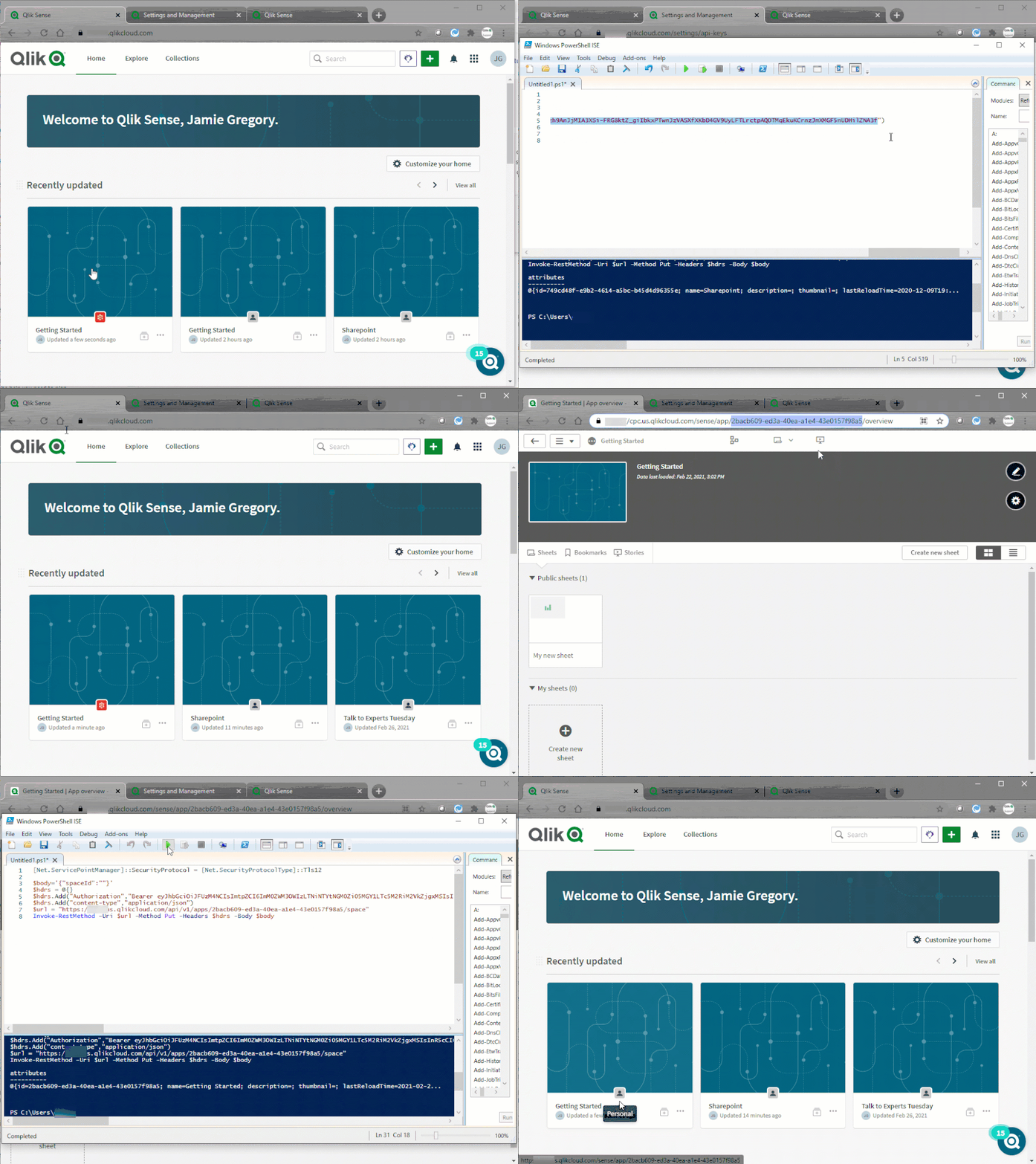
- Using PowerShell, execute the following:
[Net.ServicePointManager]::SecurityProtocol = [Net.SecurityProtocolType]::Tls12

$body='{"spaceId":""}'
$hdrs = @{}
$hdrs.Add("Authorization","Bearer eyJhbGciOiJM4ImtpZCI6IjBkZmQ5YzM2LTcy...YLmG54QLpd")
$hdrs.Add("content-type","application/json")
$url = "https://yourtenant.eu.qlikcloud.com/api/v1/apps/APPID/space"
Invoke-RestMethod -Uri $url -Method Put -Headers $hdrs -Body $body
Replace:
eyJhbGciOiJM4ImtpZCI6IjBkZmQ5YzM2LTcy...YLmG54QLpd with the API key you've generated
yourtenant.eu.qlikcloud.com with your tenant URL
APPID with your app ID
Tip: Get the App ID directly from the hub URL when you have the App open. - After the command is executed, the App will be moved to your personal space. This operation will retain bookmarks and sheets, though not their original owners.
Troubleshooting:
See following article if any TLS/SLL error are output when running the PowerShell script:
Qlik Sense API: Could not create secure SSL/TLS channel (Powershell)
Method Two: Qlik-Cli
This will move the app from a Management Space to your Personal space with the REST API, wrapped in the QLIK-CLI.
Alternatively, if qlik-cli is installed, the following commands can be used. In the code, replace APPID with the correct one (e.g. 68aae8b0-3770-435d-951d-7b97469fb78b).
- Set the qlik-cli user as the owner (this is necessary if you don't want the app to go the original owner's personal space, in case they have left the company):
qlik app owner APPID - Move the app to the owner's personal space:
qlik app space update APPID - (Optional) once moved to the personal space, create a duplicate (to use as the new source app), and put back the original app in the original space. This way, all the dependencies and links to the published app will be kept:
qlik app space update APPID --spaceId SPACEID
The admin using the qlik-cli commands will need to have full permissions on the Managed space that hosts the app.
Use this method at your own risk. The direct API calls used in this workaround make changes which bypass safety nets and the end result can lead to unexpected results.
 Sonja_Bauernfei
- Mark as Read
- Mark as New
- Bookmark
- Permalink
- Report Inappropriate Content
Hello @sten_lomme Glad this worked!
I am aware that our Ideation team is working on having the process improved, meaning you should be able to log in seamlessly whenever you click any link in the future.
All the best,
Sonja

 mgranillo
- Mark as Read
- Mark as New
- Bookmark
- Permalink
- Report Inappropriate Content
@Sonja_Bauernfeind do you know if any of these methods keep the personal sheets for all users? Its typical for us to have a few hundred unpublished personal sheets created by our users. I tested the automation method and lost the personal sheets.
Sonja_Bauernfei- Mark as Read
- Mark as New
- Bookmark
- Permalink
- Report Inappropriate Content
Hello @mgranillo
This method is only meant to be used as a workaround if the original app has been lost and will bypass safety nets. It is specific to the published app and published content. I will reach out internally if we have anything on hand regarding personal sheets, but I believe that I will need to redirect the question to our API forum.
Will get back to you as soon as possible.
All the best,
Sonja
 Daniele_Purrone
- Mark as Read
- Mark as New
- Bookmark
- Permalink
- Report Inappropriate Content
Hi @mgranillo , I just tested this with the Qlik-cli and private sheets are preserved.
As the Qlik-cli is just a wrapper for the APIs, the API method is expected to work as well.
You can do some testing as well to confirm.
mgranillo
- Mark as Read
- Mark as New
- Bookmark
- Permalink
- Report Inappropriate Content
@Daniele_Purrone the CLI method is working for me but I'm seeing something strange. After moving the app to the owner's personal space (step 2 above in method 2), I have non app owners that are able to see the app in their personal space. The duplicate is appearing as well in a non-owners personal space. The QMC does not show a copy in the non-owner's personal space yet I'm seeing the apps across two users.
To boil it down another way, a user is seeing an app that they don't own in their personal space. What is going on here?
mgranillo
- Mark as Read
- Mark as New
- Bookmark
- Permalink
- Report Inappropriate Content
@Sonja_Bauernfeind In this workaround, the app is pulled down from production. Is that right? Our apps need to be up while we makes updates. A lot of our apps are utilized on a daily basis to answer business questions. Some updates may take weeks. We can't have our apps down for weeks. Can nothing else be done?
Is there any way to correct this so that we can overwrite the app again?
Sonja_Bauernfei- Mark as Read
- Mark as New
- Bookmark
- Permalink
- Report Inappropriate Content
Hello @mgranillo
To be able to assist you better (and to give you a chance to get access to a larger audience), please summarize what you are aiming to do and what you want to achieve, as well as what challenge you've been facing and post this in the API forum (if you are looking to build a solution using our APIs) or the App Development forum (if you are facing general app development/process challenges).
All the best,
Sonja

 Gokryzex
- Mark as Read
- Mark as New
- Bookmark
- Permalink
- Report Inappropriate Content
Hi !
I'd like to pick up on the problem raised by @mgranillo
It's unthinkable to take an app out of production, even for a few minutes, whether for processing or to export the application with its data.
Has a solution been considered since the last message?
@mgranillo Have you managed to work around this issue?
Many thanks in advance.
Jordan
mgranillo
- Mark as Read
- Mark as New
- Bookmark
- Permalink
- Report Inappropriate Content
@Gokryzex hard for me to remember everything but i think this is an old post. Qlik now has a way to re-establish the parent app because pulling down the app from production to duplicate it was crazy. This is from qlik help page:
The source app for a published app was deleted
If the source app for an app in a managed space is deleted, the published copy of the app cannot be updated and republished as needed.
You need to re-establish the parent-child relationship between a source app and the published app. You can do this by saving a backup copy of the published app, then re-publishing this backup copy from a personal or shared space.
Do the following:
-
Export the published copy of the app without data.
-
Re-upload the app to a personal or shared space.
-
Publish the app back to the same managed space, with the same name as the existing published app.
When prompted, select Replace to replace the existing published copy of the app.
Gokryzex
- Mark as Read
- Mark as New
- Bookmark
- Permalink
- Report Inappropriate Content
Thanks for your quick answer
In fact, my practical case is as follows: I'm in the process of migrating my data model.
To do this, I need to extract my production apps with the data to adapt the bookmarks to the new data model. It's quite critical to perform these operations on the production application directly. So I need to be able to export the production apps to run a script modifying the bookmarks before republishing the apps.
- « Previous
-
- 1
- 2
- Next »


