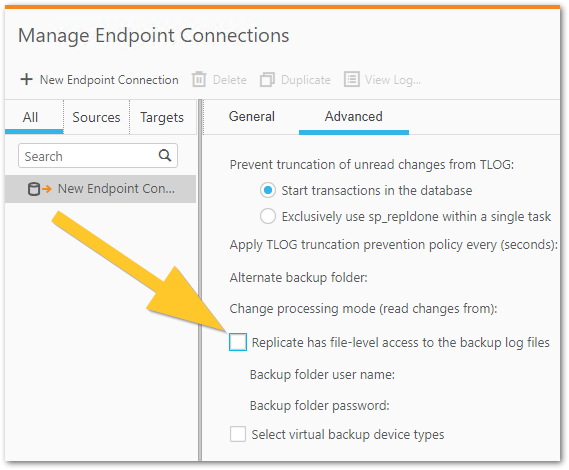
Qlik Replicate's Data/Task directory is filling up with an uncompressed temp backup file named UncomprsTemp_Test for Support.bak. A warning is logged in the task log:
[ASSERTION ]W: Failed to write to the decompressed backup file 'UncomprsTemp_Test for Support.bak' (sqlserver_drd_utl_common.c:2363)
Resolution
Option 1
Uncheck Replicate has file-level access to the backup log files in the Advanced tab of your connection properties. Note that this option can lead to performance degradation.
With this option checked: Qlik Replicate copies the compressed file onto the Qlik Replicate server and uncompressed the log. Qlik Replicate can then read the uncompressed file directly from the Qlik Replicate server.
With this option unchecked: Qlik Replicate uses the SQL Server (source system) to read the logs so Qlik Replicate reaches out over the network to SQL Server to ask it to read a log and since the logs are on the shared folder SQL Server then needs to reach back to the Qlik Replicate server. This has a performance impact. It will result in latency.
Increase the disk space for the replicate data directory. We recommend having a minimum of five times the compressed file size readily available. If your compressed file is 100 GB, then you will need a minimum of 500 GB available. In rare scenarios there are instances when uncompressing a file you may need more than 5 times the compressed file size, but this is rare as mentioned before.
Please keep in mind that for Option 2, I am referring to each bak file. Therefore, if you have 8 tasks with a 165 GB file, you'll need a disk with at least 8 (tasks) * 5 (decompression) * 165 GB (bak file size) = ~6,5TB.