Do not input private or sensitive data. View Qlik Privacy & Cookie Policy.
Skip to main content

Announcements
ALERT: The support homepage carousel is not displaying. We are working toward a resolution.

Unable to translate data type from Oracle SQL views and unable to create SnowFlake table (Length or precision specification 0 is invalid)

No ratings
cancel
Showing results for 
Search instead for 
Did you mean: 
Dineshan
Support
Support

Unable to translate data type from Oracle SQL views and unable to create SnowFlake table (Length or precision specification 0 is invalid)

Last Update:

Jun 24, 2022 4:09:00 PM

Updated By:

Dineshan

Created date:

Jun 24, 2022 4:09:44 PM

Replicating data from Oracle SQL views (with few fields defaulted to NULL explicitly) into snowflake fails to create table in Snowflake.

Environment

  • Qlik Replicate

Resolution

The work around below converts all the string (0) to string (10 or the number you specified). It is important to specify the scope under advanced options to convert only string (0) to string (10).

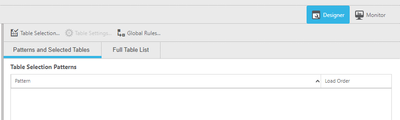
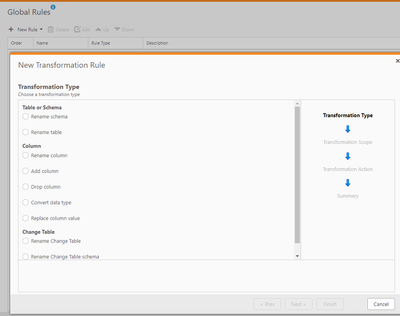
  1. From Global Rules window, click on “New Rule” and select Transformation.

Dineshan_0-1656100465926.png

Dineshan_1-1656100466029.png

  1. Select “Convert data type” and click Next
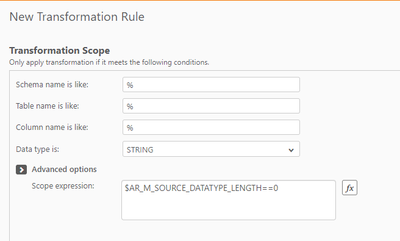
  2. Select “STRING” in the data type dropdown. Under advanced options, enter expression “$AR_M_SOURCE_DATATYPE_LENGTH==0” without quotes and click next:

Dineshan_2-1656100466064.png

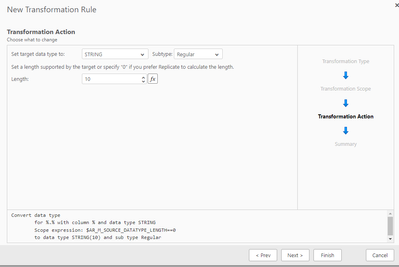
  1. Change the length to 10 or desired number and click Finish.

Dineshan_3-1656100466125.png

Cause:

NULL columns are not supported and Oracle SQL views with fields defaulted to NULL explicitly, creates fields with data type string (0).

Contributors
Version history
Last update:
‎2022-06-24 04:09 PM
Updated by: