Unlock a world of possibilities! Login now and discover the exclusive benefits awaiting you.

- Qlik Community
- :
- Discover
- :
- Programs
- :
- Learning
- :
- Qlik Learning Discussions
- :
- Coloring Text in Expression
- Subscribe to RSS Feed
- Mark Topic as New
- Mark Topic as Read
- Float this Topic for Current User
- Bookmark
- Subscribe
- Mute
- Printer Friendly Page

- Mark as New
- Bookmark
- Subscribe
- Mute
- Subscribe to RSS Feed
- Permalink
- Report Inappropriate Content
Coloring Text in Expression
Hi All,
I have a pivot table with one dimension as number and one expression as sum(amount).
I want to highlight value of sum(amount) as red for max value. I tried this through text color option in expression
and Visual Cues. But unable to find how to do.
Please anyone could help me on this?
Thanks,
Shailesh
Accepted Solutions

 stigchel
- Mark as New
- Bookmark
- Subscribe
- Mute
- Subscribe to RSS Feed
- Permalink
- Report Inappropriate Content
Hi Shailesh,
Looks good, for the text color I think the problem is the reference to the expression. Let me explain,
In my example the
=if([Amount]=....,red()
is a reference to the expression label,, so in your case that would be
=if([Total Amount]=
or
=if(Column(1)=
stigchel
- Mark as New
- Bookmark
- Subscribe
- Mute
- Subscribe to RSS Feed
- Permalink
- Report Inappropriate Content
Hi Shailesh,
You are in the right direction, try getting the expression right for the text color option of the expression. I have made an example of what I think you want, see attached.
- Mark as New
- Bookmark
- Subscribe
- Mute
- Subscribe to RSS Feed
- Permalink
- Report Inappropriate Content
Hi Piet,
Thanks. I have done as u showed in example. I am able to get the max value by using aggr() function.
But when i am using the same function in text color with max function, the color is not coming.
Please find below snapshot of the same.
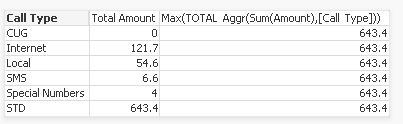
Regards,
Shailesh
stigchel
- Mark as New
- Bookmark
- Subscribe
- Mute
- Subscribe to RSS Feed
- Permalink
- Report Inappropriate Content
Hi Shailesh,
Looks good, for the text color I think the problem is the reference to the expression. Let me explain,
In my example the
=if([Amount]=....,red()
is a reference to the expression label,, so in your case that would be
=if([Total Amount]=
or
=if(Column(1)=
- Mark as New
- Bookmark
- Subscribe
- Mute
- Subscribe to RSS Feed
- Permalink
- Report Inappropriate Content
Hi Piet,
Thank you.. Its working now.. 
Regards,
Shailesh
- Mark as New
- Bookmark
- Subscribe
- Mute
- Subscribe to RSS Feed
- Permalink
- Report Inappropriate Content
Hi Piet,
There is one problem. The above thing is not coming for min. When i am trying to get color for minimum value,
it is showing as 0 for minimum value.
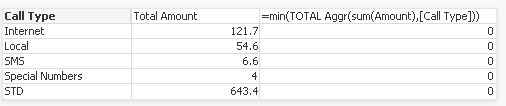
What might be the problem where it is not showing minimum value?
Thanks,
Shailesh
stigchel
- Mark as New
- Bookmark
- Subscribe
- Mute
- Subscribe to RSS Feed
- Permalink
- Report Inappropriate Content
Your picture is not showing...
In my example replacing max with min works fine, so not sure what your problem is
- Mark as New
- Bookmark
- Subscribe
- Mute
- Subscribe to RSS Feed
- Permalink
- Report Inappropriate Content
Now u can see the picture.
I did same. Just replaced max with min, but its showing 0 as minimum value.
stigchel
- Mark as New
- Bookmark
- Subscribe
- Mute
- Subscribe to RSS Feed
- Permalink
- Report Inappropriate Content
You have zero values for Amount and/or Call Type, these are suppressed in the pivot table but included in the Min expression. Try like:
Min(TOTAL Aggr(Sum({<Amount={'>0'}>} Amount),[Call Type]))
- Mark as New
- Bookmark
- Subscribe
- Mute
- Subscribe to RSS Feed
- Permalink
- Report Inappropriate Content
Yes,
U are correct. Now its working fine .
Thanks,
Shailesh