Unlock a world of possibilities! Login now and discover the exclusive benefits awaiting you.

- Qlik Community
- :
- Discover
- :
- Programs
- :
- Learning
- :
- Qlik Learning Discussions
- :
- Intervalmatch issue
- Subscribe to RSS Feed
- Mark Topic as New
- Mark Topic as Read
- Float this Topic for Current User
- Bookmark
- Subscribe
- Mute
- Printer Friendly Page

- Mark as New
- Bookmark
- Subscribe
- Mute
- Subscribe to RSS Feed
- Permalink
- Report Inappropriate Content
Intervalmatch issue
Hi All,
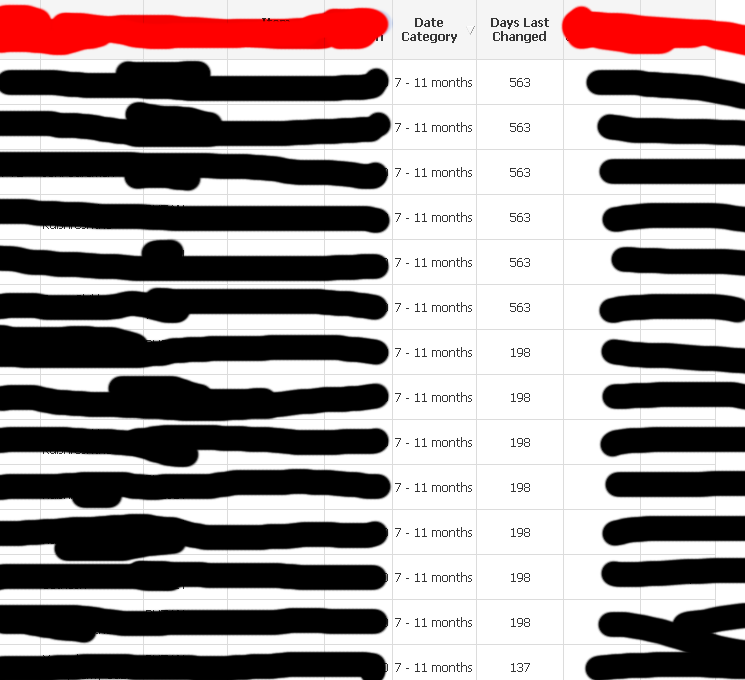
I'm trying to use Intervalmatch to map a range of days to a specific date category value e.g. 0-94 days should be mapped to "<3 months" and 341-2000 days should be mapped to ">12 months". However, I'm getting very strange results, as you can see from the screenshot below... As you can see, I expect values of 198 days to map within "7-11 months", but I don't know why it's mapping "7-11 months" even for 563 days (should be mapped to ">12 months" instead). Also, 137 days should be mapped to "3-6 months" as well instead of "7-11 months".
Is there something I'm doing wrongly?? Thanks for all your help in advance.
[ABC]:
LOAD
Customer,
[Item],
[Date of Last Price],
Round(Now()-Date(Date#([Date of Last Price], 'D-MMM-YY'),'MM/DD/YYYY')) as [Days Last Changed]
FROM
test123.csv
(txt, codepage is 1252, embedded labels, delimiter is ',', msq);
[Day_to_Months]:
LOAD * INLINE
[
Start Days, Stop Days, Date Category, DayMonths Sort Order
0,94,< 3 months,4
95,186,3 - 6 months,3
187,340,7 - 11 months,2
341,2000,> 12 months,1
];
IntervalMatch([Days Last Changed])
LEFT JOIN ([ABC])
LOAD [Start Days],[Stop Days] Resident [Day_to_Months];
- Tags:
- intervalmatch
Accepted Solutions
- Mark as New
- Bookmark
- Subscribe
- Mute
- Subscribe to RSS Feed
- Permalink
- Report Inappropriate Content
Hi,
Actually, the statement I use below still works.. I fixed where my bug lies...It's got NOTHING to do with Intervalmatch at all, but rather all the null rows generated because of unwanted associations and wrong JOINs  . I reduced the various tables and fields down to a proper snowflake schema which was most suitable for Qlikview and everything worked like a charm!
IntervalMatch([Days Last Changed])
LEFT JOIN ([Temp Cost Price History])
LOAD [Start Days],[Stop Days] RESIDENT [Day_to_Months];
Thanks for your inputs!

 Agis-Kalogianni
- Mark as New
- Bookmark
- Subscribe
- Mute
- Subscribe to RSS Feed
- Permalink
- Report Inappropriate Content
Hi William
Is it possible to attach the test123.csv file you use in your script so as to have a sample of your data?
Thanks
Agis
Agis-Kalogianni- Mark as New
- Bookmark
- Subscribe
- Mute
- Subscribe to RSS Feed
- Permalink
- Report Inappropriate Content
Ok... I thing you need to change the script to the following:
[ABC]:
LOAD
Customer,
[Item],
[Date of Last Price],
Round(Now()-Date(Date#([Date of Last Price], 'D-MMM-YY'),'MM/DD/YYYY')) as [Days Last Changed]
FROM
test123.csv
(txt, codepage is 1252, embedded labels, delimiter is ',', msq);
[Day_to_Months]:
LOAD * INLINE
[
Start Days, Stop Days, Date Category, DayMonths Sort Order
0,94,< 3 months,4
95,186,3 - 6 months,3
187,340,7 - 11 months,2
341,2000,> 12 months,1
];
IntervalMatch([Days Last Changed])
// You need to use the Inline table that defines the intervals here and not the data table
LEFT JOIN ([Day_to_Months])
LOAD [Start Days],[Stop Days] Resident [Day_to_Months];
Could you please try this and let me know?
Ragards
Agis
- Mark as New
- Bookmark
- Subscribe
- Mute
- Subscribe to RSS Feed
- Permalink
- Report Inappropriate Content
Hi,
Actually, the statement I use below still works.. I fixed where my bug lies...It's got NOTHING to do with Intervalmatch at all, but rather all the null rows generated because of unwanted associations and wrong JOINs . I reduced the various tables and fields down to a proper snowflake schema which was most suitable for Qlikview and everything worked like a charm!
IntervalMatch([Days Last Changed])
LEFT JOIN ([Temp Cost Price History])
LOAD [Start Days],[Stop Days] RESIDENT [Day_to_Months];
Thanks for your inputs!
Agis-Kalogianni- Mark as New
- Bookmark
- Subscribe
- Mute
- Subscribe to RSS Feed
- Permalink
- Report Inappropriate Content
Thanks for your feedback William.
Maybe now that you have a correct data model, could consider to transform it towards a star schema, which, in general, is much more efficient for QlikView than a snowflake schema, in terms of performance.
Could you also please mark one of the answers above as correct or helpful?
Thanks
Agis