Unlock a world of possibilities! Login now and discover the exclusive benefits awaiting you.

- Qlik Community
- :
- Discover
- :
- Programs
- :
- Learning
- :
- Qlik Learning Discussions
- :
- virtual table of running total?
- Subscribe to RSS Feed
- Mark Topic as New
- Mark Topic as Read
- Float this Topic for Current User
- Bookmark
- Subscribe
- Mute
- Printer Friendly Page

- Mark as New
- Bookmark
- Subscribe
- Mute
- Subscribe to RSS Feed
- Permalink
- Report Inappropriate Content
virtual table of running total?
I have a straight table with Person as a dimension and several expressions. I would like to add a new expression that computes "% of Clients making up 80% of Revenue"). Is this possible? Person, Client, Revenue are the applicable fields.
To do this manually, I would sort each Person's Client list in descending order by Revenue, create a running sum, divide by Person's total revenue, and count until >=80%. Seems like I need multiple aggrs for this to work, but I can't get close...thanks
- Mark as New
- Bookmark
- Subscribe
- Mute
- Subscribe to RSS Feed
- Permalink
- Report Inappropriate Content
Hi
Have you tried looking at dimension limits?
Also there is an example in the "What's New In QlikView 11" demo app.
Is this similar to what you want?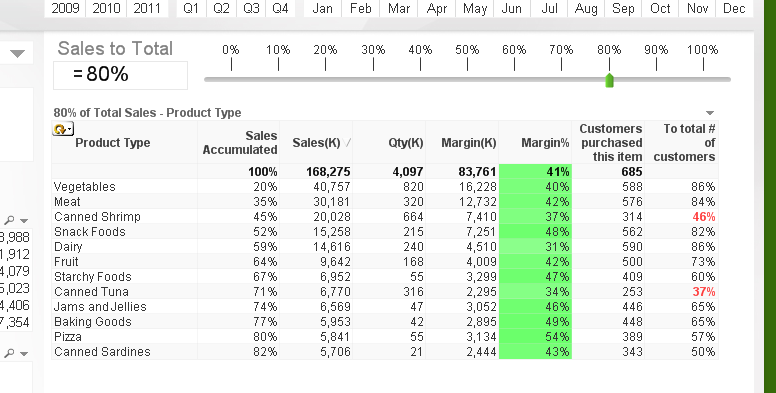
- Mark as New
- Bookmark
- Subscribe
- Mute
- Subscribe to RSS Feed
- Permalink
- Report Inappropriate Content
thanks for the reply ... in the examples you give, the sum of the rows gets the 80%. In my example, I want to compute the 80% threshold for EACH row. Make sense?
Output would look like:
Dimension ... Expression
A...4
B...5
C...6
Where 4, 5 and 6 = number of Clients making up 80% of Revenue for that Person.