Unlock a world of possibilities! Login now and discover the exclusive benefits awaiting you.

- Qlik Community
- :
- All Forums
- :
- Qlik NPrinting
- :
- Re: Add a generated on date and timestamp .
- Subscribe to RSS Feed
- Mark Topic as New
- Mark Topic as Read
- Float this Topic for Current User
- Bookmark
- Subscribe
- Mute
- Printer Friendly Page

- Mark as New
- Bookmark
- Subscribe
- Mute
- Subscribe to RSS Feed
- Permalink
- Report Inappropriate Content
Add a generated on date and timestamp .
Hi ,
I have been asked to add a generated on date and timestamp to a PDF report is this something I can do from within NPrinting designer?

 Stephen_Jasiono
- Mark as New
- Bookmark
- Subscribe
- Mute
- Subscribe to RSS Feed
- Permalink
- Report Inappropriate Content
Wayne -
You can do this by inserting a formula (Formulas) or QlikView variable for the date/time to your report template.
- Mark as New
- Bookmark
- Subscribe
- Mute
- Subscribe to RSS Feed
- Permalink
- Report Inappropriate Content
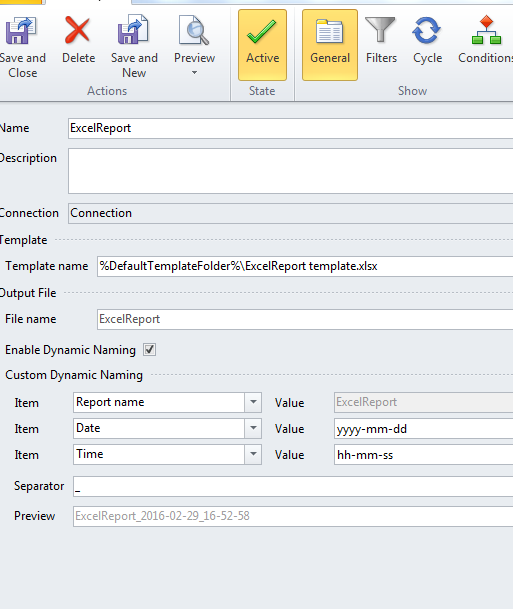
You can also dynamically change the name of your report and use date and time in the title, then your end user would not even have to open the report to get the information. The preview below shows you how it would appear.
. 
I agree with Stephen that you could easily add a formula and drag that to your report.
I often use this trick during development so that each time I create a report I get the latest iteration. If you don't do this, the report will just overwrite the previous version with the same name.