Unlock a world of possibilities! Login now and discover the exclusive benefits awaiting you.

- Qlik Community
- :
- All Forums
- :
- Qlik NPrinting
- :
- Re: Advanced Search / Date Range via the NPrinting...
- Subscribe to RSS Feed
- Mark Topic as New
- Mark Topic as Read
- Float this Topic for Current User
- Bookmark
- Subscribe
- Mute
- Printer Friendly Page

 ralphjjr
- Mark as New
- Bookmark
- Subscribe
- Mute
- Subscribe to RSS Feed
- Permalink
- Report Inappropriate Content
Advanced Search / Date Range via the NPrinting API
The shortest form of my question is - is it possible to apply an Advanced Search on a field via the NPrinting API? For example, a date range.
Here is a filter applied to a report. This works great.
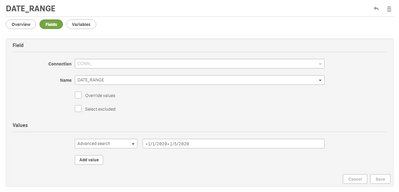
But obviously we use the API for some other integrations and on demand report creation from other applications. I've tried a few variations of our API calls to mimic this, but I can't seem to nail down the right one. I actually wrote an even longer post just a few minutes ago, and when I went to post it the website gave me an auth error and lost my post. So this is a much shorter one.
I've been through the API documentation, and I can see that there is a FilterField and FilterFieldValue, but can't quite figure out how to use them the right way. All of our current requests take the following form:
{
	"config": {
		"reportId": "report-guid-id",
		"outputFormat": "PDF"
	},
	"filters": null,
	"selections": [{
		"fieldName": "SOME_TEXT_FIELD",
		"selectedCount": 1,
		"selectedValues": ["this_value"],
		"isNumeric": false
	}],
	"connectionId": "connection-guid-id",
	"type": "report"
}
I have attempted a few variations, but I'm not getting it right.
Any ideas?
- « Previous Replies
-
- 1
- 2
- Next Replies »
ralphjjr
- Mark as New
- Bookmark
- Subscribe
- Mute
- Subscribe to RSS Feed
- Permalink
- Report Inappropriate Content
oh, right!
What a bummer. This seems like something common that we'd want to do. Select a range. 🤔

 Ruggero_Piccoli
- Mark as New
- Bookmark
- Subscribe
- Mute
- Subscribe to RSS Feed
- Permalink
- Report Inappropriate Content
Hi,
Could the following work for you?
- Manually create a filter and copy its Id
- Associate the filter to the report (or other entity where you need it)
- Change the filter by using the API PUT /filters/{id} https://help.qlik.com/en-US/nprinting/June2020/APIs/NP+API/index.html?page=20#OnDemand
Via PUT you can change the advanced search parameters:

Best Regards,
Ruggero
Best Regards,
Ruggero
---------------------------------------------
When applicable please mark the appropriate replies as CORRECT. This will help community members and Qlik Employees know which discussions have already been addressed and have a possible known solution. Please mark threads with a LIKE if the provided solution is helpful to the problem, but does not necessarily solve the indicated problem. You can mark multiple threads with LIKEs if you feel additional info is useful to others.

- « Previous Replies
-
- 1
- 2
- Next Replies »