Unlock a world of possibilities! Login now and discover the exclusive benefits awaiting you.

- Qlik Community
- :
- All Forums
- :
- Qlik NPrinting
- :
- Customizing levels in NPrinting
- Subscribe to RSS Feed
- Mark Topic as New
- Mark Topic as Read
- Float this Topic for Current User
- Bookmark
- Subscribe
- Mute
- Printer Friendly Page

 berryandcherry6
- Mark as New
- Bookmark
- Subscribe
- Mute
- Subscribe to RSS Feed
- Permalink
- Report Inappropriate Content
Customizing levels in NPrinting
Hi,
I have added an field as Level say batches it is dynamic which comes from database, batches contains
batches
12
13
14
15
16
17
But here i need it to produce only 4 rows i.e level to loop it for only
13,15,16,17 batches
How could i do this?

 avinashelite
- Mark as New
- Bookmark
- Subscribe
- Mute
- Subscribe to RSS Feed
- Permalink
- Report Inappropriate Content
As per I know NPrinting does offer such feature , you could create a dynamic filed inside QV with the top for level what you required and then use the same column in NPrinting levels ...this way you could achieve the requirement
berryandcherry6
- Mark as New
- Bookmark
- Subscribe
- Mute
- Subscribe to RSS Feed
- Permalink
- Report Inappropriate Content
Hi Avinash,
Thanks for reply.
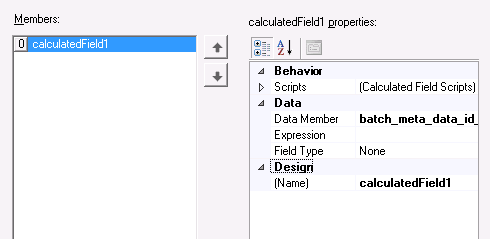
But is there any thing we could do to remove those batches in NPrinting itself. By using Expression Editor or calculated field Collection Editor. Because there are some options i think we could do some thing with that.
avinashelite
- Mark as New
- Bookmark
- Subscribe
- Mute
- Subscribe to RSS Feed
- Permalink
- Report Inappropriate Content
You could try  I have not used those often because some how I believe QV offers more flexibility to handle the things ..if something I need to update then again you need to go back to QV as well as NPrinting so if we have core logic in QV then its a added advantage ...
Hope you understand what I am trying to explain
