Unlock a world of possibilities! Login now and discover the exclusive benefits awaiting you.

- Qlik Community
- :
- All Forums
- :
- Qlik NPrinting
- :
- Exel formating is not working in Template Editor
- Subscribe to RSS Feed
- Mark Topic as New
- Mark Topic as Read
- Float this Topic for Current User
- Bookmark
- Subscribe
- Mute
- Printer Friendly Page

 sarfaraz_sheikh
- Mark as New
- Bookmark
- Subscribe
- Mute
- Subscribe to RSS Feed
- Permalink
- Report Inappropriate Content
Exel formating is not working in Template Editor
Hi Folks,
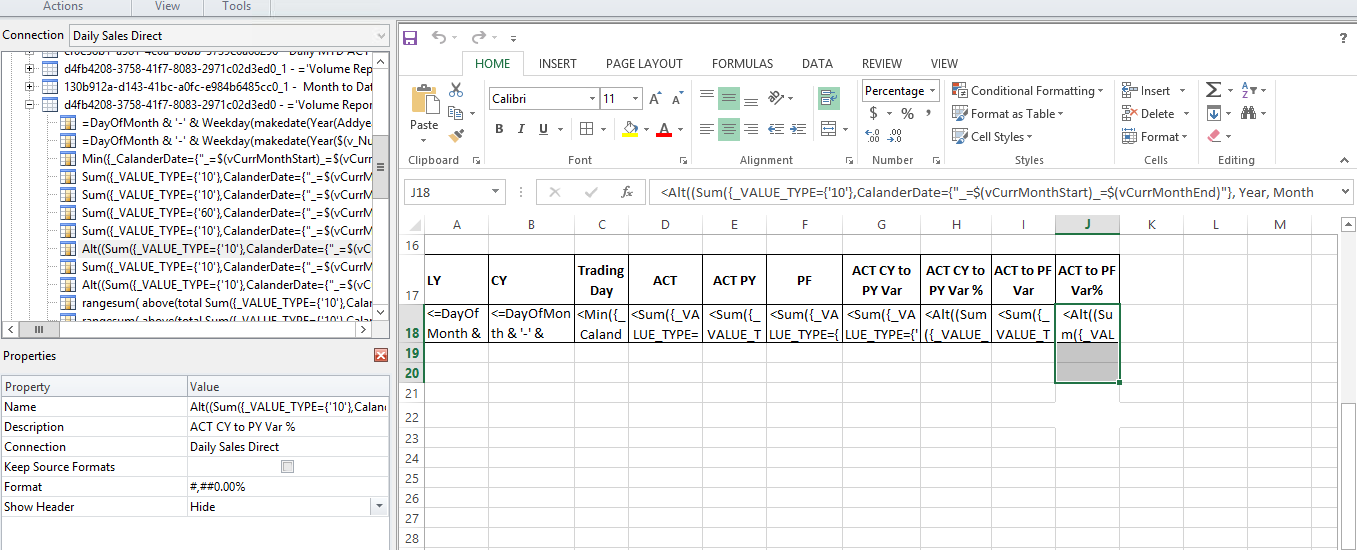
I have dragged and dropped required columns in template editor and i want to do the Exel formatting on that ..However exel formating is working except percentage column.
I have done the below things for percentage column but did not get as expected;
- I have deselected "Keep source Formats First"
-I have written #,##0.00% in format option under Propeties.
- I have selected percentage column and choose format Cell and then after under Number tab i choose percentage option ...but that also did not work.
Below is the snapshot for clarity. is there something which i missed to configure.
Help would be much appreciated.
Thanks
Sarfaraz

 Eva_B
Eva_B
- Mark as New
- Bookmark
- Subscribe
- Mute
- Subscribe to RSS Feed
- Permalink
- Report Inappropriate Content
Hello,
I saw your post did not receive any responses.
Which version of Qlik NPrinting are you using?
I do show there was a Bug with the following ID: OP-5024 that was fixed in the June 2017 release.
Regards,
Eva
