Unlock a world of possibilities! Login now and discover the exclusive benefits awaiting you.

- Qlik Community
- :
- All Forums
- :
- Qlik NPrinting
- :
- Getting a Cache Status Error when reloading metada...
- Subscribe to RSS Feed
- Mark Topic as New
- Mark Topic as Read
- Float this Topic for Current User
- Bookmark
- Subscribe
- Mute
- Printer Friendly Page

 cbn_timsmith
- Mark as New
- Bookmark
- Subscribe
- Mute
- Subscribe to RSS Feed
- Permalink
- Report Inappropriate Content
Getting a Cache Status Error when reloading metadata in Nprinting
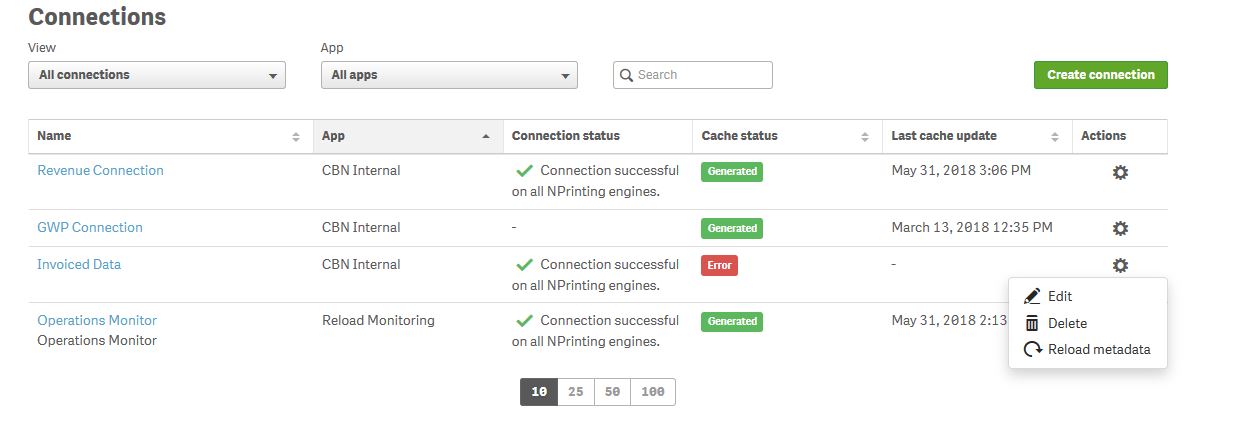
When I go to Reload metadata for one of my connections in Nprinting, it just displays Error. I can't seem to find any more details, the App works just fine in Qliksense. Where could I find detailed logs for reloading the metadata that might help me diagnose why this is suddenly failing?
I've attached a screenshot.
Accepted Solutions

 Daniel_Jenkins
- Mark as New
- Bookmark
- Subscribe
- Mute
- Subscribe to RSS Feed
- Permalink
- Report Inappropriate Content
Hi Tim,
Since you have not mentioned your NPrinting version I will assume you are on the latest.
* What type of Connection? Qlik Sense/QlikView - Local or Server?
* What is the result of running a verification on the Connection details screen?
* What do you see under Admin > Task executions & you select the relevant task?
To troubleshoot start here: https://help.qlik.com/en-US/nprinting/April2018/Content/Troubleshooting/Troubleshooting.htm
HTH - Daniel.
Daniel_Jenkins
- Mark as New
- Bookmark
- Subscribe
- Mute
- Subscribe to RSS Feed
- Permalink
- Report Inappropriate Content
Hi Tim,
Since you have not mentioned your NPrinting version I will assume you are on the latest.
* What type of Connection? Qlik Sense/QlikView - Local or Server?
* What is the result of running a verification on the Connection details screen?
* What do you see under Admin > Task executions & you select the relevant task?
To troubleshoot start here: https://help.qlik.com/en-US/nprinting/April2018/Content/Troubleshooting/Troubleshooting.htm
HTH - Daniel.
cbn_timsmith
- Mark as New
- Bookmark
- Subscribe
- Mute
- Subscribe to RSS Feed
- Permalink
- Report Inappropriate Content
Hi Daniel,
Thanks for the response.
We are on version November 2017
* It is a Qlik Sense Connection, on a Server. (by this do you mean is the NPrinting installed on the same server as Qlik Sense? They are two separate servers.)
* Pressing Run verification results in Verification successful.
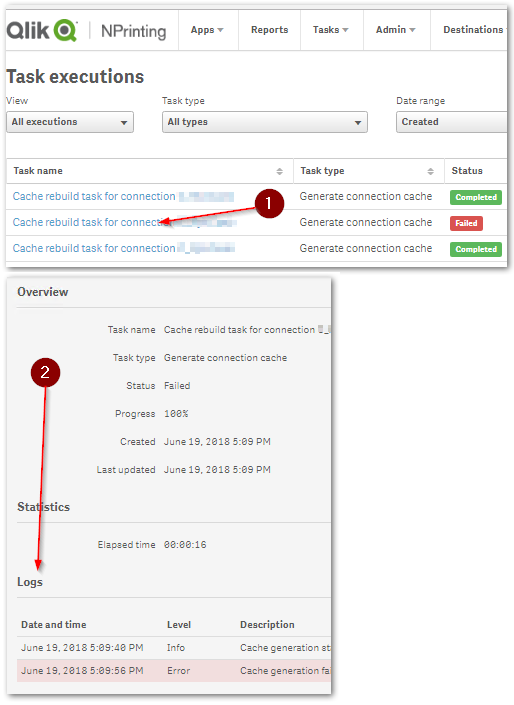
* Under Admin > Task Executions I see:
Cache rebuild task for connection Invoiced Data | Generate connection cache | Failed | 100% | <time> | <time>
Daniel_Jenkins
- Mark as New
- Bookmark
- Subscribe
- Mute
- Subscribe to RSS Feed
- Permalink
- Report Inappropriate Content
Hi Tim,
For the last point, you will need to click on the link (1) to get to the details (2)
HTH - Daniel.
