Unlock a world of possibilities! Login now and discover the exclusive benefits awaiting you.

- Qlik Community
- :
- All Forums
- :
- Qlik NPrinting
- :
- How to use variable in N Printing Power Point repo...
- Subscribe to RSS Feed
- Mark Topic as New
- Mark Topic as Read
- Float this Topic for Current User
- Bookmark
- Subscribe
- Mute
- Printer Friendly Page

 pawwy1415
- Mark as New
- Bookmark
- Subscribe
- Mute
- Subscribe to RSS Feed
- Permalink
- Report Inappropriate Content
How to use variable in N Printing Power Point report
Hi Experts,
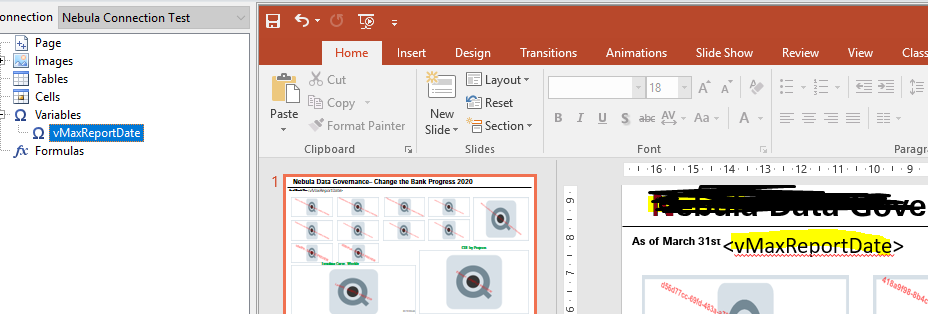
I have to add a Dynamic text box on below Nprinting Power point report as As of 02/04/2020.
For 02/04/2020 I have dragged vMaxReportDate variable to slide but its showing max(Report Date) expression which is the formula of variable but i am looking for 02/04/2020 as the result from that variable. Please help me on this.
Thanks in advance
Accepted Solutions

 Lech_Miszkiewic
- Mark as New
- Bookmark
- Subscribe
- Mute
- Subscribe to RSS Feed
- Permalink
- Report Inappropriate Content
This is working as designed.
If you want your variable to expand so it produces the result of the formula you should put = sign in its definition "=max(Report Date)" or use formula to expand it in NPrinting using $ sign
I suggest always read documentation first before posting questions here:
variables expansion:
formulas:
https://help.qlik.com/en-US/nprinting/February2020/Content/NPrinting/ReportsDevelopment/Formulas.htm
Lech_Miszkiewic- Mark as New
- Bookmark
- Subscribe
- Mute
- Subscribe to RSS Feed
- Permalink
- Report Inappropriate Content
This is working as designed.
If you want your variable to expand so it produces the result of the formula you should put = sign in its definition "=max(Report Date)" or use formula to expand it in NPrinting using $ sign
I suggest always read documentation first before posting questions here:
variables expansion:
formulas:
https://help.qlik.com/en-US/nprinting/February2020/Content/NPrinting/ReportsDevelopment/Formulas.htm
pawwy1415
- Mark as New
- Bookmark
- Subscribe
- Mute
- Subscribe to RSS Feed
- Permalink
- Report Inappropriate Content
Formula expansion is working fine. But still variable expansion is not working for me.
I have passed the variables from csv file into qliksense. There is no equal sign on variable definition in CSV file.
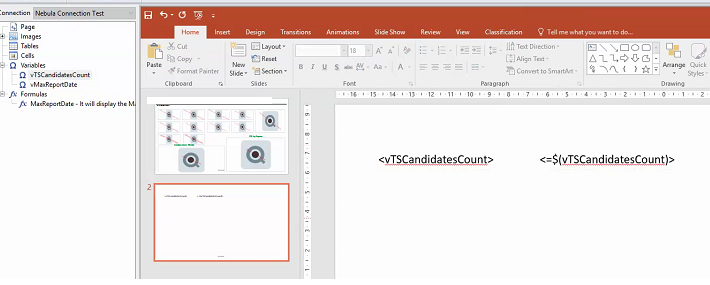
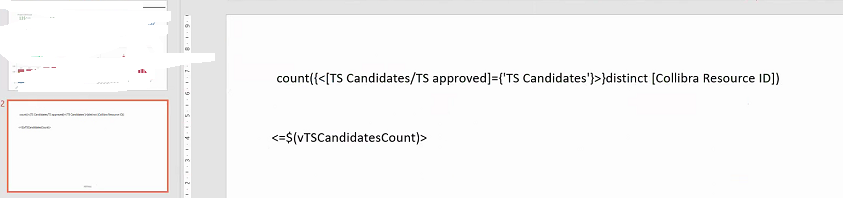
In Qliksense apps we have used these variables like =$(vTSCandidatesCount) but in N printing its not Working.
could you please explain with this example how to call in it N Printing from variable expansion.
Preview:
Thanks in advance

 NIRAJ472
- Mark as New
- Bookmark
- Subscribe
- Mute
- Subscribe to RSS Feed
- Permalink
- Report Inappropriate Content
Hi Pawwy1415,
Use =$(vTSCandidatesCount) as formula into Formula section under variable Section normally as you would use in Text box in Qlik Sense Front end. but First convert vTSCandidatesCount into text at Variable creation.
