Unlock a world of possibilities! Login now and discover the exclusive benefits awaiting you.

- Qlik Community
- :
- All Forums
- :
- Qlik NPrinting
- :
- Re: Interface not supported on NPrinting May 2022 ...
- Subscribe to RSS Feed
- Mark Topic as New
- Mark Topic as Read
- Float this Topic for Current User
- Bookmark
- Subscribe
- Mute
- Printer Friendly Page

 gs_qlik_nl
- Mark as New
- Bookmark
- Subscribe
- Mute
- Subscribe to RSS Feed
- Permalink
- Report Inappropriate Content
Interface not supported on NPrinting May 2022 SR4 Designer with Excel
After an update from Office we received strange behaviour with our NPrinting Designer. Office version is:

Below is the problem that I get when I open the NPrinting Designer.
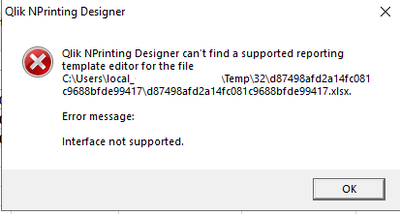
NPrinting Server version is May 2022 SR3, Designer is May 2022 SR4. (Should not be a problem)
I have tried the suggestion here: https://community.qlik.com/t5/Qlik-NPrinting/Nprinting-Designer-can-t-find-a-supported-reporting-tem...
And I also changed the compatiblity on NPrintingDesigner.exe. Nothing seems to work. Anyone an idea why NPrinting does not work??
Qlik NPrinting #Error

- « Previous Replies
-
- 1
- 2
- Next Replies »
gs_qlik_nl
- Mark as New
- Bookmark
- Subscribe
- Mute
- Subscribe to RSS Feed
- Permalink
- Report Inappropriate Content
@Lech_Miszkiewicz Second customer has Office Version 2302 (Build 16130.20306 Click-to-Run).
My colleague has received an answer regarding this problem from Qlik Support stating:
I checked with team and please follow the below suggestion:
1. Uninstall MS office
2. Uninstall NPrinting
3. Reinstall MS office (and ensure it is fully licensed)
4. Reinstall NPrinting.
Sometimes with older versions of deprecated Microsoft Office products such as office 2010, the dlls are not installed correctly, become corrupted or just lost.
https://support.microsoft.com/en-us/office/end-of-support-for-office-2010-3a3e45de-51ac-4944-b2ba-c2...
You may also suggest upgrading MS office supported version but ensure that Office is fully installed locally as web based versions of MS office are not supported.
Finally make sure they are setting their computer to 100 percent zoom setting ( and all attached monitors ) restart and retest.
https://community.qlik.com/t5/Knowledge/NPrinting-Designer-does-not-open-preview-Fails-or-other-temp...
Will this work?

 Lech_Miszkiewic
- Mark as New
- Bookmark
- Subscribe
- Mute
- Subscribe to RSS Feed
- Permalink
- Report Inappropriate Content
Hi @Shoes1
The only issues with designer I witnessed in last few years was when users had no idea what they were doing and they either tried to use it in unsupported configuration or were not meeting requirements.
Your statement does not provide much context as to what actually is wrong and as to why you have such & such opinion.
I have helped resolved quite few issues in the past but to do so I would require you to provide meaningful context and detail regarding issues you are facing. In fact it may be worth starting new topic and providing all required details there regarding your setup, versions of software used (making sure it is currently supported) so that we could prove that once used correctly Nprinting designer is not that bad.
cheers

 Ruggero_Piccoli
- Mark as New
- Bookmark
- Subscribe
- Mute
- Subscribe to RSS Feed
- Permalink
- Report Inappropriate Content
Hi,
I understand this is frustrating.
When Qlik NPrinting Designer is installed on a supported configuration, it works as expected. Since you mentioned you have not opened Designer for about a year, the first thing to verify is that Designer and Server are still on the exact same NPrinting version. A mismatch is a common cause of this behavior.
Please also follow the steps in this support article, which covers the most typical root causes and fixes:
https://community.qlik.com/t5/Official-Support-Articles/Qlik-NPrinting-Designer-cannot-find-a-suppor...
If the issue persists after these checks, the best next step is to open a support ticket and include:
-
NPrinting Server and Designer versions (exact build/SR)
-
Windows version and whether it’s a supported configuration
-
The full error message and any related logs
-
Steps to reproduce
That will allow us to reproduce the issue and confirm the specific cause in your environment.
Finally, since this thread is quite old, I suggest opening a new discussion with your current issue details.
Regards,
Ruggero
Best Regards,
Ruggero
---------------------------------------------
When applicable please mark the appropriate replies as CORRECT. This will help community members and Qlik Employees know which discussions have already been addressed and have a possible known solution. Please mark threads with a LIKE if the provided solution is helpful to the problem, but does not necessarily solve the indicated problem. You can mark multiple threads with LIKEs if you feel additional info is useful to others.

- « Previous Replies
-
- 1
- 2
- Next Replies »