Unlock a world of possibilities! Login now and discover the exclusive benefits awaiting you.

- Qlik Community
- :
- All Forums
- :
- Qlik NPrinting
- :
- Re: Linked image cannot be displayed
- Subscribe to RSS Feed
- Mark Topic as New
- Mark Topic as Read
- Float this Topic for Current User
- Bookmark
- Subscribe
- Mute
- Printer Friendly Page

 danaleota1
- Mark as New
- Bookmark
- Subscribe
- Mute
- Subscribe to RSS Feed
- Permalink
- Report Inappropriate Content
Linked image cannot be displayed
Hello,
I have two separate html reports that I embed in a single email/task. I have a group that consists of around 20 users that the two reports go to.
If successful I get a job that returns finished publications:40. However the users report that they receive the email but get this message for the first report (while the second report renders as expected). "The Linked Image cannot be displayed. The file may have been moved, renamed, or deleted. Verify that the link points to the correct file and location."
However when I run the users individually in a different task or one at a time both reports render as expected. I guess my question is then, are the reports not rendering because the group size of 20 users is too big? Or having two reports in one task or email is too much for the task?


 Frank_S
- Mark as New
- Bookmark
- Subscribe
- Mute
- Subscribe to RSS Feed
- Permalink
- Report Inappropriate Content
Can you try deleting then re-adding the 2nd report tag?
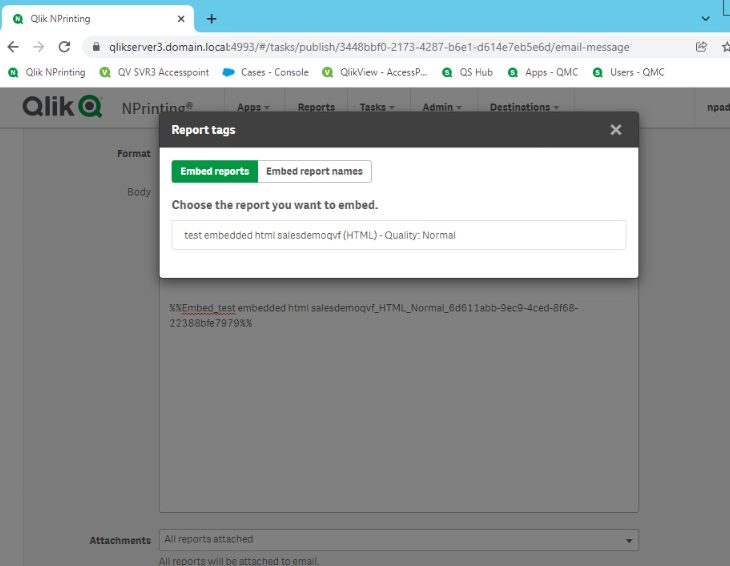
Perhaps the report tag recently changed - perhaps due to a slight report name change - and thus may need only deleted and re-added in your publish task.
If I misunderstood the problem perhaps you could provide more specific detail including:
- details steps to reproduce the issue
- snapshots of what your publish task/email message appears as
- any other detail that would better help us to understand the issue.
Kind regards...
danaleota1
- Mark as New
- Bookmark
- Subscribe
- Mute
- Subscribe to RSS Feed
- Permalink
- Report Inappropriate Content
Hi Frank,
I checked the report tag as you suggested and it looks correct, I did delete it and re-added it though just in case. But I guess I'm wondering how come when I disable the group and run the task one user at a time those same reports render as expected?
Thanks!
Dana
Frank_S
- Mark as New
- Bookmark
- Subscribe
- Mute
- Subscribe to RSS Feed
- Permalink
- Report Inappropriate Content
Hi again.
Perhaps you could provide more specific detail including:
- details steps to reproduce the issue
- snapshots of what your publish task/email message appears as
- any other detail that would better help us to understand the issue.
Yes it is odd that sending user by user works. If you could share the above, perhaps we could better understand where to troubleshoot next.
 Ruggero_Piccoli
- Mark as New
- Bookmark
- Subscribe
- Mute
- Subscribe to RSS Feed
- Permalink
- Report Inappropriate Content
Hi,
So if you add recipients in a group (an NPrinting group) and you add the group to the publish task you had the problem. Instead, if you add each single user to the publish task instead of the group it works correctly. Did I understood correctly?
Could be a problem of the email client? Some email clients do not download the images by default and you have to enable the related option. Are you having the issue on different email clients than the one where it works?
Check also the applied filters (user, task and report) to be sure you have not issue with empty dataset in certain cases.
Best Regards,
Ruggero
Best Regards,
Ruggero
---------------------------------------------
When applicable please mark the appropriate replies as CORRECT. This will help community members and Qlik Employees know which discussions have already been addressed and have a possible known solution. Please mark threads with a LIKE if the provided solution is helpful to the problem, but does not necessarily solve the indicated problem. You can mark multiple threads with LIKEs if you feel additional info is useful to others.
