Unlock a world of possibilities! Login now and discover the exclusive benefits awaiting you.

- Qlik Community
- :
- All Forums
- :
- Qlik NPrinting
- :
- NPrinting - Container Object unseen in Report
- Subscribe to RSS Feed
- Mark Topic as New
- Mark Topic as Read
- Float this Topic for Current User
- Bookmark
- Subscribe
- Mute
- Printer Friendly Page

- Mark as New
- Bookmark
- Subscribe
- Mute
- Subscribe to RSS Feed
- Permalink
- Report Inappropriate Content
NPrinting - Container Object unseen in Report
After generating a report on Nprinting, I realized that some of the objects are not present in the final PDF file. Specifically container objects, which I use to group together several objects in an organized way. This happens rather randomly, meaning that it has happened for some containers one day and for others in some other day, both on local and on server (Testing).
I would greatly appreciate any advice on how to solve this matter.
Thank you all in advance.
Regards.
- Tags:
- nprinting
- « Previous Replies
-
- 1
- 2
- Next Replies »
- Mark as New
- Bookmark
- Subscribe
- Mute
- Subscribe to RSS Feed
- Permalink
- Report Inappropriate Content
it is my understanding that there are known issues with reporting and containers. I have notices it depends on how you are using the containers.
I have a report that shows trending inforamtion - On each tab, I have 1 container with 2-3 objects but they are shown all of the time
Can you provide a screen sample of how your objects are being displayed within the container?
- Mark as New
- Bookmark
- Subscribe
- Mute
- Subscribe to RSS Feed
- Permalink
- Report Inappropriate Content
Trank you Adam for answering so quickly.
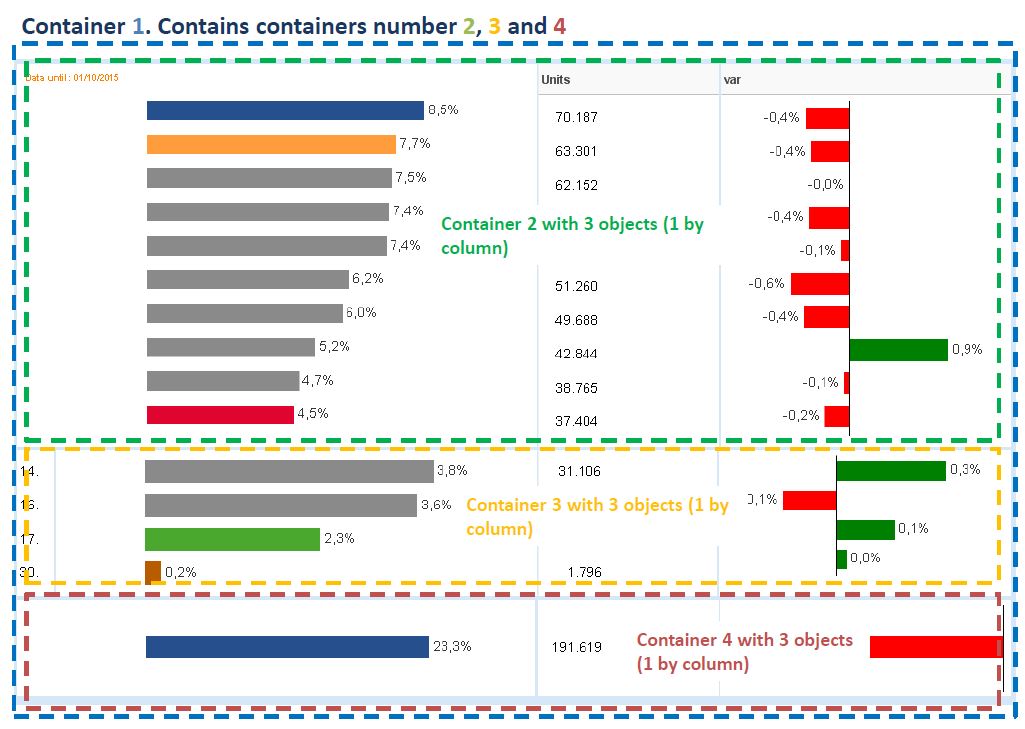
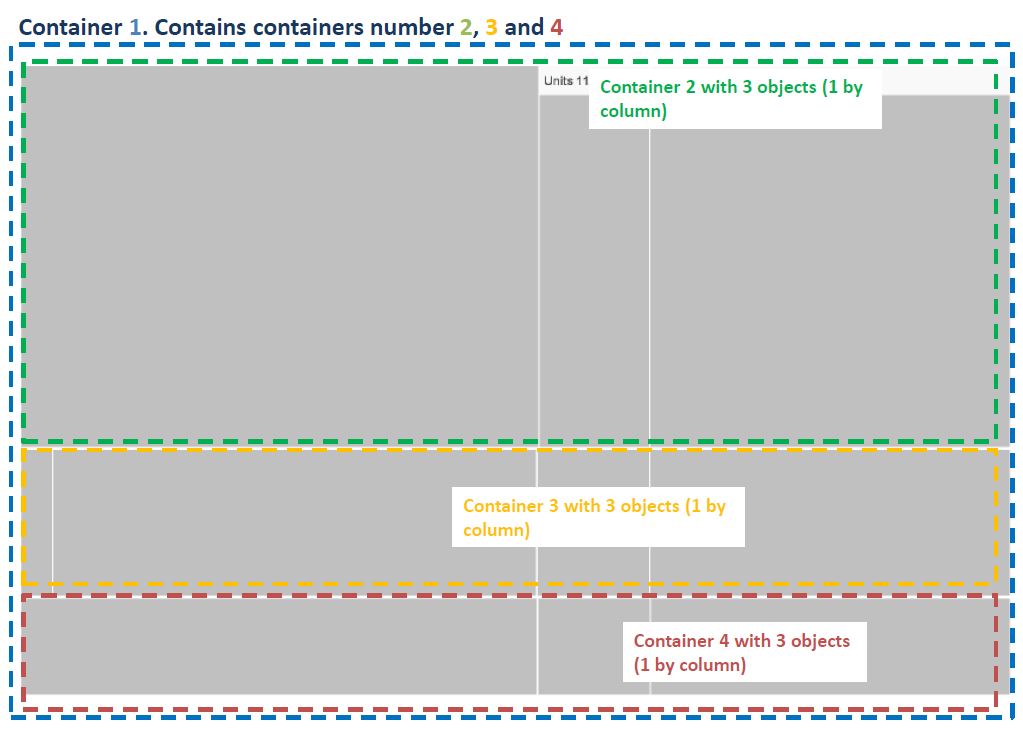
Here I provide an example: the first screen shot is how I see it in qlikview and the second one is how I get it in the report. The colors are just to make it easier to understand the configuration of the different objects (charts within containers, and containers within another container)
Regards
- Mark as New
- Bookmark
- Subscribe
- Mute
- Subscribe to RSS Feed
- Permalink
- Report Inappropriate Content
ahhh - if I understand the diagram, you have containers within containers?
are the objects that do not show up always from the same containers?
Is it possible, based on filters, selection criteria, etc, that there is not any data for those objects?
- Mark as New
- Bookmark
- Subscribe
- Mute
- Subscribe to RSS Feed
- Permalink
- Report Inappropriate Content
First question: Exactly, I have containers within containers.
Second question: No, it´s actually random, because I have several containers like the one on the image, and sometimes this happens to one container and some other time it happens to other container, and so on.
Third question: No filters are applied and there is data because I can actually see it on my qlikview app, but not on the report after it´s generated.
Regards
- Mark as New
- Bookmark
- Subscribe
- Mute
- Subscribe to RSS Feed
- Permalink
- Report Inappropriate Content
there are issues and limitations with containers even withing QlikView itself, and have heard of others having issues with objects within containers in Nprinting - interesting since NPrinting is accessing the object, not the container, but it must be during run time when it is getting the object the the issue is encountered.
From your sample above (and you did a great job with your screen sample and colors) I would gess that the objects are being brought into NPrinting as images?
This may be a question for NPrinting support
- Mark as New
- Bookmark
- Subscribe
- Mute
- Subscribe to RSS Feed
- Permalink
- Report Inappropriate Content
I will forward this issue to NPrinting Support and see what they have to say.
Thank you for your quick response.
Yes, they are brought as images into a powerpoint template and then exported as a PDF file.
The colored rectangles and text boxes were added just for the sample in powerpoint.
Regards.

 Sayani
- Mark as New
- Bookmark
- Subscribe
- Mute
- Subscribe to RSS Feed
- Permalink
- Report Inappropriate Content
I am facing a similar issue. Please provide an update if you got any remedy from Nprinting Support related to this issue.

 Lech_Miszkiewic
- Mark as New
- Bookmark
- Subscribe
- Mute
- Subscribe to RSS Feed
- Permalink
- Report Inappropriate Content
Hi @Sayani
This is 11 years old topic and it applies to different software with different functionality.
Please create new thread and provide all the details from your scenario including version of QlikView or Qlik Sense, NPrinting version and type of container you are trying to use. Make sure you are familiar with documentation re supported and unsupported objects: https://help.qlik.com/en-US/nprinting/May2026/Content/NPrinting/ReportsDevelopment/Qlik-objects-supp...
thanks
Lech

 Ruggero_Piccoli
- Mark as New
- Bookmark
- Subscribe
- Mute
- Subscribe to RSS Feed
- Permalink
- Report Inappropriate Content
Hi @Sayani ,
I agree with @Lech_Miszkiewicz : open a new question instead of asking in a very old one. Unluckily we can't "close" older conversations.
- take a backup copy of "C:\Program Files\NPrintingServer\NPrinting\Scheduler\scheduler.config"
- open scheduler.config file with a text editor as an administrator
- add, within <appSettings> section (e.g., before enclosing </appSettings>)<add key="qliksense-enable-parent-container" />
- save the file so that its name remain scheduler.config (pay attention it does not get saved as a txt, i.e., it should not become scheduler.config.txt)
- restart Qlik NPrinting Windows services (.config files are readed only on services starting)
- do a connection cache reload
- if opened, close and re-open the Designer (connection caches are readed only on opening)
- modify template as needed
Note that customizations on .config files are lost after upgrading the installation but this should not be needed in next releases.
Best Regards,
Ruggero
Best Regards,
Ruggero
---------------------------------------------
When applicable please mark the appropriate replies as CORRECT. This will help community members and Qlik Employees know which discussions have already been addressed and have a possible known solution. Please mark threads with a LIKE if the provided solution is helpful to the problem, but does not necessarily solve the indicated problem. You can mark multiple threads with LIKEs if you feel additional info is useful to others.
- « Previous Replies
-
- 1
- 2
- Next Replies »