Unlock a world of possibilities! Login now and discover the exclusive benefits awaiting you.

- Qlik Community
- :
- All Forums
- :
- Qlik NPrinting
- :
- NPrinting Designer May 2021-Create Line Chart From...
- Subscribe to RSS Feed
- Mark Topic as New
- Mark Topic as Read
- Float this Topic for Current User
- Bookmark
- Subscribe
- Mute
- Printer Friendly Page

 JustinDallas
- Mark as New
- Bookmark
- Subscribe
- Mute
- Subscribe to RSS Feed
- Permalink
- Report Inappropriate Content
NPrinting Designer May 2021-Create Line Chart From QlikSense
Hello Folks,
I'm working with PixelPerfect and NPrinting. Right now, I've got a chart with 2-dimensions that I'd like to render in NPrinting. One of the dimensions is [US State] so it has 50 values so making a series for each state is unreasonable.
I've created Linecharts in NPrinting, but I've only been able to put one dimension in there, and not the [Fiscal Year],[US State] dimensions that I need.
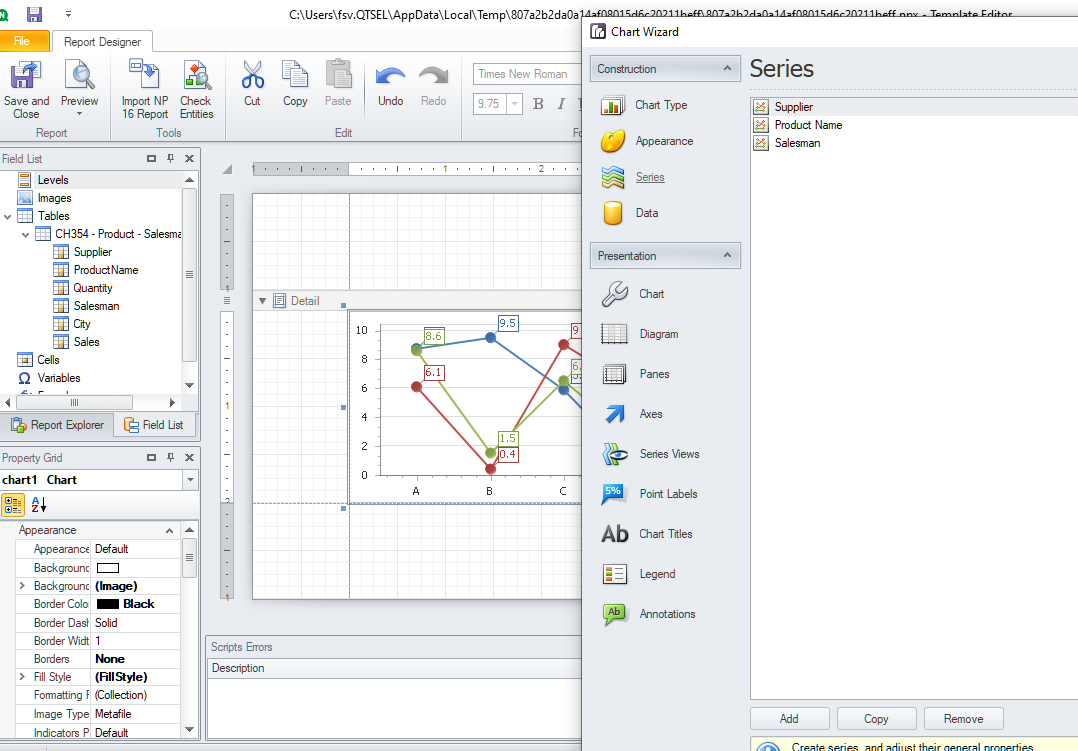
Is there anyway to get an NPrinting PixelPerfect Linechart to have multiple lines? Below is an example of what I'm trying to accomplish.

My current source for data is a small table that I've got. The designer version is May 2021, and the server is May 2022
Any help is greatly appreciated.

 Lech_Miszkiewic
- Mark as New
- Bookmark
- Subscribe
- Mute
- Subscribe to RSS Feed
- Permalink
- Report Inappropriate Content
I apologise because i dont have answer for your question yet, but….
first thing first-designer version must be the same as your server and engine - that is documented in documentation and must be ensured…
regarding your actual problem i may need yo test it. Are you expecting to have 50 lines on that chart? With 50 lines on it can you read anything meaningful?

 Frank_S
- Mark as New
- Bookmark
- Subscribe
- Mute
- Subscribe to RSS Feed
- Permalink
- Report Inappropriate Content
Did a quick test with PxP and found that I did need to add a dimension as a separate series.
This is as far as I got at the end of my day...