Unlock a world of possibilities! Login now and discover the exclusive benefits awaiting you.

- Qlik Community
- :
- All Forums
- :
- Qlik NPrinting
- :
- Resizing images
- Subscribe to RSS Feed
- Mark Topic as New
- Mark Topic as Read
- Float this Topic for Current User
- Bookmark
- Subscribe
- Mute
- Printer Friendly Page

- Mark as New
- Bookmark
- Subscribe
- Mute
- Subscribe to RSS Feed
- Permalink
- Report Inappropriate Content
Resizing images
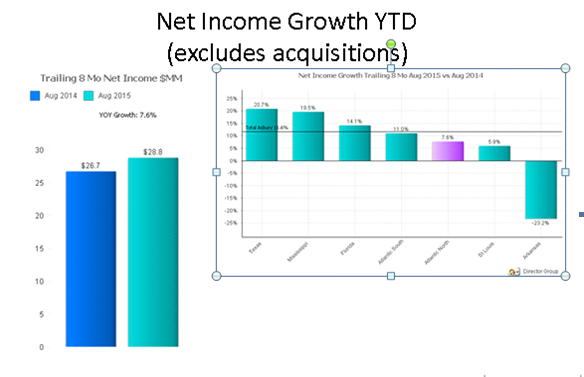
Have anyone had issues with the Nprinting output changing to a different size from the template? I have two charts on one power point page. I have no issues with the chart on the left but the chart on the right always comes out in a shrunken version. When I use the stretch, fit and etc values in properties, the chart exceeds the page size.
Accepted Solutions
- Mark as New
- Bookmark
- Subscribe
- Mute
- Subscribe to RSS Feed
- Permalink
- Report Inappropriate Content
Dean,
A few things about images:
- In MS office based templates, they will always maintain the same aspect ratio as have in the QVW.
- The default behavior for images which get re-sized is to take the side which is proportionally smaller and use that as the image size.
- The net result is that you should resize images in PowerPoint by dragging the corners of the image as this will maintain the aspect ration of the "sample" image. Otherwise you risk resizing images in your report output in unexpected ways (always smaller than expected).
I suspect the way the image was resized is the issue, but I'd have to see a sample to be sure.
The attached tutorial in PDF format may help.
Best
Aran
- Mark as New
- Bookmark
- Subscribe
- Mute
- Subscribe to RSS Feed
- Permalink
- Report Inappropriate Content
Dean,
A few things about images:
- In MS office based templates, they will always maintain the same aspect ratio as have in the QVW.
- The default behavior for images which get re-sized is to take the side which is proportionally smaller and use that as the image size.
- The net result is that you should resize images in PowerPoint by dragging the corners of the image as this will maintain the aspect ration of the "sample" image. Otherwise you risk resizing images in your report output in unexpected ways (always smaller than expected).
I suspect the way the image was resized is the issue, but I'd have to see a sample to be sure.
The attached tutorial in PDF format may help.
Best
Aran
- Mark as New
- Bookmark
- Subscribe
- Mute
- Subscribe to RSS Feed
- Permalink
- Report Inappropriate Content
Dean,
Were you able to resolve the issue?
- Mark as New
- Bookmark
- Subscribe
- Mute
- Subscribe to RSS Feed
- Permalink
- Report Inappropriate Content
Thanks for the help Aran. Below is example of what I'm talking about. Still playing with the dimensions to get it as close to the template as possible.

- Mark as New
- Bookmark
- Subscribe
- Mute
- Subscribe to RSS Feed
- Permalink
- Report Inappropriate Content
see above