Unlock a world of possibilities! Login now and discover the exclusive benefits awaiting you.

- Qlik Community
- :
- All Forums
- :
- Qlik NPrinting
- :
- <verify> not working on Import Recipient Filter
- Subscribe to RSS Feed
- Mark Topic as New
- Mark Topic as Read
- Float this Topic for Current User
- Bookmark
- Subscribe
- Mute
- Printer Friendly Page

- Mark as New
- Bookmark
- Subscribe
- Mute
- Subscribe to RSS Feed
- Permalink
- Report Inappropriate Content
<verify> not working on Import Recipient Filter
Hi
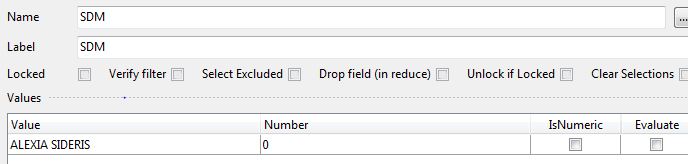
I have added a <verify> parameter to my Filter on Import Recipient, the Filter is successfully created but the Verify Filter field is not checked. Anyone with any tips or clues greatly appreciated Thanks.
Excel cell contains:
| SDM={ALEXIA SIDERIS}<verify> |
Accepted Solutions
- Mark as New
- Bookmark
- Subscribe
- Mute
- Subscribe to RSS Feed
- Permalink
- Report Inappropriate Content
there are also some excel examples in the nprinting training environment zip file that you can check and validate your syntax against
- Mark as New
- Bookmark
- Subscribe
- Mute
- Subscribe to RSS Feed
- Permalink
- Report Inappropriate Content
my original thought is there is an issue with the syntax(looks correct but it is fickle)
please refer to the advanced filters syntax on recipient import
aarticle
- Mark as New
- Bookmark
- Subscribe
- Mute
- Subscribe to RSS Feed
- Permalink
- Report Inappropriate Content
there are also some excel examples in the nprinting training environment zip file that you can check and validate your syntax against
- Mark as New
- Bookmark
- Subscribe
- Mute
- Subscribe to RSS Feed
- Permalink
- Report Inappropriate Content
Hi Adam,
My issue is resolved, my cell content was based on a formula, when I converted it to a text value it successully checked the verify filter.
From your suggestion to also look at training examples I resolved another error to make a recipient inactive.
Thanks for taking the time to respond
- Mark as New
- Bookmark
- Subscribe
- Mute
- Subscribe to RSS Feed
- Permalink
- Report Inappropriate Content
glad I was able to help