Unlock a world of possibilities! Login now and discover the exclusive benefits awaiting you.

- Qlik Community
- :
- All Forums
- :
- Qlik NPrinting
- :
- previous month data
- Subscribe to RSS Feed
- Mark Topic as New
- Mark Topic as Read
- Float this Topic for Current User
- Bookmark
- Subscribe
- Mute
- Printer Friendly Page

 raadwiptec
- Mark as New
- Bookmark
- Subscribe
- Mute
- Subscribe to RSS Feed
- Permalink
- Report Inappropriate Content
previous month data
hi all,
iam using nprinting to deliver the data . I am trying to apply a filter for one of the columns called transaction date. Basically I only need previous months data .
please suggest

 prma7799
- Mark as New
- Bookmark
- Subscribe
- Mute
- Subscribe to RSS Feed
- Permalink
- Report Inappropriate Content
You can use filter like
=date(addmonths(max([Date]), -1), 'MMM')
prma7799
- Mark as New
- Bookmark
- Subscribe
- Mute
- Subscribe to RSS Feed
- Permalink
- Report Inappropriate Content
Or you can create variable in your qvw file and use it into Nprinting filter.

 Stephen_Jasiono
- Mark as New
- Bookmark
- Subscribe
- Mute
- Subscribe to RSS Feed
- Permalink
- Report Inappropriate Content
something like month(now()) -1 should also do the trick
raadwiptec
- Mark as New
- Bookmark
- Subscribe
- Mute
- Subscribe to RSS Feed
- Permalink
- Report Inappropriate Content
it is not getting filtered

 Daniel_Jenkins
- Mark as New
- Bookmark
- Subscribe
- Mute
- Subscribe to RSS Feed
- Permalink
- Report Inappropriate Content
Hi,
Please post a sample QVW and sample Excel file showing what output you want.
- Daniel.
raadwiptec
- Mark as New
- Bookmark
- Subscribe
- Mute
- Subscribe to RSS Feed
- Permalink
- Report Inappropriate Content
hi Daniel,
Iam using a report with following data
transid ¦ custname ¦ billing date
1 xxx1 12/12/2015
2 xxx2 11/12/2015
3 xxx3 10/12/2015
4 xxx4 09/11/2015
5 xxx5 08/10/2015
My first problem is I have a Year and Month List box. So whenever I open the report fresh. it shows 2016 and chart shows empty as their is no data for 2016. So I want to make it always all data visible
secondly I am calling this report via nprinting. and would like to limit the data only to last month before sending to the user. I tried couple of option with billing date as mont(now() -1 ...et etc but it is not filtering
Daniel_Jenkins
- Mark as New
- Bookmark
- Subscribe
- Mute
- Subscribe to RSS Feed
- Permalink
- Report Inappropriate Content
Hi,
Regarding showing all values when the QVW opens I believe you need to un-check the Always one selected value check box in the General tab of the list box properties.
I gather that you have a QVW with a list box and chart like this:

...and you want a report filtered only for billing date falling in the last month like this:
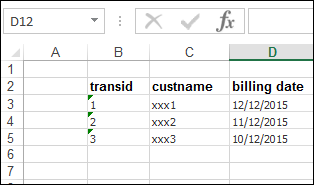
I would:
1. Add a calculated field (YearMonthNum) in the load script like this
T1:
LOAD * INLINE [
transid, custname, billing date
1, xxx1, 12/12/2015
2, xxx2, 11/12/2015
3, xxx3, 10/12/2015
4, xxx4, 09/11/2015
5, xxx5, 08/10/2015
];
Transactions:
LOAD *,
Year([billing date]) & num(Month([billing date]),'00') as YearMonthNum
RESIDENT T1;
DROP TABLE T1;
2. In NPrinting use a Field filter defined like this:
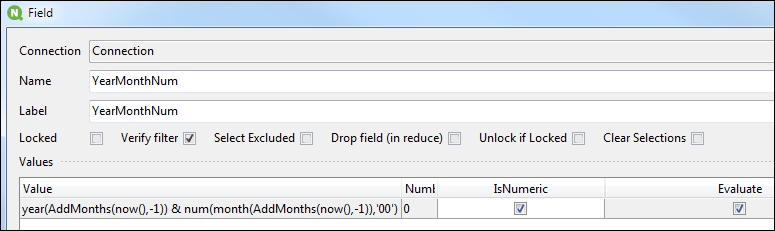
I have attached a sample project. Please extract to folder C:\Temp\Community\025 in order to preserve the paths used.
HTH - Daniel.
raadwiptec
- Mark as New
- Bookmark
- Subscribe
- Mute
- Subscribe to RSS Feed
- Permalink
- Report Inappropriate Content
the above is not giving any results..
Daniel_Jenkins
- Mark as New
- Bookmark
- Subscribe
- Mute
- Subscribe to RSS Feed
- Permalink
- Report Inappropriate Content
I just checked and it is working fine.
* Did you extract to folder C:\Temp\Community\025?
* Did you check your Default output folder after running the report task?
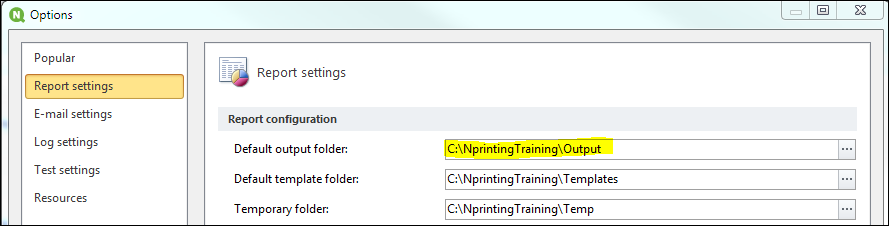
If it still does not work can you attach the log file (look under File > Options > Log settings to get the location)?
- Daniel.
