Unlock a world of possibilities! Login now and discover the exclusive benefits awaiting you.

- Qlik Community
- :
- All Forums
- :
- Qlik NPrinting
- :
- send emails only when chart is not empty
- Subscribe to RSS Feed
- Mark Topic as New
- Mark Topic as Read
- Float this Topic for Current User
- Bookmark
- Subscribe
- Mute
- Printer Friendly Page

 ali_hijazi
- Mark as New
- Bookmark
- Subscribe
- Mute
- Subscribe to RSS Feed
- Permalink
- Report Inappropriate Content
send emails only when chart is not empty
Hello
got an NPrinting report (Excel format in template editor)
the publishing task send email to a group of users; each user has his own filter defined
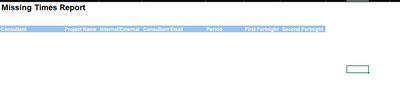
for some users the chart is empty but that user still receives email with empty excel attachment and only headers of the table appear
how can I make NPrinting not to send email to the user when the report is empty?
kindly advise
Accepted Solutions

 Ruggero_Piccoli
- Mark as New
- Bookmark
- Subscribe
- Mute
- Subscribe to RSS Feed
- Permalink
- Report Inappropriate Content
Hi,
I replicate your scenario in my installation and it works as expected: the user that doesn't met the condition doesn't receive any email. Instead the user that met the condition receive the report.
If I add an unconditioned report the user that doesn't met the condition receives an email with only one report and no error messages.
So I think you have something hidden in the report that cause its generation. Check the Task Executions page and you will see something like:

for users that should not met the condition.
Best Regards,
Ruggero
Best Regards,
Ruggero
---------------------------------------------
When applicable please mark the appropriate replies as CORRECT. This will help community members and Qlik Employees know which discussions have already been addressed and have a possible known solution. Please mark threads with a LIKE if the provided solution is helpful to the problem, but does not necessarily solve the indicated problem. You can mark multiple threads with LIKEs if you feel additional info is useful to others.
Ruggero_Piccoli
- Mark as New
- Bookmark
- Subscribe
- Mute
- Subscribe to RSS Feed
- Permalink
- Report Inappropriate Content
Hi,
You could use conditions that are explained in details at https://help.qlik.com/en-US/nprinting/May2021/Content/NPrinting/ReportsDevelopment/Conditions.htm. There are also some old conversations about them here in the community.
Best Regards,
Ruggero
Best Regards,
Ruggero
---------------------------------------------
When applicable please mark the appropriate replies as CORRECT. This will help community members and Qlik Employees know which discussions have already been addressed and have a possible known solution. Please mark threads with a LIKE if the provided solution is helpful to the problem, but does not necessarily solve the indicated problem. You can mark multiple threads with LIKEs if you feel additional info is useful to others.
ali_hijazi
- Mark as New
- Bookmark
- Subscribe
- Mute
- Subscribe to RSS Feed
- Permalink
- Report Inappropriate Content

I've added the above rule; but this means if the report as a whole contains values then run; am I wrong?
what I want is that if the filters on each user return empty report then do not send the email to that particular user
with this condition added some users still get emails containing an attachment with empty chart
Ruggero_Piccoli
- Mark as New
- Bookmark
- Subscribe
- Mute
- Subscribe to RSS Feed
- Permalink
- Report Inappropriate Content
Hi,
So you have to apply the condition to the report in the publish task, not to the publish task:
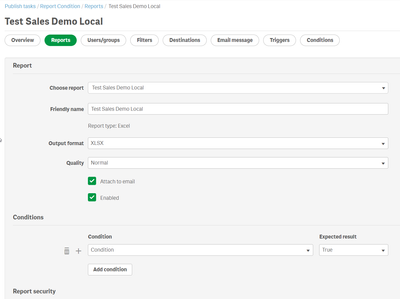
Then set the email distribution error to:
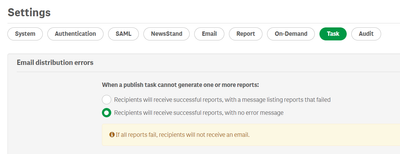
With this configuration users with empty reports will not receive the email.
Best Regards,
Ruggero
Best Regards,
Ruggero
---------------------------------------------
When applicable please mark the appropriate replies as CORRECT. This will help community members and Qlik Employees know which discussions have already been addressed and have a possible known solution. Please mark threads with a LIKE if the provided solution is helpful to the problem, but does not necessarily solve the indicated problem. You can mark multiple threads with LIKEs if you feel additional info is useful to others.
ali_hijazi
- Mark as New
- Bookmark
- Subscribe
- Mute
- Subscribe to RSS Feed
- Permalink
- Report Inappropriate Content
still some users receive emails with reports without data attached
first I created the condition as follows:

then I added the condition to the report in the task->report as you told me
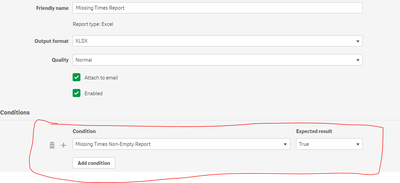
in the settings:
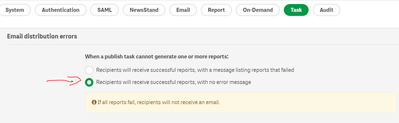

 Lech_Miszkiewic
- Mark as New
- Bookmark
- Subscribe
- Mute
- Subscribe to RSS Feed
- Permalink
- Report Inappropriate Content
Hi @ali_hijazi
Are you suppressing 0 values in the Qlik Sense table (used for condition evaluation) settings ?
The process is:
- NPrinting starts task and applies task filters and task conditions (if there are any)
- Starts generating report (applies report filters if there are any)
- Checks user filters and applies them
- Checks condition for those and all earlier applied filters. This means it checks if the condition is met. If you set the condition on one particular chart that condition is checked against only that one particular chart and not any others used in the report.
- regarding comment i made around "suppress 0 values" - based on my experience table has to return no records, meaning that if there is a row with nulls and 0 values then condition will not be met as there is still a record in it.
- Starts generating report (applies report filters if there are any)
Further investigation of your issue would require us to:
- look at your chart dimensions and expressions (the one used for condition evaluation) + all settings used in it.
- look at filters for users which should not receive report but still do receive it
- apply those filters directly in Qlik Sense and check if they are applied properly
- check if user filters are properly configured - it is possible that your user filters are disregarded maybe because of wrong filter datatype used?
cheers
ali_hijazi
- Mark as New
- Bookmark
- Subscribe
- Mute
- Subscribe to RSS Feed
- Permalink
- Report Inappropriate Content
Hello @Lech_Miszkiewicz
yes I suppressed the zero values in the chart;
and users who meeting the filter condition get emails with data in the attached chart
but users whose filters return no data still receive emails with the attached chart empty
following is a screen shot of an attachment with empty rows and the next for an attachment whose user's filter return data

Ruggero_Piccoli
- Mark as New
- Bookmark
- Subscribe
- Mute
- Subscribe to RSS Feed
- Permalink
- Report Inappropriate Content
Hi,
I replicate your scenario in my installation and it works as expected: the user that doesn't met the condition doesn't receive any email. Instead the user that met the condition receive the report.
If I add an unconditioned report the user that doesn't met the condition receives an email with only one report and no error messages.
So I think you have something hidden in the report that cause its generation. Check the Task Executions page and you will see something like:
for users that should not met the condition.
Best Regards,
Ruggero
Best Regards,
Ruggero
---------------------------------------------
When applicable please mark the appropriate replies as CORRECT. This will help community members and Qlik Employees know which discussions have already been addressed and have a possible known solution. Please mark threads with a LIKE if the provided solution is helpful to the problem, but does not necessarily solve the indicated problem. You can mark multiple threads with LIKEs if you feel additional info is useful to others.
