Unlock a world of possibilities! Login now and discover the exclusive benefits awaiting you.

- Qlik Community
- :
- All Forums
- :
- Qlik NPrinting
- :
- Re: the preview request failed
Options
- Subscribe to RSS Feed
- Mark Topic as New
- Mark Topic as Read
- Float this Topic for Current User
- Bookmark
- Subscribe
- Mute
- Printer Friendly Page
Turn on suggestions
Auto-suggest helps you quickly narrow down your search results by suggesting possible matches as you type.
Showing results for

 mhoudas78
Contributor III
2018-10-16
10:52 AM
- Mark as New
- Bookmark
- Subscribe
- Mute
- Subscribe to RSS Feed
- Permalink
- Report Inappropriate Content
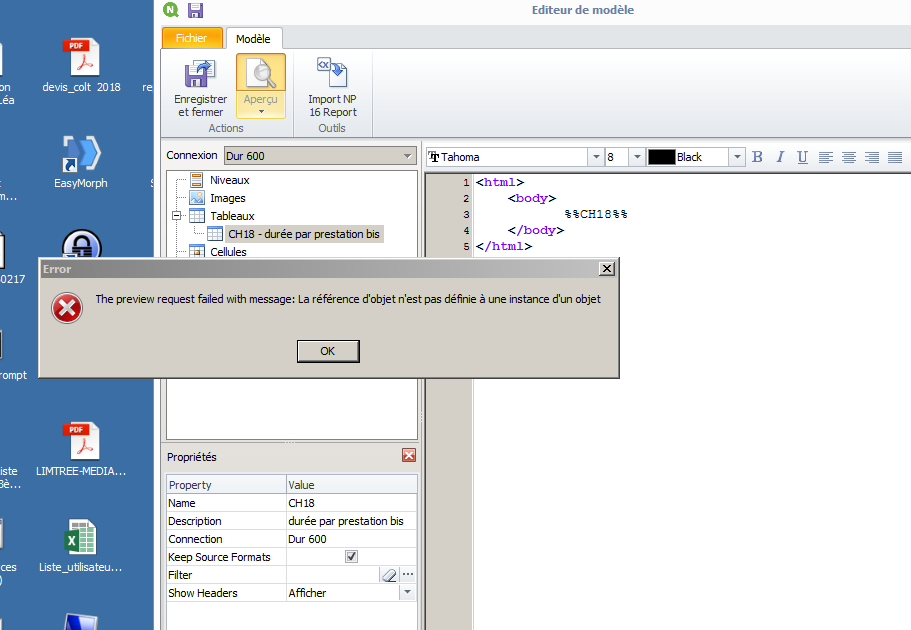
the preview request failed
Have you an idea ? I changed the format of a QLK object (CH18) and i suddenly have this error
2,404 Views
5 Replies

 rubenmarin
MVP
2018-10-16
10:55 AM
- Mark as New
- Bookmark
- Subscribe
- Mute
- Subscribe to RSS Feed
- Permalink
- Report Inappropriate Content
Hi Michel, if changes are made to the CH18 object in QV you need to refresh the metadata (in connections).
Also check the the ID still exists, maybe you do a copy of the object and the new object has a different ID.
mhoudas78
Contributor III
2018-10-16
11:16 AM
Author
- Mark as New
- Bookmark
- Subscribe
- Mute
- Subscribe to RSS Feed
- Permalink
- Report Inappropriate Content
I refresh the metadata and the id is the same.
2,341 Views
rubenmarin
MVP
2018-10-16
11:25 AM
- Mark as New
- Bookmark
- Subscribe
- Mute
- Subscribe to RSS Feed
- Permalink
- Report Inappropriate Content
And tried to remove and reload the object in designer?

 Lech_Miszkiewic
Partner Ambassador/MVP
2018-10-16
07:50 PM
- Mark as New
- Bookmark
- Subscribe
- Mute
- Subscribe to RSS Feed
- Permalink
- Report Inappropriate Content
Elaborate what have you change in this object?
cheers Lech, When applicable please mark the correct/appropriate replies as "solution" (you can mark up to 3 "solutions". Please LIKE threads if the provided solution is helpful to the problem.
2,341 Views
Lech_Miszkiewic
Partner Ambassador/MVP
2018-10-16
08:07 PM
- Mark as New
- Bookmark
- Subscribe
- Mute
- Subscribe to RSS Feed
- Permalink
- Report Inappropriate Content
as Ruben said you need to also update object in designer to inherit changes
cheers Lech, When applicable please mark the correct/appropriate replies as "solution" (you can mark up to 3 "solutions". Please LIKE threads if the provided solution is helpful to the problem.
