Unlock a world of possibilities! Login now and discover the exclusive benefits awaiting you.

- Qlik Community
- :
- Forums
- :
- Forums by Product
- :
- Products (A-Z)
- :
- Qlik Sense
- :
- Documents
- :
- Conditional Performance Indicators in Tables using...
- Move Document
- Delete Document
- Subscribe to RSS Feed
- Mark as New
- Mark as Read
- Bookmark
- Subscribe
- Printer Friendly Page
- Report Inappropriate Content
Conditional Performance Indicators in Tables using HTML Unicode Chr() Values

 richbyard
- Move Document
- Delete Document and Replies
- Mark as New
- Bookmark
- Subscribe
- Mute
- Subscribe to RSS Feed
- Permalink
- Report Inappropriate Content
Conditional Performance Indicators in Tables using HTML Unicode Chr() Values
Inserting KPI indicators into tables is actually quite simple if you understand the HTML Unicode UTF-8 characters that are available for you to use and display with simple if conditions. These characters behave like any other text so applying conditional colors is very simple.
Some examples, an example application and a link to many character options are at the bottom of this post.
Setting up the Measure
The measure needs to be a simple if statement, for example:
if([Sales This Year]>[Sales Last Year],chr(9650),chr(9660))
Where 9650 and 9660 are the triangle up and down character codes based on standard HTML Unicode UTF-8 charsets.
Setting up the conditional colours
Under Text color Expression use an if statement to switch the colours similar to the measure expression, for example:
if([Sales This Year]>[Sales Last Year],rgb(0,220,0),rgb(255,0,0))
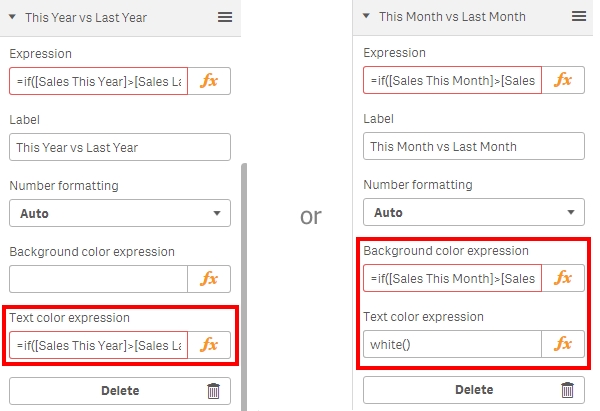
Note:
I have used the field names of the columns in the table to create these expressions rather than repeat the measure expression by wrapping the field label in square brackets (as you will most likely know as of version 3.2 we can not reference the Master Items here). For this method to work both fields must be visible in the table.
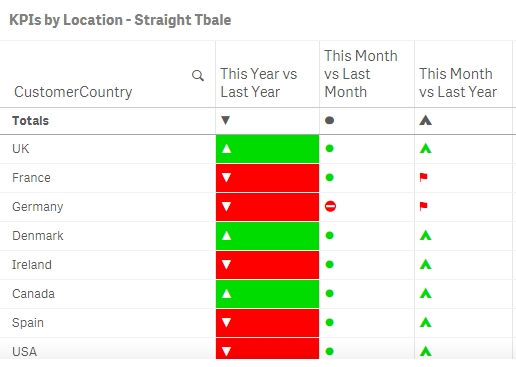
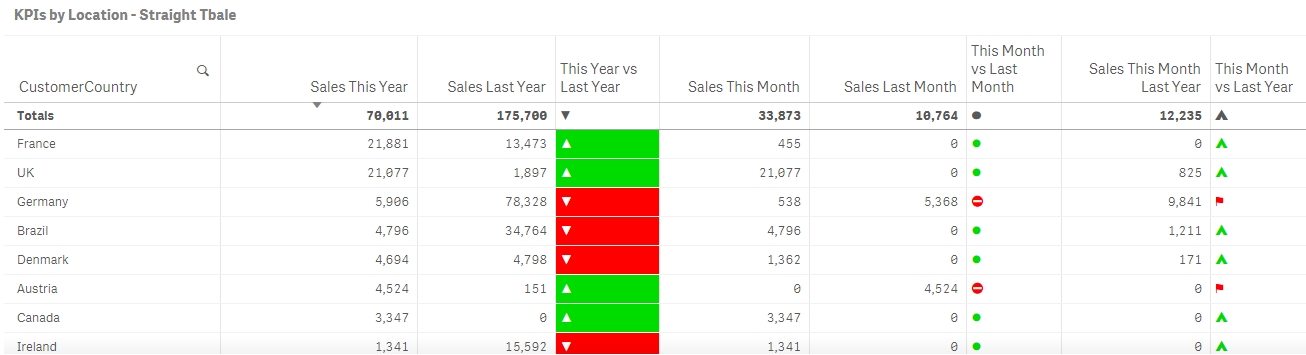
Straight table example
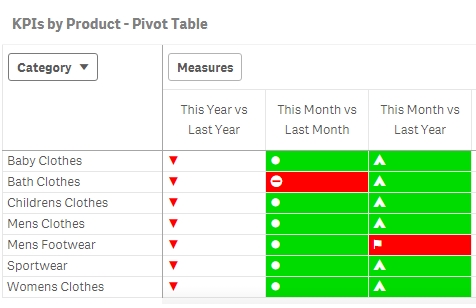
Pivot table example
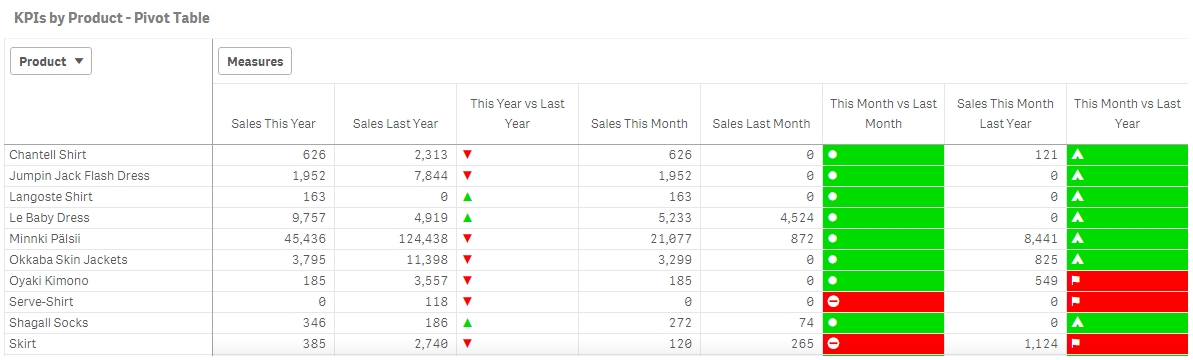
Example Characters and codes can be found here, there are many different groupings with this link taking you to the Geometric shapes.
Some useful Characters and codes are below:
| Character Code | Character Desc | Character |
| 9604 | LOWER HALF BLOCK | ▄ |
| 9605 | LOWER FIVE EIGHTHS BLOCK | ▅ |
| 9606 | LOWER THREE QUARTERS BLOCK | ▆ |
| 9607 | LOWER SEVEN EIGHTHS BLOCK | ▇ |
| 9608 | FULL BLOCK | █ |
| 9609 | LEFT SEVEN EIGHTHS BLOCK | ▉ |
| 9610 | LEFT THREE QUARTERS BLOCK | ▊ |
| 9611 | LEFT FIVE EIGHTHS BLOCK | ▋ |
| 9612 | LEFT HALF BLOCK | ▌ |
| 9613 | LEFT THREE EIGHTHS BLOCK | ▍ |
| 9632 | BLACK SQUARE | ■ |
| 9650 | BLACK UP-POINTING TRIANGLE | ▲ |
| 9658 | BLACK RIGHT-POINTING POINTER | ► |
| 9660 | BLACK DOWN-POINTING TRIANGLE | ▼ |
| 9668 | BLACK LEFT-POINTING POINTER | ◄ |
| 9679 | BLACK CIRCLE | ● |
| 9680 | CIRCLE WITH LEFT HALF BLACK | ◐ |
| 9681 | CIRCLE WITH RIGHT HALF BLACK | ◑ |
| 9682 | CIRCLE WITH LOWER HALF BLACK | ◒ |
| 9683 | CIRCLE WITH UPPER HALF BLACK | ◓ |
| 9684 | CIRCLE WITH UPPER RIGHT QUADRANT BLACK | ◔ |
| 9685 | CIRCLE WITH ALL BUT UPPER LEFT QUADRANT BLACK | ◕ |
| 9698 | BLACK LOWER RIGHT TRIANGLE | ◢ |
| 9699 | BLACK LOWER LEFT TRIANGLE | ◣ |
| 9700 | BLACK UPPER LEFT TRIANGLE | ◤ |
| 9701 | BLACK UPPER RIGHT TRIANGLE | ◥ |
| 9733 | BLACK STAR | ★ |
| 9734 | WHITE STAR | ☆ |
| 9745 | BALLOT BOX WITH CHECK | ☑ |
| 9746 | BALLOT BOX WITH X | ☒ |
| 9754 | BLACK LEFT POINTING INDEX | ☚ |
| 9755 | BLACK RIGHT POINTING INDEX | ☛ |
| 9785 | WHITE FROWNING FACE | ☹ |
| 9786 | WHITE SMILING FACE | ☺ |
| 9787 | BLACK SMILING FACE | ☻ |
| 9829 | BLACK HEART SUIT | ♥ |
| 9830 | BLACK DIAMOND SUIT | ♦ |
| 9872 | WHITE FLAG | ⚐ |
| 9873 | BLACK FLAG | ⚑ |
| 9898 | MEDIUM WHITE CIRCLE | ⚪ |
| 9899 | MEDIUM BLACK CIRCLE | ⚫ |
| 9940 | NO ENTRY | ⛔ |
| 9978 | TENT | ⛺ |
| 9989 | WHITE HEAVY CHECK MARK | ✅ |
| 9995 | RAISED HAND | ✋ |
| 10003 | CHECK MARK | ✓ |
| 10004 | HEAVY CHECK MARK | ✔ |
| 10005 | MULTIPLICATION X | ✕ |
| 10006 | HEAVY MULTIPLICATION X | ✖ |
| 10007 | BALLOT X | ✗ |
| 10008 | HEAVY BALLOT X | ✘ |
| 10009 | OUTLINED GREEK CROSS | ✙ |
| 10010 | HEAVY GREEK CROSS | ✚ |
| 10011 | OPEN CENTRE CROSS | ✛ |
| 10026 | CIRCLED WHITE STAR | ✪ |
| 10060 | CROSS MARK | ❌ |
| 10062 | NEGATIVE SQUARED CROSS MARK | ❎ |
| 10067 | BLACK QUESTION MARK ORNAMENT | ❓ |
| 10068 | WHITE QUESTION MARK ORNAMENT | ❔ |
| 10069 | WHITE EXCLAMATION MARK ORNAMENT | ❕ |
| 10070 | BLACK DIAMOND MINUS WHITE X | ❖ |
| 10071 | HEAVY EXCLAMATION MARK SYMBOL | ❗ |

- Move Comment
- Delete Comment
- Mark as Read
- Mark as New
- Bookmark
- Permalink
- Report Inappropriate Content
Wow, great list. Talk about an awesome post to bookmark!
Lots of great eye-openers in this list. For instance, I didn't realize that there were the little quarter-block, half-block, & three quarters-block characters (in fact, looks like they even have them by eigths, etc.) ...All good for some creative approaches for unicode & the chr() function.
Bonus: Some of these can be used with the repeat(x,

 beck_bakytbek
- Move Comment
- Delete Comment
- Mark as Read
- Mark as New
- Bookmark
- Permalink
- Report Inappropriate Content
Thank a lot for your sharing
richbyard
- Move Comment
- Delete Comment
- Mark as Read
- Mark as New
- Bookmark
- Permalink
- Report Inappropriate Content
I haven't played with the repeat (x,y) function before but it's a great suggestion as you can now assign a weighting to how good/bad something is in your expression (double arrows when it meets a condition as dramatically changing)..
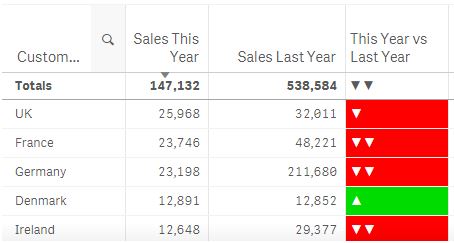
FYI - I played with the example app and changed the expression to... (meaningless but interesting to test)
=repeat(if([Sales This Year]>[Sales Last Year],chr(9650),chr(9660)),
if(fabs([Sales This Year]-[Sales Last Year])>[Sales This Year],2,1))
Thanks for the suggestion tedemang
 luismadriz
- Move Comment
- Delete Comment
- Mark as Read
- Mark as New
- Bookmark
- Permalink
- Report Inappropriate Content
Very handy!. Many thanks. Cheers. Luis
 muktasrivastava
- Move Comment
- Delete Comment
- Mark as Read
- Mark as New
- Bookmark
- Permalink
- Report Inappropriate Content
Hi,
Is there a way to make this field selectable ?
beck_bakytbek
- Move Comment
- Delete Comment
- Mark as Read
- Mark as New
- Bookmark
- Permalink
- Report Inappropriate Content
Hi Mukta,
you can make the field as selectable only in QlikView with the help of function: Inputfield, but this function is not available in Qlik Sense. In Qlik Sense you solve this issue by using of extensions.
i hope that helps
Beck
muktasrivastava
- Move Comment
- Delete Comment
- Mark as Read
- Mark as New
- Bookmark
- Permalink
- Report Inappropriate Content
Thanks Beck for the information.
Do you know any particular extension for Qlik Sense which i can use?
beck_bakytbek
- Move Comment
- Delete Comment
- Mark as Read
- Mark as New
- Bookmark
- Permalink
- Report Inappropriate Content
 Taps
Taps
- Move Comment
- Delete Comment
- Mark as Read
- Mark as New
- Bookmark
- Permalink
- Report Inappropriate Content
Hi Friends!
How will I apply color to the symbols in the Total row. It is showing as black.
I have tried "Dimentionality", but it did not worked. Also, it will not help to change the color basis on condition. It will fixed the header with a single color.
If (dimentionality=0, LightGreen() - Here, no other condition can set for multiple conditon.
Thanks
Taps