Unlock a world of possibilities! Login now and discover the exclusive benefits awaiting you.

- Qlik Community
- :
- All Forums
- :
- QlikView Administration
- :
- Re: Null Column
- Subscribe to RSS Feed
- Mark Topic as New
- Mark Topic as Read
- Float this Topic for Current User
- Bookmark
- Subscribe
- Mute
- Printer Friendly Page

- Mark as New
- Bookmark
- Subscribe
- Mute
- Subscribe to RSS Feed
- Permalink
- Report Inappropriate Content
Null Column
Hello I have a pivot table
i have several columns
i use in one column the after expression.
so i can show the difference between the same columns of two years.
2014 2013
number difference number difference
100 50 50 -
e.g. 2014 difference from 2013. but the difference column of 2013 is empty. all null values.
Is it possible to not showing this empty column?
- Tags:
- qlikview_deployment
Accepted Solutions

.png "Former Employee") JonnyPoole
JonnyPoole
- Mark as New
- Bookmark
- Subscribe
- Mute
- Subscribe to RSS Feed
- Permalink
- Report Inappropriate Content
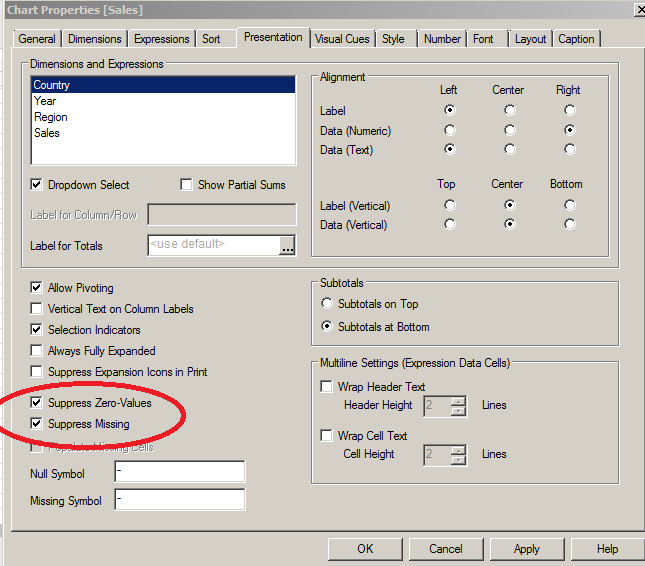
IF the whole column has nothing but nulls or zeroes you can suppress it using these properties circled below.
additionally, a common trick is put an IF expression on the expression to make it zero or null based on a condition... then use these to remove the unwanted rows/columns as well.
JonnyPoole
- Mark as New
- Bookmark
- Subscribe
- Mute
- Subscribe to RSS Feed
- Permalink
- Report Inappropriate Content
IF the whole column has nothing but nulls or zeroes you can suppress it using these properties circled below.
additionally, a common trick is put an IF expression on the expression to make it zero or null based on a condition... then use these to remove the unwanted rows/columns as well.