Unlock a world of possibilities! Login now and discover the exclusive benefits awaiting you.

- Qlik Community
- :
- All Forums
- :
- QlikView App Dev
- :
- 2 facts, 2 measures, 1 calendar and null values
- Subscribe to RSS Feed
- Mark Topic as New
- Mark Topic as Read
- Float this Topic for Current User
- Bookmark
- Subscribe
- Mute
- Printer Friendly Page

- Mark as New
- Bookmark
- Subscribe
- Mute
- Subscribe to RSS Feed
- Permalink
- Report Inappropriate Content
2 facts, 2 measures, 1 calendar and null values
Hi,
I would appreciate your help.
What would be easiest way to use one max (Date_Fact2) value to select all values from two different facts. For example, in attached picture, if I remove this (Date_Fact2) from SUM({$<"some filters", Date_Fact2= >} Fact1.Value_Fact1) from function, it returns 0, because there is no matching date for those dates in Fact1 (or there is but but all values are 0).
IF(ISNULL(Date_Fact2),Date_Fact1 ,Date_Fact2 ) would be one solution, creating a new calendar table for the purpose, another, but I don't like either.
Any ideas, how would you do it?
Updated 28.11.2014: Simplifying the question:
How can I show both Value_Fact1 and Value_Fact2 measures, if I create a calendar object for Date_Fact2 and use it to select max date for both date fields (min is a static date).
For example, if I select max(Date_Fact2) < 30.6.2009 it returns only respective Date_Fact1 date 24.6.2009 and not 12.5.2009 as there is no Date_Fact2 value (or it is null). So only values I get to Value_Fact1 are zeros and not 49 588, which I want.
Any ideas, how to tackle this?
Message was edited by: Esa Liimatta Updated the question.
Update 08.12.014
Still trying to solve this problem. I created an example .qvw -file to work with. What I would like to achieve, is to show F1_Amount when F1_Date is smaller than Max_F2_Date selected in calendar. --> So, if I choose Max_F2_Date to be <= 1.2.2012, also F1_Amount (15051) should be shown.
I have tried this and that, but just can't figure out how to work this out. So I'd really appreciate your help and advice here.
Message was edited by: Esa Liimatta. I added a qvw-file to demonstrate the problem live.

 Gysbert_Wassena
- Mark as New
- Bookmark
- Subscribe
- Mute
- Subscribe to RSS Feed
- Permalink
- Report Inappropriate Content
Perhaps this: rangesum([Value_Fact1],[Value_Fact2])
talk is cheap, supply exceeds demand
- Mark as New
- Bookmark
- Subscribe
- Mute
- Subscribe to RSS Feed
- Permalink
- Report Inappropriate Content
Hi Gysbert,
Thank you for your reply. This could work in another situation, but here I'm looking for something else. I have opened up the problem little further:
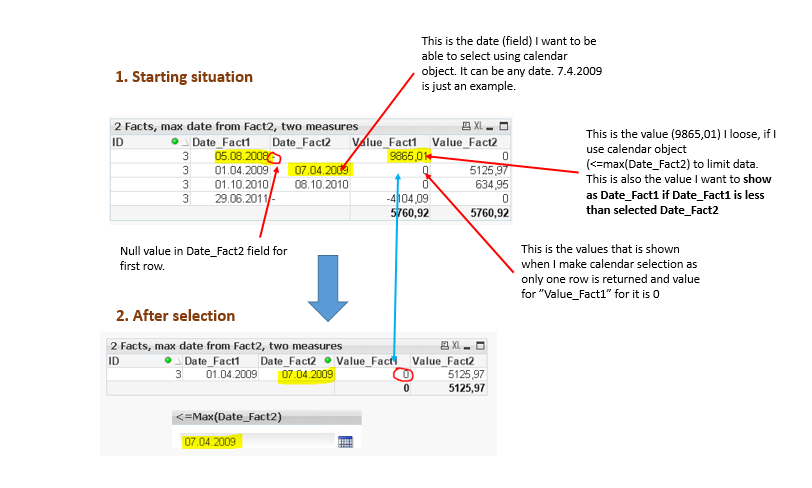
==> because first row does have null in Date_Fact2 - field, value (Value_Fact1 =9865,01) is not returned as I would like. Instead, only second row is returned and as Value_Fact1 = 0, it is shown in value field. That is because only related date is 01.04.2009.
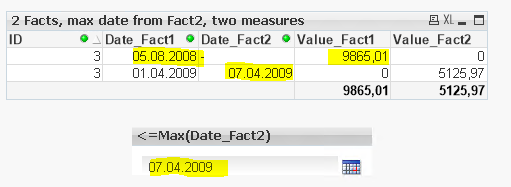
So, what I want is to make date selection based on Date_Fact2 and return all dates from both date fields that are less than equal to selected date. I.e. here I want to show value 9865,01 in lower table as Date_Fact1 (05.08.2008) is less than selected date 07.04.2009. Something like this (this is possible, because I have used another calendar, which effects Date_Fact1 -value. However, we want only one calendar to make selections from):
I have tried to create an IF -clause ( ~ if(isnull(Date_Fact2),Date_Fact1, Date_Fact2), but it works only, if I create it straight to table as a new calculated item column. If I try to make it as and variable (I need it to make a calendar object for max date selection), and add it to the table, it just can't show any data.
Any ideas?
-Esa-