Unlock a world of possibilities! Login now and discover the exclusive benefits awaiting you.

- Qlik Community
- :
- All Forums
- :
- QlikView App Dev
- :
- Allocation of space for bars in bar chart
- Subscribe to RSS Feed
- Mark Topic as New
- Mark Topic as Read
- Float this Topic for Current User
- Bookmark
- Subscribe
- Mute
- Printer Friendly Page

- Mark as New
- Bookmark
- Subscribe
- Mute
- Subscribe to RSS Feed
- Permalink
- Report Inappropriate Content
Allocation of space for bars in bar chart
Hi,
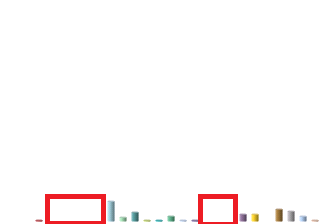
I would like to know how does qlikview allocates space for bars in bar chart? I have two dimensions A and B. The values in B > values in A and the bar chart displays bars for every value of B across every value of A. The values of B which are not present for value of A are not displayed and because of which the chart diplays a white space between bars. I would like to know how to remove this space and how qlikview allocates space for bars in bar chart.
Thanks

 tresesco
- Mark as New
- Bookmark
- Subscribe
- Mute
- Subscribe to RSS Feed
- Permalink
- Report Inappropriate Content
This could be because some of your x-axis values don't have measures or have zero measures. Try followings:
- uncheck 'Show All Values' in the dimension tab, and
- check 'Supress Zero Values' and 'Supress Missing' in the presentation tab
- Mark as New
- Bookmark
- Subscribe
- Mute
- Subscribe to RSS Feed
- Permalink
- Report Inappropriate Content
Hi tresesco,
I tried but the problem still persists the reason may be because there is no data of B for a value in A but there might be data in B for another value of A and due to this i am getting white space. Sorry i forgot to mention that this is a scrollable bar chart and if there are more than 1 value of A(x-axis) scroll bar gets displayed.
tresesco
- Mark as New
- Bookmark
- Subscribe
- Mute
- Subscribe to RSS Feed
- Permalink
- Report Inappropriate Content
Can you post a sample qvw with the issue?

 jagan
jagan
- Mark as New
- Bookmark
- Subscribe
- Mute
- Subscribe to RSS Feed
- Permalink
- Report Inappropriate Content
Hi,
If you have two dimensions in the chart, and for dimension1 if there is some missing dimension2 values then it will block that space in the chart, I think this is not possible to remove.
The space is block based on distinct dimension2 values for dimension1.
Regards,
Jagan.
- Mark as New
- Bookmark
- Subscribe
- Mute
- Subscribe to RSS Feed
- Permalink
- Report Inappropriate Content
I have attached a sample qvw for your reference. Please scroll to last value.
- Mark as New
- Bookmark
- Subscribe
- Mute
- Subscribe to RSS Feed
- Permalink
- Report Inappropriate Content
Jagan,
Thanks for the reply. I thought the same and am curious to know on how qlikview allocates space whether it pre allocates space for every value or it dynamically allocates based on the runtime results.
Thanks
jagan
- Mark as New
- Bookmark
- Subscribe
- Mute
- Subscribe to RSS Feed
- Permalink
- Report Inappropriate Content
Hi Gaurav,
It pre allocates the space for each dimension1 value, earlier I tried this and it is not possible. Check below threads
http://community.qlik.com/message/495575#495575
http://community.qlik.com/message/552406#552406
http://community.qlik.com/message/684046#684046
Regards,
Jagan.
- Mark as New
- Bookmark
- Subscribe
- Mute
- Subscribe to RSS Feed
- Permalink
- Report Inappropriate Content
Thanks for the information Jagan.
jagan
- Mark as New
- Bookmark
- Subscribe
- Mute
- Subscribe to RSS Feed
- Permalink
- Report Inappropriate Content
Hi,
Please close this thread by giving correct and helpful answers to the useful posts.